
TL;DR
A trustworthy AI headshot looks like the same person on a polished day, not a flawless stranger. The strongest signals are accurate facial features, natural skin texture, believable eyes, realistic lighting, suitable clothing, and a background that matches the intended professional context.
Trust breaks fast when a profile photo looks too perfect. The clearest answer to what makes an AI headshot look trustworthy is simple: it must preserve real likeness while improving presentation. AI headshot: a computer-generated or AI-enhanced portrait designed for professional, social, or personal profile use. For job seekers, founders, creators, remote workers, and dating app users, the image needs to feel current, human, and context-aware. Looktara helps people create polished profile visuals, but the final test is still credibility: does the photo look like a person who could walk into the room?
Table of Contents
What makes an AI headshot look trustworthy?
A trustworthy AI headshot looks realistic, consistent with the person's real face, and appropriate for the platform where it appears. The strongest credibility signals are accurate eyes, natural skin texture, believable lighting, realistic clothing, a clean background, and facial features that match recent real photos.
Key insight: Trustworthy does not mean perfect. It means recognizable, polished, and believable.
Search results around AI headshots show a clear concern: people do not only ask whether AI photos look professional, they ask whether they look honest. One 2026 ranking result on AI headshots notes that AI often makes faces too perfect, while another result on credible LinkedIn headshots says a good image should look like the person on a good day, not a different person. Those two ideas form the practical standard.
For career platforms, trust depends on recognition. A recruiter, client, podcast host, or first date should be able to connect the headshot with the person who appears on a call. Visual polish helps, but likeness carries the trust.
Brand consistency also matters. A creator using a trustworthy headshot beside campaign visuals, such as a fitness Instagram Facebook ad generated with AI, should keep facial style, tone, and lighting aligned across channels.
Core credibility signals at a glance
| Signal | Trustworthy look | Warning sign |
|---|---|---|
| Face shape | Matches recent photos | Jawline or cheeks look redesigned |
| Eyes | Same color, spacing, and gaze | Glassy, mismatched, or overly sharp eyes |
| Skin | Texture, pores, and normal variation | Plastic-smooth or waxy finish |
| Lighting | Direction makes sense | Shadows conflict across face and neck |
| Clothing | Fits the role and platform | Generic suit, odd collar, distorted fabric |
| Background | Clean and believable | Fake office blur or warped objects |
| Expression | Natural and relaxed | Frozen smile or unnatural symmetry |
Which facial details create believable likeness?
Believable likeness comes from preserving the face's stable features: eye shape, nose structure, mouth width, jawline, hairline, skin tone, and natural asymmetry. A trustworthy AI portrait can improve lighting and styling, but it should not change the identity markers that make a person recognizable.
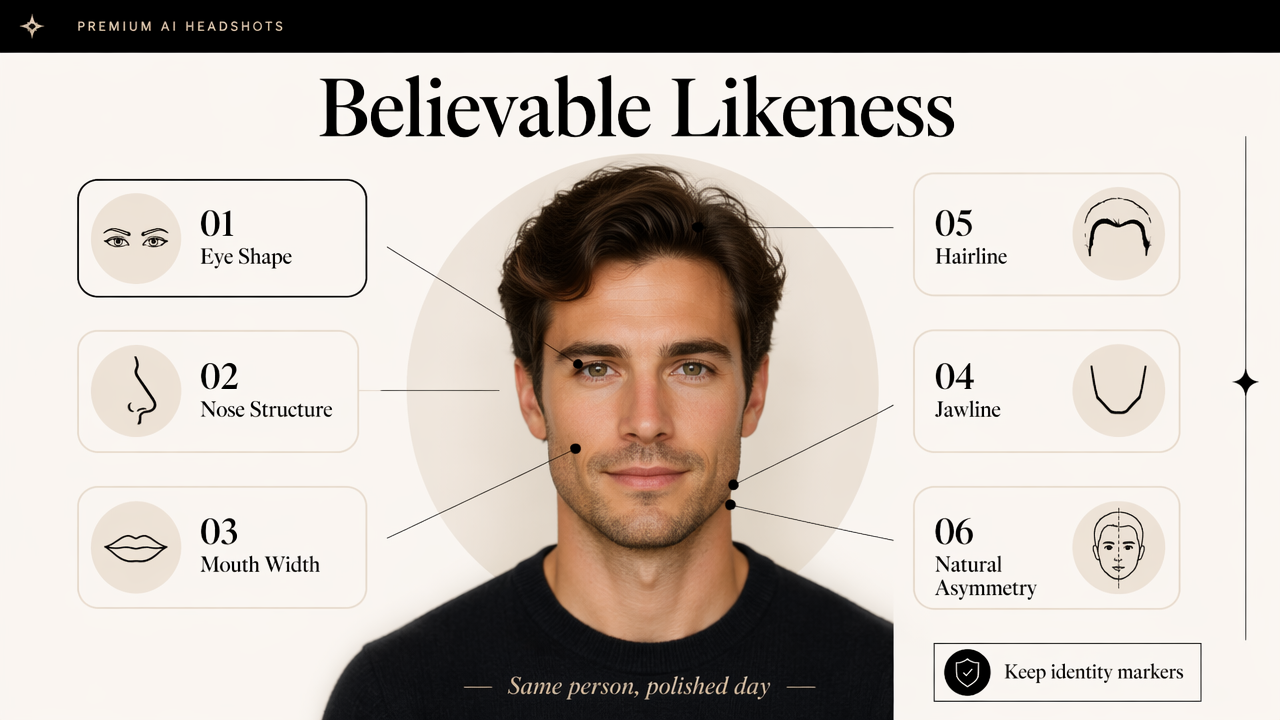
Human faces are not perfectly symmetrical. Slightly different eye sizes, uneven smiles, and natural skin variation are normal. When AI removes every irregularity, the result may look attractive at first but less credible after a second look.
Research on artificial intelligence and moral psychology by Bonnefon, Rahwan, and Shariff in the Annual Review of Psychology examines how people judge AI systems and their social effects, making trust a practical design issue rather than only a technical one (source). In a headshot, that trust judgment happens in milliseconds.
A quick face-accuracy checklist
Use this checklist before a generated headshot appears on LinkedIn, a company bio, a media kit, or a dating profile:
- Compare the AI headshot with three recent real photos.
- Check whether both eyes match the person's real shape and spacing.
- Confirm that the nose, mouth, chin, and jawline have not been redesigned.
- Look for natural asymmetry instead of a mirrored face.
- Inspect hairline, hair texture, facial hair, and glasses.
- Zoom out and ask whether the image still reads as the same person.
A strong AI headshot should survive both close inspection and quick scrolling. If it only works as a tiny thumbnail, it may not be suitable for high-trust settings.
Why eyes and skin matter most
Eyes carry identity and attention. Trustworthy eyes have natural catchlights, matching pupils, believable eyelids, and a gaze that lands near the camera without feeling vacant. Over-bright eyes can look edited, especially when the rest of the face has softer lighting.
Skin is the second major trust cue. Real skin has pores, texture, faint lines, under-eye variation, and tone shifts. A good portrait can reduce distractions, but it should not erase the human surface. For creators building a larger visual presence, consistency between headshots and assets like a fitness TikTok banner made with AI helps the face feel part of a real personal brand.
How should lighting, clothing, and background support trust?
Lighting, clothing, and background support trust when they match the person's role and do not pull attention away from the face. Realistic light direction, properly fitted clothing, and a believable setting make an AI headshot feel intentional instead of synthetic.
A credible professional portrait usually has soft directional lighting. The face, neck, hair, and clothing should share the same light source. If the cheeks glow from one side while the collar casts a shadow from another, the image starts to feel assembled.
Clothing should match the platform. LinkedIn often calls for business casual or professional attire. A founder may need a sharper editorial look. A freelancer may benefit from a relaxed but clean style. Dating app photos should feel approachable rather than corporate.
Context rules for common profile uses
| Use case | Best visual style | Trust signal to prioritize |
|---|---|---|
| LinkedIn profile | Clean business or business casual | Accurate likeness and eye contact |
| Founder bio | Confident, polished, modern | Lighting and wardrobe fit |
| Freelancer profile | Friendly and capable | Natural expression |
| Creator profile | Distinct but realistic | Consistent brand style |
| Dating profile | Warm, authentic, relaxed | Human texture and believable smile |
Backgrounds should be simple but not fake-looking. A soft studio wall, realistic office, neutral interior, or outdoor blur can work. Problems appear when bookshelves bend, windows glow oddly, or background blur cuts into hair.
Clothing details that AI often mishandles
Clothing can quietly reveal whether a photo is AI-generated. Collars, lapels, buttons, earrings, necklaces, and glasses need special attention because small distortions make the whole portrait feel less reliable.
- Collars should sit evenly without melting into the neck.
- Jacket seams should follow the shoulders naturally.
- Glasses should have clear, symmetrical frames.
- Earrings should match unless an asymmetrical style is intentional.
- Fabric should not contain unreadable logos or strange patterns.
For public-facing professionals, the headshot often appears beside social graphics, event pages, and content thumbnails. Matching tone with assets like a fitness Instagram poster generated with AI can make the whole profile feel more coherent.
What mistakes make an AI headshot look untrustworthy?
An AI headshot looks untrustworthy when it changes identity, over-smooths the face, creates unnatural eyes, invents unrealistic clothing, or places the person in a background that does not fit the setting. The most common issue is not bad image quality, it is too much artificial perfection.
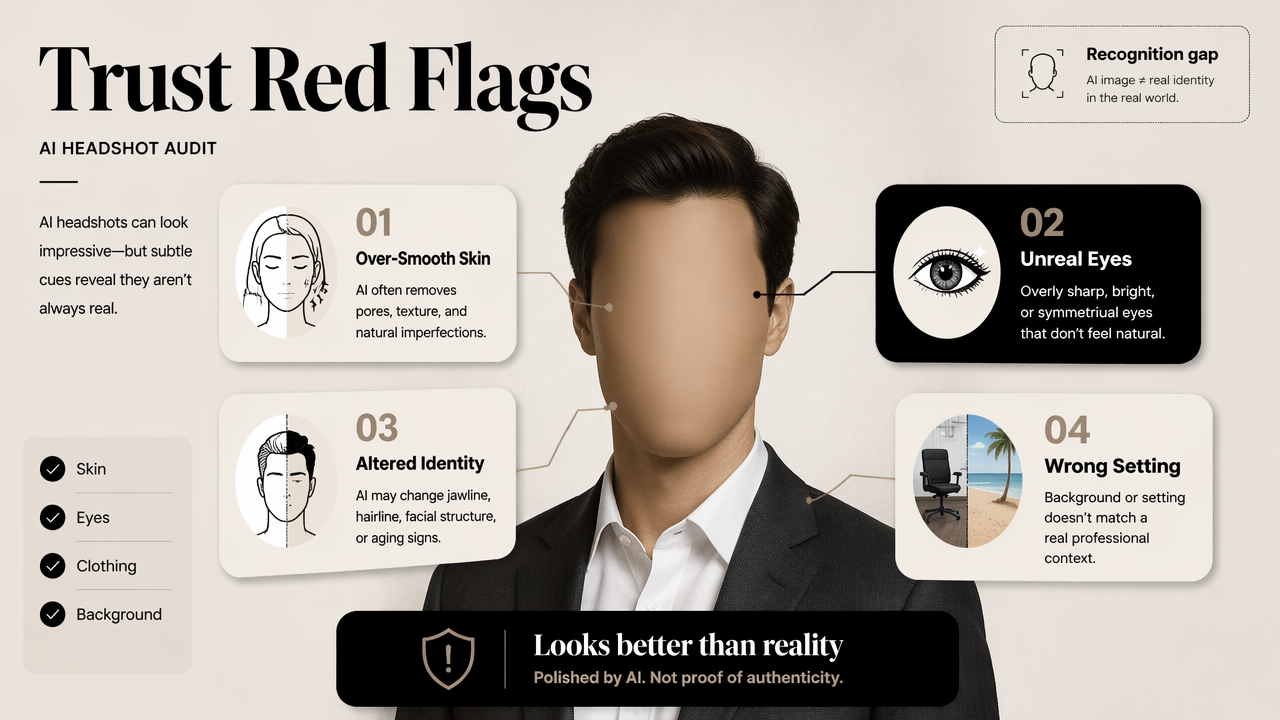
The biggest red flag is a photo that looks better than reality in a way that changes the person. A sharper jaw, altered age, different hair density, lighter skin, or modified body shape may create a polished image, but it also creates a recognition gap.
Privacy is another trust issue. A 2024 IEEE Access survey by Golda, Mekonen, and Pandey examined privacy and security concerns in generative AI, including risks around data handling and generated content (source). For headshots, responsible use includes checking how source photos are uploaded, stored, and reused.
Red flags to reject before publishing
Reject or regenerate a headshot when any of these signs appear:
- The face looks younger, thinner, or more symmetrical than recent photos.
- The eyes point in slightly different directions.
- Teeth, fingers, earrings, glasses, or hair edges look distorted.
- Skin has no texture or looks waxy under zoom.
- The background contains warped lines, fake depth, or odd objects.
- Clothing does not match the intended audience.
- The person would not be recognized on a video call.
Practical rule: If the image needs an explanation, it is probably not the right profile photo.
Some skepticism around AI headshots comes from ethics, not aesthetics. Competitor content in the search results frames AI portraits as potentially misleading when they replace real identity with an idealized version. That concern is valid, especially for hiring, client work, and dating contexts.
When disclosure makes sense
Disclosure depends on context. A lightly enhanced portrait used as a profile image usually does not need a long disclaimer. A fully generated image used in journalism, regulated work, identity verification, or public claims may need clearer context.
A survey of video surveillance systems in smart cities by Myagmar-Ochir and Kim discusses technical systems where visual recognition and monitoring matter (source). Although profile photos are different from surveillance, both cases show why accurate visual identity matters when images affect decisions.
How can AI headshots stay credible in 2026?
AI headshots stay credible in 2026 by using high-quality source photos, limiting identity changes, checking images manually, and choosing outputs that fit the person's real-world role. The best workflow treats AI as a portrait assistant, not an identity replacement.
A reliable process starts with strong inputs. Clear, recent photos with different angles help an AI system preserve likeness. Heavy filters, sunglasses, group crops, and old images reduce accuracy.
The Looktara platform is best used with a practical review habit: generate options, shortlist the most realistic ones, then compare them against current photos before publishing. For broader personal branding, matching headshots with channel assets like a fitness Shopify podcast cover created with AI or a fitness Instagram Story design helps create a consistent public presence.
A 2026 publishing workflow
- Start with recent, well-lit face photos.
- Select styles that match the actual use case.
- Remove images that alter age, face shape, or skin tone.
- Check eyes, teeth, hair, clothing, and background at full size.
- Ask a trusted person whether the image looks recognizable.
- Use the same approved look across key professional profiles.
By 2027, credibility will likely depend more on provenance, consent, and consistency. As AI image quality improves, obvious artifacts may matter less, while accurate representation and transparent data practices may matter more.
FAQ: What do people ask before using an AI headshot?
Is an AI headshot acceptable for LinkedIn?
An AI headshot is acceptable for LinkedIn when it accurately represents the person and fits a professional context. The image should preserve real facial features, avoid extreme retouching, and look believable beside work history, posts, and video calls.
Should an AI headshot look perfect?
An AI headshot should not look perfect. A credible portrait keeps natural skin texture, slight facial asymmetry, and a relaxed expression. Overly smooth skin, identical facial sides, and flawless studio lighting can make the image feel less human.
How many source photos improve trust?
More varied, recent source photos generally help preserve likeness, especially when they show the face from different angles and lighting conditions. Quality matters more than quantity. Blurry, filtered, obstructed, or outdated images can lead to less accurate results.
What makes an AI dating profile photo trustworthy?
A dating profile photo feels trustworthy when it looks warm, current, and recognizable. It should avoid corporate styling, unrealistic retouching, and major appearance changes. Natural lighting, real skin texture, and a believable smile matter more than a studio-perfect finish.
Conclusion
The answer to what makes an AI headshot look trustworthy is not a single filter or style. Credibility comes from accurate likeness, human texture, natural eyes, believable lighting, suitable clothing, and a background that supports the profile's purpose. A polished image should still feel like a real person.
For the next profile refresh, choose recent source photos, review every output against the checklist above, and publish only the version that would feel honest in a meeting, interview, creator bio, or first conversation. For a guided visual workflow, head to looktara.com and create a profile image that looks professional without losing the person behind it.
Generated by EarlySEO.com