
TL;DR
Strong profile photos match the platform: polished for LinkedIn, expressive for creator channels, and warm but authentic for dating apps. The safest choice is a clear face-forward image with soft light, simple background, natural expression, and a crop that stays readable at small sizes.
A profile photo often works like a one-second introduction, so vague advice such as "use a nice picture" isn't enough. The best profile pictures examples in 2026 show a clear face, intentional styling, and platform fit, not just high resolution. [Profile picture]: a profile picture is a visual identity image used on social platforms, work profiles, communities, apps, and digital accounts; in computing, it overlaps with an avatar, which Wikipedia defines as a graphical representation of a user, character, or persona. For people who need polished images without booking a studio, Looktara helps create professional profile imagery from existing photos while keeping the result practical for real platforms.
Table of Contents
What makes a good profile picture in 2026?
A good profile picture in 2026 is clear, current, platform-appropriate, and easy to recognize at small sizes. The strongest images show the face, use soft even light, avoid visual clutter, and match the viewer's expectation, such as career trust on LinkedIn, personality on Instagram, or approachability on dating apps.
Digital identity now spans work, social, creator, and semi-virtual spaces. Research by Dwivedi, Hughes, Baabdullah, and coauthors on the metaverse examined how digital presence is expanding across social, commercial, and policy contexts, which makes consistent identity signals more valuable across platforms (ScienceDirect, 2022).
Key insight: the best image is not the fanciest one; it is the one that communicates the right role in the first glance.
The OpenAI GPT-4 Technical Report showed how capable modern AI systems have become at interpreting and generating complex multimodal outputs, even though the report is not a profile-photo study (arXiv, 2023). For profile images, that shift matters because AI-created headshots, edited backgrounds, and automated image checks are now common in personal branding workflows.
Core traits that nearly always work
Strong profile photos usually share the same visual basics, even when the mood changes by platform.
- Face visibility: eyes, face shape, and expression should be clear at thumbnail size.
- Soft light: window light, shaded outdoor light, or balanced studio light looks more natural than harsh flash.
- Simple background: clean walls, offices, cafés, parks, or brand-colored backdrops keep attention on the person.
- Intentional outfit: clothing should match the platform, industry, and desired impression.
- Recent likeness: the image should look like the person now, not a version from years ago.
Profile pictures examples by platform
The best profile pictures examples change by platform because each audience reads the same visual cue differently. A blazer may signal credibility on LinkedIn, feel stiff on a dating app, and look off-brand for a playful creator account. Context decides what looks "professional," "authentic," or "interesting."
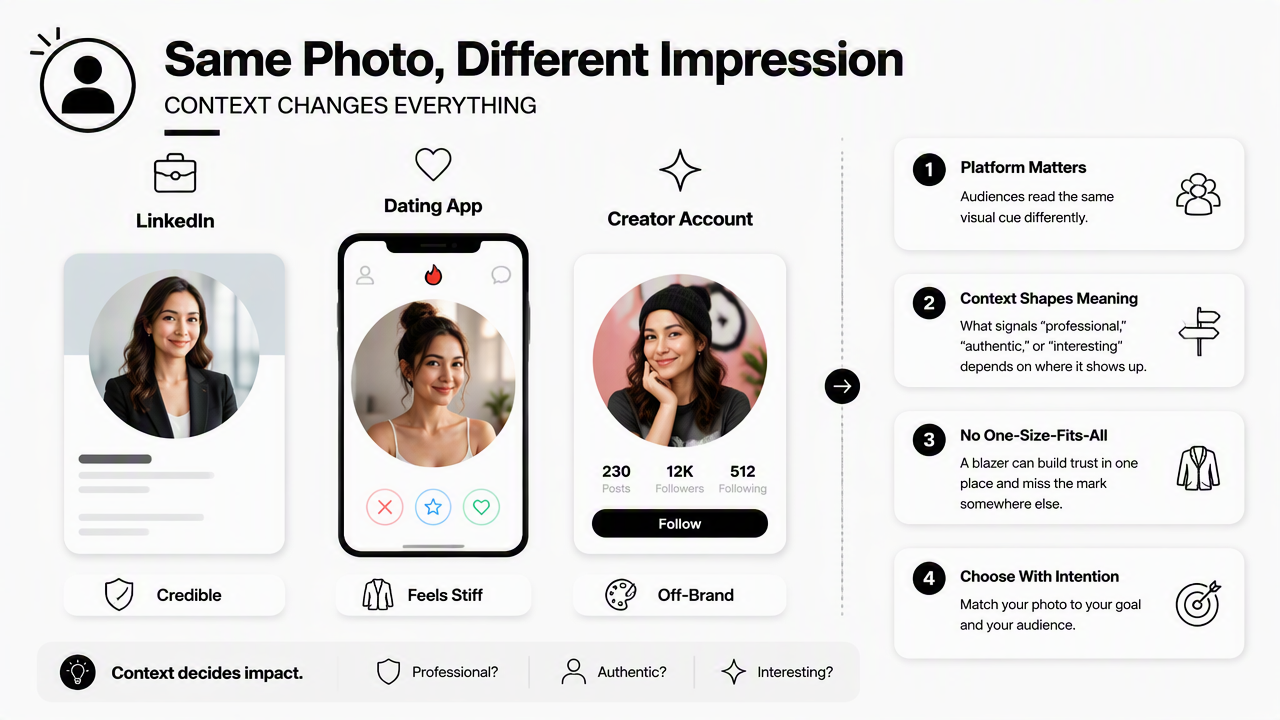
Platform photo examples compared
| Platform or use case | Best example | Background | Crop | Expression | Outfit |
|---|---|---|---|---|---|
| Bright head-and-shoulders portrait | Office, neutral wall, subtle city setting | Tight headshot | Calm smile or confident neutral | Blazer, knit, button-up, clean workwear | |
| Newsletter bio | Warm editorial portrait | Desk, bookshelf, soft home office | Chest-up | Friendly and thoughtful | Simple top, brand colors, creator style |
| Instagram creator | Personality-led portrait | Street, studio, set, niche environment | Headshot or half-body | Expressive, relaxed, on-brand | Trend-aware, niche-specific |
| Pinterest profile | Clean, bright brand image | Light wall, lifestyle setup, branded prop | Face-forward headshot | Open smile | Polished casual or niche outfit |
| Dating app | Natural solo photo | Outdoors, café, travel, activity setting | Head-and-shoulders or half-body | Warm, relaxed, genuine | Date-ready casual, not formal corporate |
| Freelancer site | Professional but human portrait | Workspace, studio, client-friendly scene | Headshot or waist-up | Trustworthy and approachable | Industry-appropriate workwear |
A LinkedIn photo should reduce uncertainty. Career professionals, remote workers, founders, and consultants usually benefit from a clean portrait with direct eye contact and restrained styling. Fitness coaches and wellness entrepreneurs can adapt this approach with a more active brand feel through a fitness LinkedIn profile picture generator when the profile needs both credibility and niche relevance.
Creator and newsletter photos can be more editorial. A writer, coach, or independent operator does not always need a formal studio headshot; a warm desk photo, clean bookshelf image, or bright lifestyle portrait can communicate both authority and personality. A fitness newsletter profile picture generator fits creators who want a consistent identity across email, landing pages, and social bios.
Dating photos work best when they feel specific and alive. A good first image is usually a solo shot with a clear face, natural smile, and real-world setting. Group images, heavy filters, and cropped-out faces create extra work for the viewer and weaken trust.
Fast matching guide by goal
A useful profile photo starts with the intended outcome, not the camera roll.
- Job search: use a polished headshot with neutral background and work-ready clothing.
- Founder brand: choose a confident portrait with subtle company or industry cues.
- Creator growth: pick a bright, expressive image that matches the content niche.
- Dating: lead with warmth, solo framing, and a real environment.
- Freelance work: balance professionalism with approachability and avoid overly casual framing.
How to choose the right crop, light, background, and outfit
Choose a profile picture by checking four visual signals in order: crop, light, background, then outfit. The face should remain recognizable in a small circle, the lighting should flatter without hiding features, the background should support the message, and the outfit should match the platform's social norms.
- Pick a clear face-forward image.
- Crop from the upper chest or shoulders for small profile icons.
- Use soft natural or studio-style light.
- Remove busy objects behind the head.
- Match clothing to the platform and audience.
- Test the image at thumbnail size before publishing.
Visual checklist for selecting the strongest photo
| Element | Strong choice | Weak choice | Why it matters |
|---|---|---|---|
| Crop | Head and shoulders, eyes near upper third | Full body as main profile icon | Small circles hide detail quickly |
| Light | Soft window light or shade | Harsh overhead light or heavy shadows | Face shape and eyes stay readable |
| Background | Clean wall, workspace, outdoor blur | Messy room, clutter, random people | Attention stays on the person |
| Expression | Natural smile or calm confidence | Forced grin, blank stare, exaggerated pose | Expression sets trust and tone |
| Outfit | Platform-appropriate, simple, fitted | Distracting logos, rumpled clothing | Clothing frames the intended identity |
| Editing | Light retouching, realistic color | Plastic skin, extreme filters | Authenticity remains intact |
Small format is the hidden test. Many photos look good full-screen but fail once cropped into a tiny circle on LinkedIn, Gmail, Instagram, Pinterest, or dating apps. A strong image still reads when reduced to a thumbnail.
Color also matters. A dark outfit against a dark background can disappear, while a light shirt on a white wall may look flat. Contrast between face, clothing, and background helps the profile image pop without looking over-edited.
Pinterest and creator platforms reward brighter, more graphic images than corporate networks. Fitness creators, coaches, and visual brands can use a fitness Pinterest profile picture generator to create a clean, recognizable look for boards, pins, and brand profiles.
Profile photo mistakes worth fixing before upload
Some weak choices are common because they appear harmless in a personal gallery but read poorly in public profiles.
- Old photos: outdated images create mismatch during interviews, calls, or dates.
- Group crops: a shoulder, hairline, or hand from another person distracts from the subject.
- Sunglasses: hidden eyes reduce warmth and recognition.
- Heavy beauty filters: overly smooth skin or altered features can feel less trustworthy.
- Busy backgrounds: clutter competes with the face.
- Extreme angles: high or low angles can distort facial proportion.
The fix is usually simple: choose a current solo image, crop tighter, brighten the face, and remove distractions.
How Looktara handles profile photo creation
Looktara turns everyday source images into polished profile pictures for people who need platform-ready options without a traditional photoshoot. The Looktara platform is most useful when the goal is not one generic headshot, but several versions that fit career, creator, and personal-brand contexts.
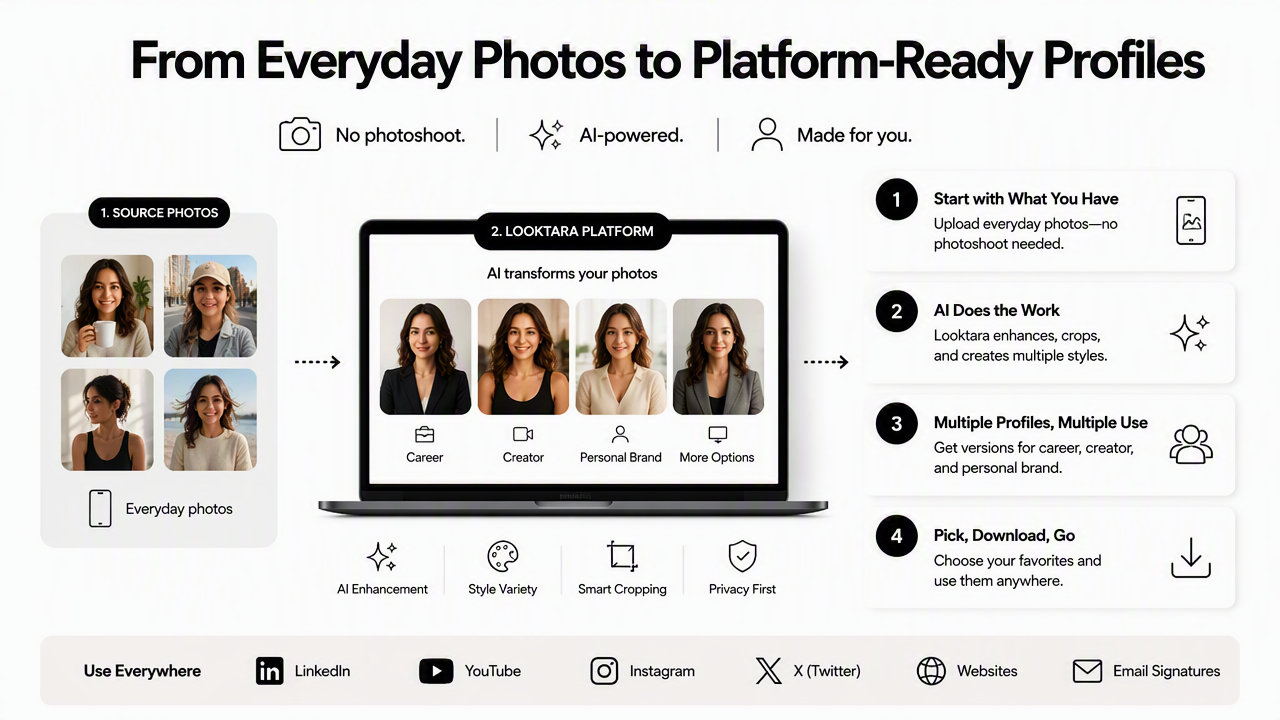
A practical workflow starts with selecting clear source photos that already resemble the person closely. Then Looktara can help produce cleaner backgrounds, sharper presentation, and styles suitable for business profiles, newsletters, or social channels. The result should still look like a real person, not a synthetic character.
Best practice: AI profile images should improve lighting, framing, and polish while preserving recognizable identity.
Looktara fits the 2026 shift toward faster personal-brand production. Remote workers, job seekers, solopreneurs, and creators often need more than one image: a formal headshot for LinkedIn, a warmer bio photo for a newsletter, and a brighter version for social platforms. More examples and creation options are available at looktara.com.
The strongest approach is to generate several options, then choose based on platform fit. A recruiter-facing image can be more restrained. A creator avatar can show stronger color and personality. A dating image should still feel candid, human, and grounded in real life.
When an AI-generated headshot makes sense
AI-assisted profile imagery works best for specific, practical needs.
- A career profile needs a cleaner photo quickly.
- A founder wants consistent images across a website, LinkedIn, and press bio.
- A creator needs multiple styles for different channels.
- A freelancer wants a polished image without arranging a studio session.
- A remote worker has no recent professional portrait.
Human review still matters. The chosen final image should be accurate, current, and appropriate for the platform where it will appear.
FAQ: profile picture examples and best practices
These common questions cover the decisions that most affect whether a profile image feels trustworthy, attractive, and platform-ready.
What is the best profile picture example for LinkedIn?
The best LinkedIn example is a clear head-and-shoulders portrait with soft light, direct eye contact, a simple background, and work-appropriate clothing. A natural smile usually works better than a stiff pose. The image should look current and remain easy to identify inside LinkedIn's small circular crop.
What kind of profile photo works best for dating apps?
A strong dating profile photo is a recent solo image with a clear face, relaxed expression, and real-world setting. Outdoor light, café settings, or hobby-based photos often feel more natural than formal headshots. The first image should avoid sunglasses, group ambiguity, heavy filters, and cropped-out people.
Should a profile picture be professional or casual?
The right level depends on the platform. Career platforms usually need professional polish, while creator profiles can be more expressive and dating apps usually benefit from relaxed authenticity. The safest middle ground is clean lighting, simple composition, and clothing that fits the setting rather than looking forced.
Are AI profile pictures acceptable in 2026?
AI profile pictures are acceptable when they remain realistic, recognizable, and honest to the person's current appearance. They work well for improving lighting, backgrounds, and styling options. Problems appear when the image changes facial structure, age, body shape, or identity cues so much that it creates a misleading impression.
Conclusion
The most useful profile pictures examples share one pattern: they match the platform before they try to impress. A LinkedIn image should communicate trust, a creator photo should communicate personality, a newsletter portrait should feel warm, and a dating photo should feel natural.
A strong next step is to gather five recent solo photos, check them against the crop-light-background-outfit checklist, then create platform-specific versions rather than using one image everywhere. For polished options that fit work, creator, and personal-brand profiles, visit looktara.com and choose the image style that matches the next profile update.
Generated by EarlySEO.com