
TL;DR
Profile portraits need text alternatives that match their purpose, not descriptions of every visible detail. Use descriptive text for meaningful portraits, an empty attribute for redundant images, and a destination-focused label for image-only links. Check the published page because nearby names and link structure change the correct choice.
A portrait beside a name doesn't automatically need that name repeated in alt text. Profile pictures alt text accessibility depends on what the image contributes and whether it acts as a link. The same headshot can need a description on a biography page, an empty attribute in a staff card, or a destination-focused label in an author link.
Alt text: A text alternative that communicates an image's relevant information or function when the image cannot be perceived.
For professionals creating portraits with Looktara, accessibility belongs in the publishing workflow alongside cropping and image selection. A clear headshot serves visual recognition; its text alternative serves the image's purpose in context.
Table of Contents
What is alt text for a profile picture?
Alt text for a profile picture is a text alternative that identifies the person, describes meaningful visual information, or explains an image's function. The correct wording depends on the surrounding content. Accessibility doesn't require a detailed appearance inventory; it requires equivalent access to the information or action the portrait provides.
On a personal website, a portrait may introduce the site's owner. In a newsletter byline, the same portrait may repeat an already visible author name. Inside an image-only link, its main job may be opening the author's biography.
Accessible name: The label assistive technology uses to identify an interface element, such as a link.
Decorative or redundant image: An image that adds no information needed to understand or operate the surrounding content.
Empty alt attribute: The HTML value alt="", which marks an image as having no text alternative to announce in ordinary image navigation.
Purpose matters more than visual detail
An image's role determines its alternative text more reliably than its appearance.
- Identity: Name the person when the portrait supplies identification absent from nearby text.
- Meaningful appearance: Describe visible details when those details matter to the page's message.
- Navigation: Explain the destination when the portrait is the only content of a link.
- Redundancy: Use an empty attribute when the image adds nothing beyond accessible surrounding text.
A filename such as headshot-final.jpg describes a file, not a person or action. Likewise, a caption and alt text serve different audiences and don't always need identical wording.
When should a portrait have empty alt text?
A portrait should have empty alt text when it adds no meaningful information beyond nearby accessible text and isn't the only label for an interactive element. A staff photo beside a person's name often qualifies. An image-only link doesn't qualify unless another reliable mechanism supplies the link's accessible name.
Reusable examples for common publishing contexts
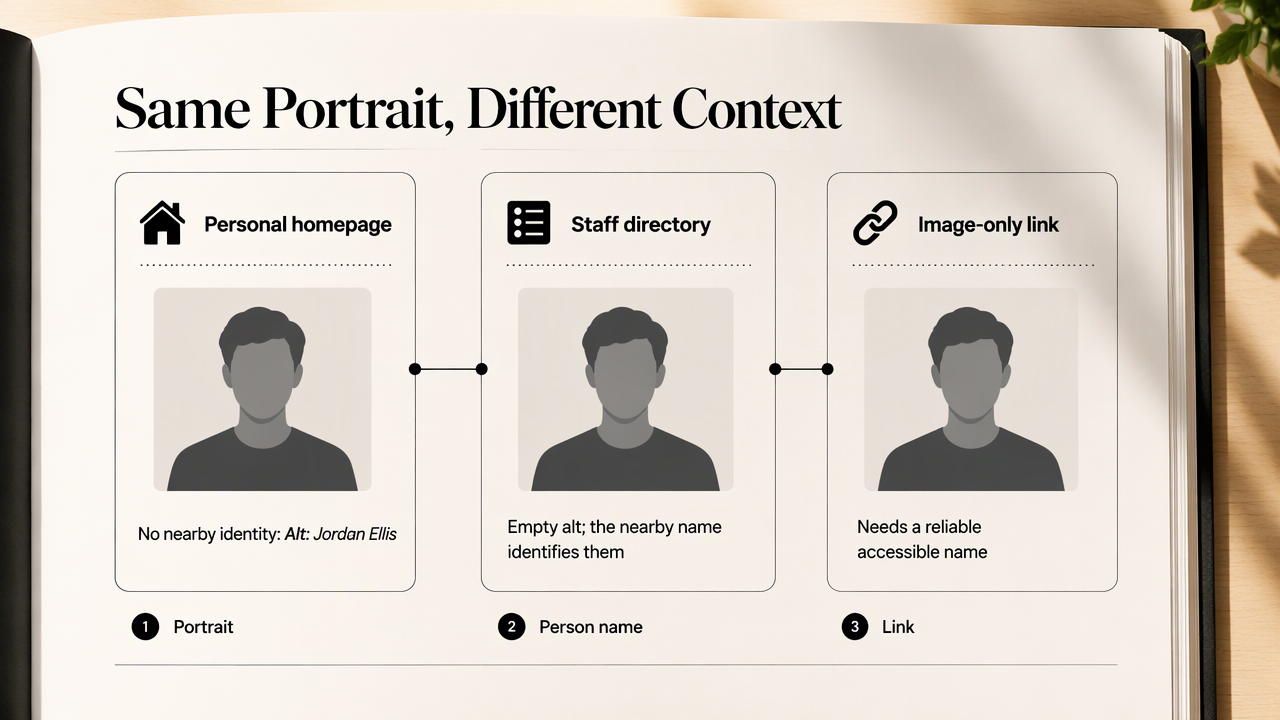
These examples show how placement changes the correct text alternative for the same fictional person.
| Placement | Suggested alternative | Reason |
|---|---|---|
| Personal homepage with no nearby identification | alt="Jordan Ellis" |
Supplies the person's identity |
| Biography discussing a signature speaking style | alt="Jordan Ellis speaking onstage, holding a microphone" |
Describes relevant visual context |
| Staff directory card with a visible name and job title | alt="" |
Avoids repeating information already available |
| Author image and "Jordan Ellis" inside the same link | alt="" |
The link's text supplies its name |
| Author portrait alone inside a link | alt="Jordan Ellis's author profile" |
Communicates the destination |
| Portrait beside a separate linked author name | Assess the image link separately | The neighboring link doesn't automatically label it |
The staff-directory example assumes the photograph adds no essential information. If the page teaches readers to recognize staff members by appearance, a short description may serve a real purpose.
Empty and missing attributes are different
An empty attribute explicitly treats the image as unnecessary to announce, while an omitted attribute leaves its alternative unspecified.
Some screen readers may announce a filename or other fallback when alternative text is missing. Actual behavior varies by browser, assistive technology, and markup.
A nearby name can make a portrait redundant, but a nearby link cannot be assumed to label a separate image-only link.
For linked author images, inspect the complete anchor rather than judging the portrait in isolation.
How should profile picture alt text be written?
- Identify the profile picture's purpose: identity, appearance, navigation, or decoration.
- Read the nearby text and check the link structure.
- Choose a descriptive alternative, a destination label, or
alt="". - Include only details that support the image's purpose.
- Test the published page with images unavailable and with a screen reader.
Write for recognition without guessing identity
Useful portrait descriptions separate visible facts from assumptions about the person.
A description such as alt="Jordan Ellis wearing a navy jacket against a gray background" can suit a page where presentation matters. On a routine contact card, simply naming Jordan may be enough, or the image may be redundant.
Avoid guessing ethnicity, gender identity, disability, personality, or age from appearance. Sensitive details should have a clear contextual purpose and an appropriate basis, rather than being added merely because a writer thinks they are visible.
There isn't a universal character count that makes alt text accessible. Concision helps, but the image's purpose determines the necessary length. Introductory wording such as "image of" usually adds little because assistive technology can already identify an image.
Check the rendered page rather than the upload form
A publishing check should confirm that the intended alternative survives the website's template and image settings.
- Inspect the rendered
<img>for the correctaltvalue. - Navigate linked portraits by keyboard and confirm each destination has a meaningful label.
- Listen for repeated names, unclear links, and missing information.
- Check mobile layouts where captions or labels may change.
A successful test preserves identity and navigation without making routine directory browsing needlessly repetitive. Accessibility review should include the full card, not only the uploaded image.
How Looktara handles this publishing workflow
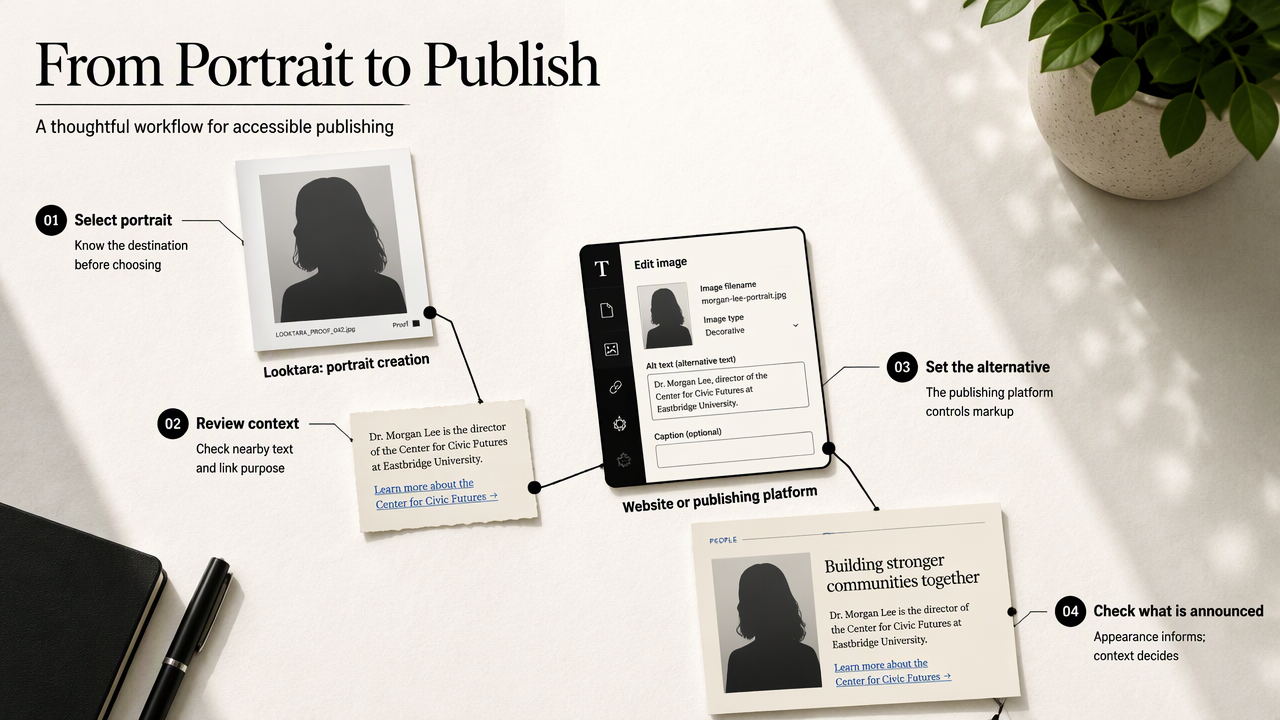
Looktara fits the portrait-creation stage, while accessible text alternatives belong to the website or publishing platform displaying the final image. A practical workflow pairs image selection with a separate context review. The portrait's appearance informs description, but the destination's markup determines whether that description should be announced.
Match portrait selection to the destination
Portrait selection works best when the final publishing context is known in advance.
Fitness professionals seeking business imagery can consider the fitness LinkedIn profile picture generator. Newsletter publishers can consider the fitness newsletter profile picture generator when preparing author imagery. Each destination still needs its own accessibility decision.
A personal website allows direct control over HTML. A hosted social platform exposes only the settings its interface supports. Where a profile-photo alt-text field is unavailable, an accurate display name and useful biography remain valuable, though they aren't substitutes for equivalent image functionality.
Keep human review in AI-assisted descriptions
AI-assisted description should be checked against both the final portrait and its page context.
The 2024 paper VisualWebArena: Evaluating Multimodal Agents on Realistic Visual Web Tasks examines visual web tasks, not a profile-photo accessibility standard. The 2025 paper Z-Image: An Efficient Image Generation Foundation Model with Single-Stream Diffusion Transformer concerns image generation, not requirements for portrait alternatives.
Those research topics distinguish creating or interpreting images from deciding what a page needs to communicate. Neither title alone establishes that generated descriptions satisfy accessibility requirements.
Describe the published portrait, then verify its purpose in the published interface.
FAQ: Profile portraits and accessible labels
These practical answers address recurring decisions about portrait labels, personal details, and publishing platforms.
Should every staff photo repeat the employee's name?
No. When an employee's name is already available in the same noninteractive staff card, a redundant portrait can use alt="". If the photograph is independently linked, the link still needs an accessible name. The decision depends on the card's structure and whether appearance contributes information beyond the visible name.
Should portrait alt text include clothing and background?
Clothing and background belong in alt text when they help communicate the image's purpose. A brand biography discussing presentation may benefit from those details. A basic author byline usually doesn't. Descriptions should prioritize useful context rather than turning every headshot into a complete inventory of colors, accessories, and facial features.
Can a visible caption replace the alt attribute?
A caption can provide information that makes an image redundant, but it doesn't remove the need to decide the image's alternative. A redundant portrait can retain alt="". If an image is the sole content of a link, a separate caption doesn't automatically provide that link with an accessible name.
Does an AI-generated headshot need different alt text?
An AI-generated headshot follows the same purpose-based rules as a camera photograph. Its alternative should describe relevant visible content or communicate its function. Where image origin needs disclosure, clear visible wording can make that information available broadly rather than leaving it only in an alternative that many visitors won't encounter.
Conclusion
Put the accessibility decision into the publishing checklist
Accessible portrait publishing starts with one decision: does the image add information, repeat it, or open a destination? Assign the matching alternative, inspect the link structure, and test the final page.
For professionals preparing a new portrait, Looktara at looktara.com offers a starting point for image creation. Pair the selected image with a documented alt-text decision before publishing the next homepage, staff directory, or author profile.
Generated by EarlySEO.com