
TL;DR
Use Google Lens to check both the original headshot and a cropped version, then review matching pages for context. Save evidence before reporting unauthorized reuse, and treat an empty search as incomplete coverage rather than proof that a photo is protected.
A professional headshot deserves the same routine attention as a professional profile. Photo reverse search for profile photo protection gives job seekers, freelancers, business owners, and creators a practical way to check where their public images appear.
In 2026, a useful check combines image searches, careful review of matching pages, and a clear response plan. The goal isn't to hide every public portrait. It's to keep legitimate professional visibility while spotting uses that need attention.
Table of Contents
What is reverse image search for profile protection?
Reverse image search is a search method that uses an image instead of typed keywords to retrieve matching or related images from a service's dataset. For profile protection, it helps locate public pages displaying a headshot, so the person pictured can review the context and identify possible unauthorized reuse.
Image matching: Finding copies or visually similar versions of a supplied picture.
Face search: Looking for appearances of a face, potentially across different photographs.
Impersonation: Presenting an account or page as belonging to someone else.
These terms describe different tasks. A matching photograph doesn't automatically establish impersonation, and a visually similar face doesn't prove identity.
Search matches require context, not assumptions
A result might be an approved conference biography, an old employer page, or a copied profile. The surrounding name, description, links, and activity determine what deserves action.
| Search result | Possible explanation | Useful next step |
|---|---|---|
| Same portrait on an employer page | Authorized professional use | Check whether the biography remains accurate |
| Same portrait under another name | Possible impersonation | Preserve the account URL and visible claims |
| Cropped portrait on an unfamiliar website | Reuse requiring review | Check context, permission, and attribution |
| Similar face in a different photograph | Visual resemblance | Avoid treating similarity as identification |
| No matching results | No match in that search coverage | Try another crop and repeat later |
A reverse image search is a discovery tool, not proof of ownership, identity, or complete internet coverage.
How can professionals search headshots on desktop and mobile?
- Save the public headshot used on the profile.
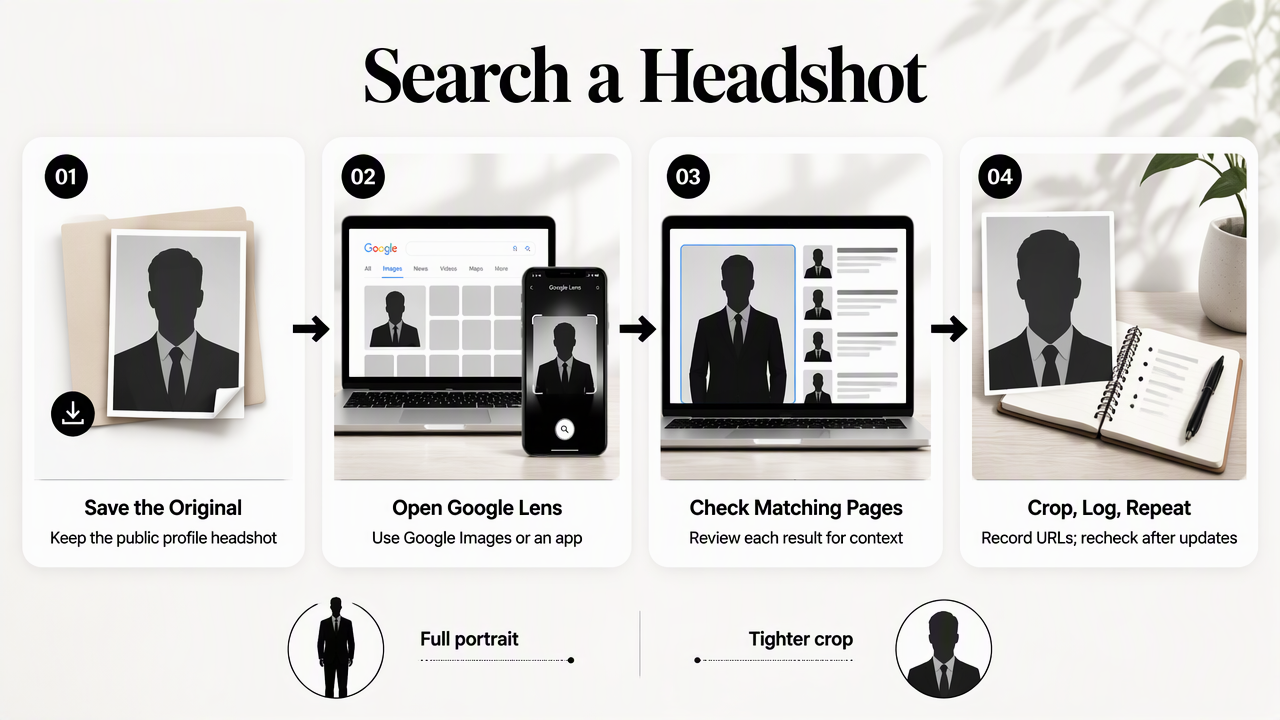
- Open Google Lens through Google Images or an available app interface.
- Upload or select the image and inspect matching pages.
- Repeat with a tighter face-and-shoulders crop.
- Record relevant URLs and repeat the check after major profile updates.
Desktop: inspect the full image before cropping
On desktop, open Google Images and select its image-search or Lens control. Upload the saved headshot, or supply an image URL when that option is available. Interface labels can vary, so the image-search control matters more than its exact position.
Start with the complete portrait. Clothing, background, and composition can help reveal copies of that specific photograph. Then adjust the selected area or upload a cropped version to reduce distracting background details.
Open promising source pages rather than relying on thumbnails. Record the page URL, account name, and how the portrait is used. A result thumbnail alone rarely supplies enough context for a useful report.
Mobile: use the saved photo or a clean screenshot
On mobile, access Lens through an available Google app, browser interface, or Google Photos integration. Select the saved profile picture from the device. If only a screenshot is available, crop out menus, usernames, and surrounding text before searching.
The supplied research also describes Photo Sherlock as supporting searches from a camera or gallery. The FaceOnLive reverse face search page describes a different approach: searching for other appearances of a person from a face photo. These approaches answer related, but distinct, questions.
Before uploading a portrait to any unfamiliar service, review its privacy information and image-retention terms. Public availability doesn't remove the need to assess where another copy is being submitted.
- Search the original profile image first.
- Try a crop when the background dominates results.
- Search older headshots that remain publicly visible.
- Keep a simple log of search dates and relevant URLs.
What should happen when a headshot appears elsewhere?
When a headshot appears on a fake account or scraped website, the first step is to preserve evidence before requesting removal. Record the URL, date, screenshot, and misleading context. Then use the platform's impersonation process or contact the website, choosing a complaint that accurately describes the issue.
Fake accounts: document the identity claim
For a suspected fake account, capture both the portrait and the details suggesting impersonation: name, biography, employer claims, contact links, or messages. Keep the legitimate profile URL ready for comparison.
Use the platform's reporting route for impersonation where available. If the account is requesting money or contacting clients, notify affected contacts through an established channel. Avoid public accusations based only on a similar photograph.
- Save screenshots and the exact account URL.
- Record the misleading identity claims.
- Submit the appropriate platform report.
- Store confirmation numbers and follow-up messages.
Scraped websites: separate privacy from copyright
For an unfamiliar website, identify the page operator and request removal with the exact page URL and image location. Describe the unauthorized use plainly, without sending unnecessary identity documents to an unverified contact.
Copyright and likeness concerns aren't interchangeable. Appearing in a portrait doesn't automatically mean the subject owns its copyright; a photographer or another party may hold those rights, depending on the agreement and applicable law. A copyright complaint should come from the rights holder or an authorized representative.
Search-result removal and source-page removal are separate goals. Removing a result from a search service doesn't necessarily remove the photograph from its hosting website. Threats, extortion, or persistent harassment warrant a separate safety response and appropriate local advice.
Preserve evidence first, then pursue the removal route that matches the actual problem.
How can professionals build a repeatable photo-protection routine?
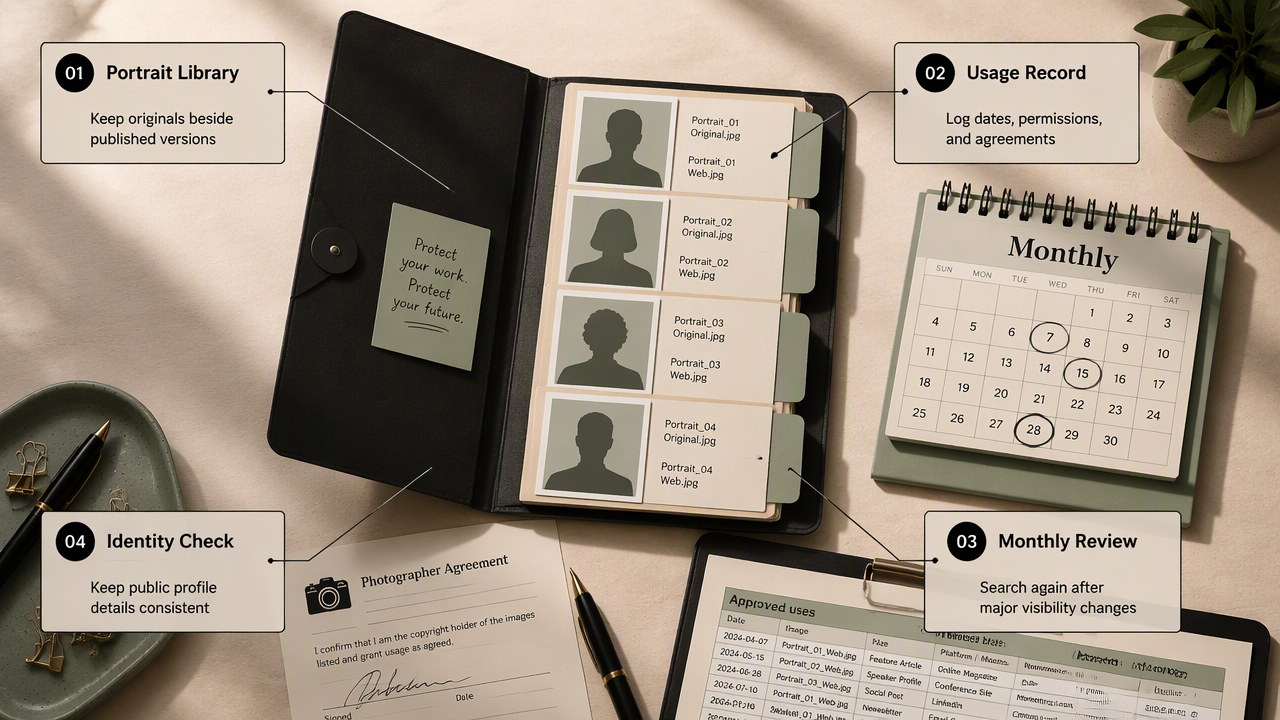
A repeatable photo-protection routine combines an organized portrait library, consistent public identity details, periodic searches, and a record of approved uses. Professionals can schedule a monthly review as a practical starting point, then add checks after a job change, campaign launch, or significant increase in public visibility.
Keep a small, documented public portrait set
Save each published portrait alongside its original file, publication date, permitted uses, and relevant photographer agreement. Different filenames for LinkedIn, Instagram, and website versions make later checks easier. A simple spreadsheet can track authorized placements without adding another complicated system.
For fitness professionals preparing platform-specific imagery, a LinkedIn profile-picture option and an Instagram profile-picture option fit different presentation needs. Recording which version appears on each channel creates a useful reference for future searches.
- Maintain accurate bios and official contact links.
- Store source files separately from published copies.
- Record permission for partner and event use.
- Add a calendar reminder for image checks.
How Looktara fits a profile-image workflow
Looktara offers a relevant starting point for professionals preparing profile imagery. Its role in this workflow is image creation and presentation, while reverse image search serves the separate task of checking public appearances.
A portrait prepared with Looktara can become part of the documented image set: save the final version, note its intended channel, and retain a copy for later searches. That pairing keeps presentation and monitoring organized without confusing the two tasks.
FAQ: Practical limits of profile-photo searches
Profile-photo searches work best when their limits are understood: they can surface relevant public images, but results still need verification and follow-up.
Can Google Lens find every copy of a headshot?
Google Lens shouldn't be treated as a complete inventory of every copy. Results depend on the images and pages available to the service and how closely they match the submitted picture. Private accounts, inaccessible pages, and edited versions may not appear. An empty result means no useful match appeared in that check.
Does reverse image search reveal the original photographer?
Reverse image search may locate pages containing credits or publication details, but it doesn't establish authorship by itself. A highly ranked or older-looking result isn't necessarily the original source. Photographer agreements, original files, publication records, and direct confirmation provide stronger evidence when ownership or permission needs to be resolved.
Should a professional delete a headshot after unauthorized reuse?
Deleting a legitimate headshot doesn't remove copies already published elsewhere. A more targeted response is to preserve evidence, report the unauthorized placement, and review public profile details. Replacing the portrait may help refresh professional presentation, but the earlier image should remain in the monitoring file for future searches.
Protection depends on repeatable checks and accurate reports, not a single search or photo replacement.
Conclusion
Start with the current headshot: run a full-image search, repeat with a crop, and save any relevant URLs. Then create a short approved-use log and schedule the next review. For professionals preparing a refreshed portrait with Looktara, looktara.com is a starting point; keeping the final file organized makes future monitoring easier.
Generated by EarlySEO.com