
TL;DR
Use a full photo editor for exposure, color, and cropping; choose a background remover when only the backdrop needs changing. Consider AI generation when the whole portrait needs a coordinated setting, then check facial likeness and the final circular crop.
A cleaner background won't fix poor lighting. The choice between a photo editor vs background remover for profile pictures starts with identifying what actually needs changing: the portrait, the backdrop, or the entire setting.
Photo editor: Software that adjusts an existing image through tools such as cropping, exposure correction, color adjustment, and retouching.
Background remover: A tool that separates the main subject from the surrounding image, usually creating a transparent cutout.
AI portrait generation: A process that creates new portrait imagery rather than only adjusting pixels in an existing photograph.
For professionals and creators seeking a coordinated profile setting, Looktara offers an AI profile-imagery option. The practical question remains the same in 2026: how much of the original photograph should stay?
Table of Contents
What separates photo editing from background removal?
Photo editing changes the appearance or composition of an existing photograph, while background removal isolates its subject from the surroundings. For profile pictures, an editor addresses brightness, color, and framing; a remover addresses backdrop distraction. AI generation is a third approach when a new setting or portrait treatment is the goal.
Three approaches, three different jobs
Each approach solves a different portrait problem, even when one application combines several tools.
| Approach | Best use | What changes | Main review task |
|---|---|---|---|
| Full photo editor | Improving an already useful portrait | Exposure, color, crop, and selected details | Check natural skin tones and facial detail |
| Background remover | Keeping the subject while replacing the backdrop | Subject isolation and background | Inspect hair, glasses, and shoulder edges |
| AI portrait generation | Creating a coordinated setting and presentation | Potentially the setting, clothing, lighting, and portrait | Confirm recognizable likeness and suitable context |
A background remover can be a feature inside a full editor, not a separate product category. The meaningful comparison concerns the operation performed, rather than the label on the application.
Mask: A selection that controls which parts of an image remain visible or receive an adjustment.
Transparency: Image areas without visible color, allowing another background to show through.
Regeneration: Creating replacement image content instead of simply correcting the existing photograph.
Why the same selfie can need different treatment
A window-lit selfie against a plain wall may need only tighter framing and a small exposure adjustment. The same expression photographed in a busy café may benefit from background removal. A portrait intended for a coordinated business campaign may call for generation when the setting itself needs a different visual direction.
Choose the smallest change that achieves the profile's purpose.
Which approach should each profile owner choose?
The right approach depends on whether the existing subject and setting already serve the profile's purpose. A photo editor suits a strong photograph needing correction, a background remover suits a strong subject against a distracting backdrop, and AI generation suits a request for a newly coordinated portrait and setting.
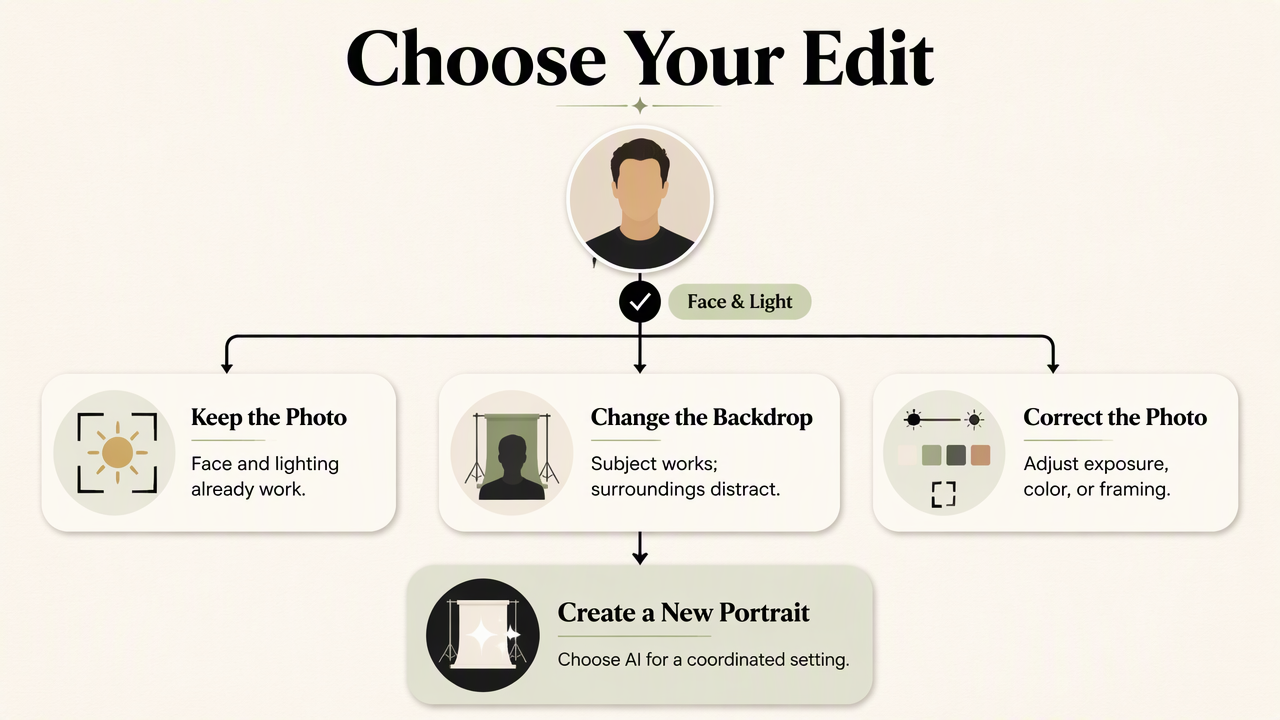
A decision tree for quick selection
The simplest decision tree starts with the face, then checks the surroundings.
- Face and lighting already work: Keep the photograph and inspect the backdrop.
- Only the backdrop distracts: Remove or replace the background.
- Exposure, color, or framing needs adjustment: Use a full editor, adding removal only if needed.
- The whole setting needs an intentional look: Consider AI generation.
- The photograph doesn't resemble the person clearly: Choose another original before continuing.
These choices aren't mutually exclusive. A portrait can need background removal followed by color correction, especially when the replacement backdrop changes the overall balance.
Match the treatment to the profile's purpose
Professional context should guide the final presentation, not the number of available effects.
- Job seekers and remote workers: Favor a clear face, comfortable expression, and restrained setting that reads well beside career information.
- Entrepreneurs and freelancers: Match the portrait's color and atmosphere to the business identity.
- Creators and influencers: Keep recognizable features while allowing more personality in the background.
- Dating-app users: Favor recent, representative photographs; preserve useful context rather than making every image look studio-produced.
For a fitness coach building a professional presence, a fitness LinkedIn profile-picture generator is a relevant route to explore. The same visual goal won't necessarily suit a personal dating profile, where everyday context can carry more meaning.
How should profile pictures be edited and checked?
- Select a sharp original with a recognizable expression.
- Correct exposure and color without flattening facial detail.
- Remove the background only when it competes with the subject.
- Match any replacement backdrop to the portrait's lighting.
- Preview the circular crop and export a suitable finished image.
Keep lighting believable after replacing the backdrop
A convincing background replacement preserves a believable relationship between the person and the surroundings. Soft daylight on the face generally fits a softly lit setting better than a scene suggesting harsh directional light.
Check the edges at full size, particularly around loose hair, glasses, ears, and shoulders. Then inspect the image at profile-thumbnail size. A technically neat cutout can still look pasted on when the background's brightness or color clashes with the subject.
Avoid treating background removal as facial repair. It doesn't restore missed focus, change the original camera angle, or correct an expression.
Evaluate a free background remover before committing
A free background remover is useful when its export and edge controls meet the intended use.
- Check whether the download is full resolution or a reduced preview.
- Confirm whether a watermark appears in the finished image.
- Look for manual restore and erase controls for difficult edges.
- Review upload storage, deletion, and reuse terms before submitting portraits.
Free access doesn't automatically mean unlimited exports or every editing feature. Terms can change, so the current plan details matter more than an old comparison.
Export for the destination, not just the editor
A profile picture should be checked in the destination's crop before publication. Circular previews can cut off hair, shoulders, or details that looked fine in a square canvas.
Use PNG when retaining transparency for further design work. For a finished portrait with a solid backdrop, JPEG is often practical. Keep a separate high-quality master so later banners, newsletter graphics, or print materials don't depend on a small profile download.
The final quality check belongs at thumbnail size as well as full size.
How Looktara handles intentional profile imagery
Looktara provides an AI profile-imagery route for people whose goal is a coordinated portrait rather than an isolated background edit. Its profile-picture pages offer a starting point for exploring professional or creator presentation. Generation addresses the broader visual concept; conventional editing remains useful for final framing and finishing.
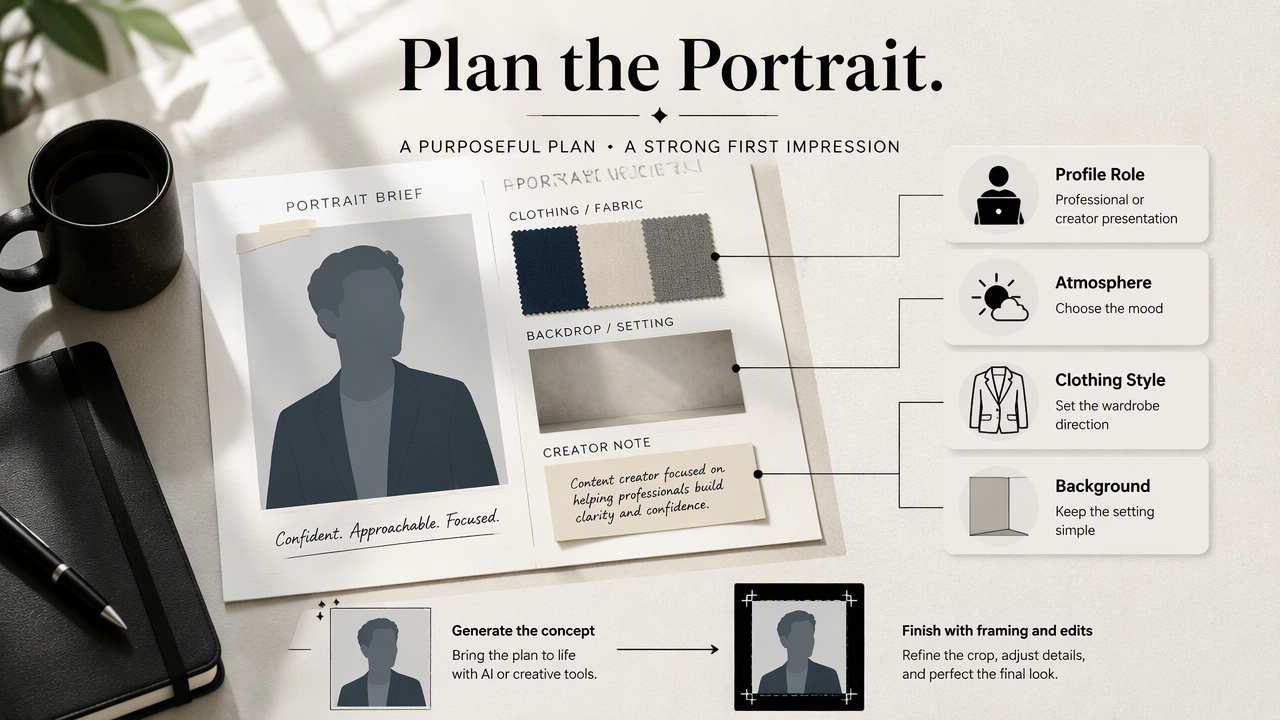
Start with the intended role and setting
A clear visual brief makes the choice of imagery more purposeful. It can specify the profile's role, preferred atmosphere, clothing style, and background simplicity.
For fitness creators, the fitness Instagram profile-picture generator offers a relevant starting point. A creator portrait can communicate energy, while a professional directory image may call for a quieter treatment.
A useful brief includes:
- Role: Trainer, founder, freelancer, or other public-facing identity.
- Setting: Studio-style, workplace-inspired, or relaxed lifestyle context.
- Presentation: Natural expression, recognizable appearance, and suitable clothing.
The objective is intentional presentation, not simply a larger collection of effects.
Choose generation for a new concept, editing for continuity
Generation suits a new visual concept, while editing suits continuity with a photograph that already works. A founder planning coordinated imagery may explore generation; a job seeker preserving a recent portrait may prefer exposure correction and a cleaner crop.
The broader commercial context is current: Khalil Israfilzade's 2025 paper on generative AI in e-commerce examines trends, challenges, and opportunities. That topic supports considering generation as a distinct workflow, not as evidence that generated profile pictures outperform photographs.
Published profile imagery should still represent the person and the intended professional or personal context accurately.
FAQ: Cost, authenticity, and combining tools
The practical questions about profile editing concern what a tool changes, what the download includes, and whether the finished image still represents the person accurately.
A useful profile picture communicates identity clearly; the editing method is secondary.
Can a free background remover replace a photo editor?
A free background remover can replace an editor only when subject isolation is the entire task. A portrait needing exposure correction, color balancing, retouching, or careful cropping still benefits from editing tools. Some applications combine both functions, so the available controls and export quality matter more than the product category.
Does removing the background make a portrait look professional?
Removing the background can make a portrait less distracting, but professionalism also depends on expression, lighting, framing, and context. A plain backdrop works well for many business profiles, yet a tidy workplace can be equally suitable. The strongest choice supports the person's role without competing with the face.
Should generated portraits be checked differently from edited photographs?
Generated portraits need a likeness check as well as a visual-quality check. Review facial proportions, hair, accessories, and whether the setting suggests credentials or circumstances that aren't accurate. Edited photographs need similar care when retouching changes recognizable traits. For both workflows, compare the finished image with recent, representative photographs.
Conclusion
Choose the smallest useful change
The photo editor vs background remover for profile pictures decision comes down to scope: correct the photograph, isolate the subject, or create a coordinated setting. Start with one representative image and define its destination before choosing a tool.
For a new professional or creator concept, explore Looktara at looktara.com, then select a recognizable portrait and check its final circular crop before publication.
Generated by EarlySEO.com