
TL;DR
Meet headshot upload limits by checking the accepted format, cropping first, and adjusting compression before reducing dimensions further. Keep the original, inspect facial detail, and verify the exported file's actual byte size. A target-size compressor suits strict caps; manual export offers more control over appearance.
A professional headshot can meet an upload limit without sacrificing the facial detail that makes it useful. Choosing a photo compressor for professional headshot file size limits starts with the destination's requirements, not a universal quality setting. The practical goal is a recognizable portrait at an accepted size, rather than the smallest possible file.
Looktara fits the image-creation stage of that process, with headshot-focused pages for professional use. Once a portrait is selected, careful export settings prepare it for LinkedIn, application portals, newsletters, or other profile destinations.
Table of Contents
What determines a headshot's upload size?
A headshot's upload size depends on its pixel dimensions, file format, compression settings, and image content. The destination may also require a particular aspect ratio or minimum resolution. A successful export satisfies those conditions together, rather than meeting the byte limit while leaving the portrait too small or incorrectly cropped.
Photo compressor: A tool that reduces an image's stored file size by changing its encoding, discarding some image information, or combining compression with resizing.
Headshot: A photographic portrait focused on the subject's face, commonly used for professional profiles and other identity-focused images.
File size: The storage occupied by a file, usually displayed in bytes, KB, or MB.
Pixel dimensions: The image's width and height in pixels; these determine how much spatial detail remains available.
The requirement checklist for November 2026
The supplied research contains no verified, dated platform limits, so a universal LinkedIn, dating-app, or recruitment-portal cap would be unreliable. As of November 26, 2026, the destination's current upload instructions should be the reference for each export.
Record these requirements before editing:
- Maximum file size and the units shown.
- Accepted formats, such as JPEG or PNG.
- Minimum and maximum pixel dimensions, if specified.
- Required crop or aspect ratio.
- Any automatic profile-photo cropping shown in the preview.
A portal accepting a file doesn't guarantee a good presentation. Its preview should also show the face clearly, with enough space around the head for the final crop.
How can a headshot meet a file-size cap?
- Check the headshot destination's file-size, format, and dimension requirements.
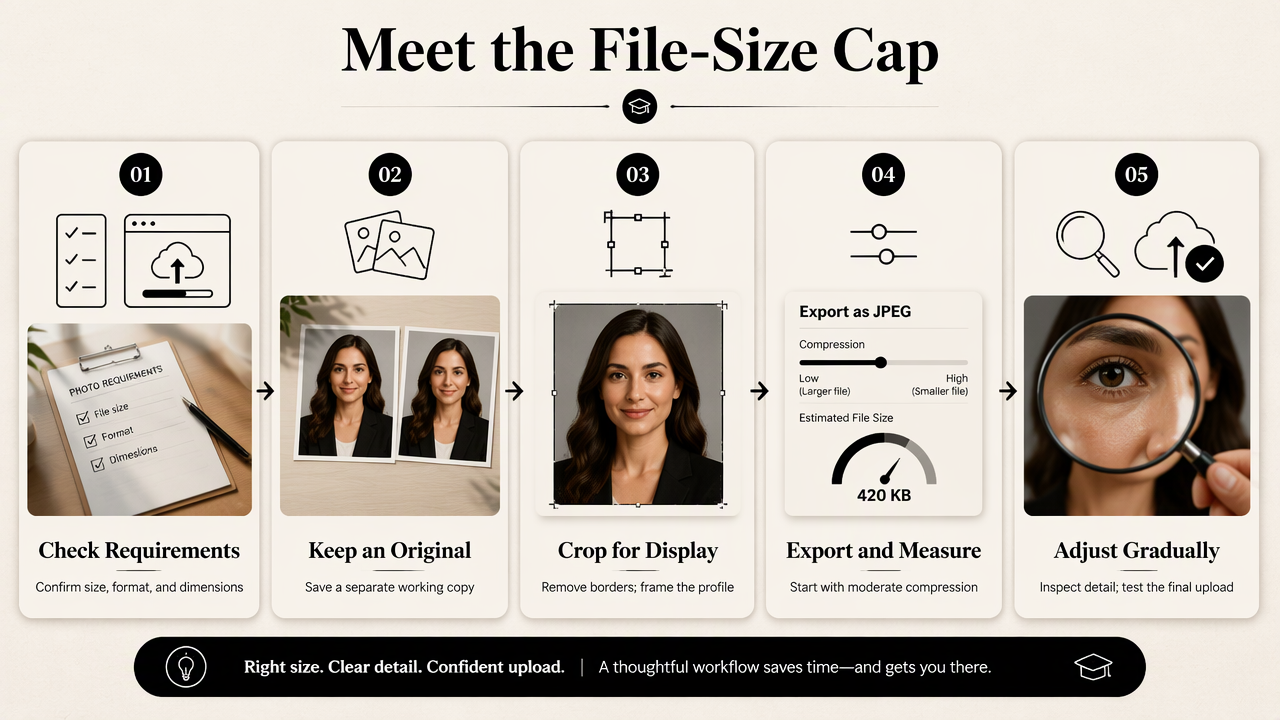
- Save a separate working copy of the original portrait.
- Crop for the intended profile display and remove unnecessary borders.
- Export with moderate compression, then measure the resulting file.
- Adjust quality or dimensions gradually, inspect facial detail, and test the final upload.
A decision tree that preserves useful detail
The next adjustment should address the actual constraint, rather than changing every setting at once.
- Wrong format? Export to a format the destination accepts before testing size.
- Much larger than the required display? Resize toward the destination's recommended dimensions while respecting its minimum.
- Appropriate dimensions but above the cap? Lower export quality in small steps and compare previews.
- Visible artifacts before reaching the cap? Return to the original and try a modest dimension reduction with a less aggressive quality setting.
- Under the cap with clear detail? Keep that version and test the destination's crop.
Starting from the original matters. Repeatedly editing and saving an already compressed JPEG can compound quality loss. Each new candidate should come from the master image, not the previous smaller export.
A face-first inspection checklist
A useful quality check examines both the full-size export and its likely profile-display size. Fine defects can disappear in a thumbnail, while an awkward crop remains obvious.
- Inspect eyes, eyebrows, hair edges, teeth, and glasses.
- Look for blocky patches, halos, or smeared skin texture.
- Check that the face remains recognizable at thumbnail size.
- Compare candidates under the same viewing conditions.
- Confirm the final file size after saving, not just in the export preview.
Preserve facial clarity first. Background detail usually matters less than recognizable eyes, natural skin texture, and a balanced crop.
Metadata removal may reduce file size without changing visible pixels. Its effect varies, so it shouldn't replace measuring the actual export.
Which compression approach fits the limit?
A target-size compressor fits a strict byte cap, while a manual image editor fits a portrait that needs careful cropping and visual comparison. The best choice depends on the task. Tool selection should also account for privacy, batch handling, and whether the destination accepts the exported format.
Three approaches compared
| Approach | Best use | What to check |
|---|---|---|
| Target-size compressor | Producing a file below a stated KB or MB cap | Actual saved size, face detail, and upload handling |
| Manual image editor | Controlling crop, dimensions, and export quality | Whether each saved candidate meets the cap |
| Batch image processor | Preparing several approved portraits or staff photos | Consistent settings and individual quality checks |
Who should pick which: Job seekers submitting one portrait to a strict portal can start with a target-size tool. Entrepreneurs preparing several brand assets may prefer manual export presets. Teams processing many headshots benefit from batch handling, followed by individual review.
For photographic portraits, JPEG is often a practical starting point when accepted. PNG can suit images requiring transparency, but it isn't automatically the smallest choice. A newer format such as WebP should only be used when the destination explicitly accepts it.
A measurement worksheet, not invented benchmarks
Compression results vary with the source image, so the following numbers illustrate calculations rather than measured tool performance. The supplied research provides no controlled before-and-after headshot tests.
| Illustrative starting size | Example cap | Required reduction to reach the cap |
|---|---|---|
| 1,000 KB | 200 KB | 80% |
| 600 KB | 300 KB | 50% |
| 250 KB | 200 KB | 20% |
The calculation is (starting size - target size) / starting size × 100. That percentage describes the file-size reduction required, not the export quality setting.
For a measured comparison, record the original size, output dimensions, quality setting, exported bytes, and visual result for each candidate. Change one setting at a time. An export quality value of 80 doesn't mean the file becomes 80% of its original size, and settings aren't directly comparable across tools.
How Looktara handles this
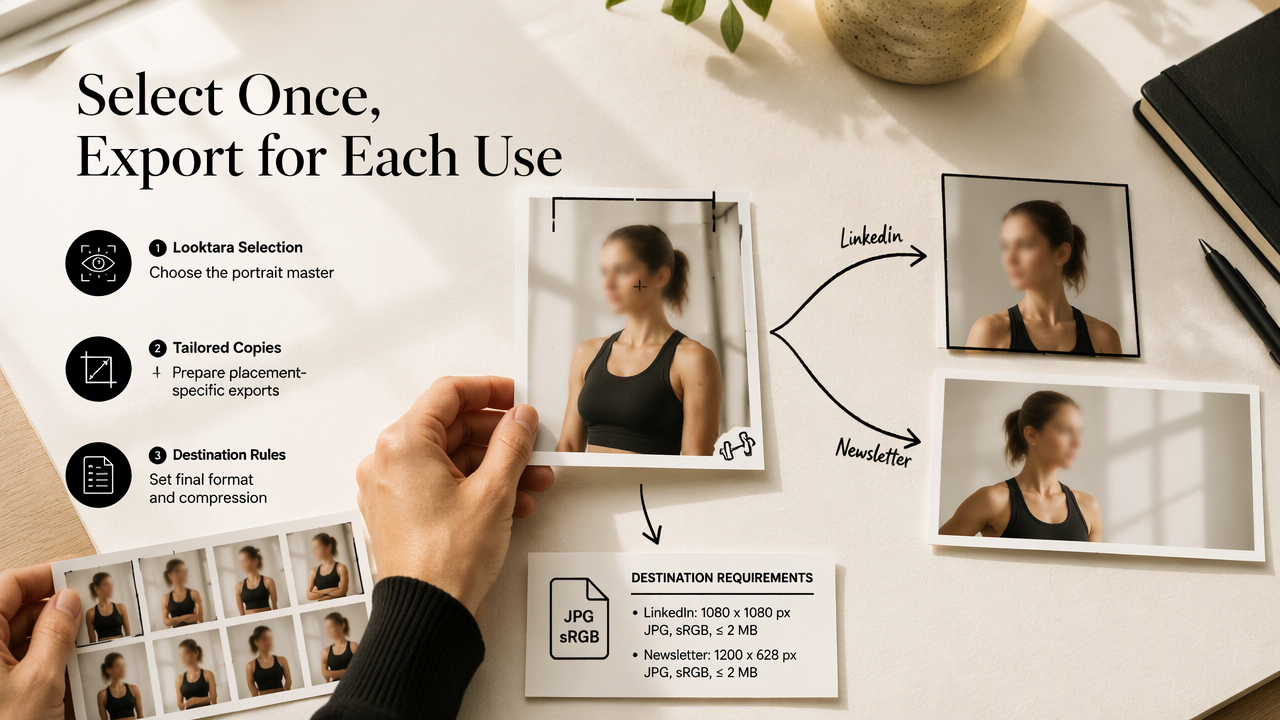
Looktara fits the portrait-selection stage, while the destination's requirements guide the final compression and export stage. Keeping those jobs separate allows the chosen image to serve as a master portrait, with tailored copies prepared for different professional placements.
Prepare separate copies for professional placements
The fitness LinkedIn resume headshot generator is a relevant starting point for fitness professionals preparing career-profile imagery. The fitness newsletter resume headshot generator provides a related route for newsletter-focused portraits.
An organized export set can include:
- A master portrait preserved at its original quality.
- A profile copy with the destination's preferred crop.
- An application copy prepared for a stated file-size cap.
- A newsletter copy sized for its actual placement.
Descriptive filenames such as headshot-profile.jpg and headshot-application.jpg make those versions easier to distinguish. The master should remain available for future exports rather than being overwritten.
Headshot compression FAQ
Headshot compression decisions should follow the destination's requirements and the portrait's visible quality, rather than a fixed setting applied to every image.
Does lowering DPI reduce a headshot's file size?
Changing DPI metadata alone usually doesn't meaningfully reduce a digital headshot's file size because it doesn't remove pixels. Pixel dimensions, encoding, and compression settings are the more useful controls for online uploads. For print work, DPI has a different role in describing intended physical output size.
Can a headshot be compressed without losing quality?
Lossless optimization can reduce some files without changing their decoded pixels, but the available saving depends on the source. JPEG quality reduction is lossy, even when the difference is difficult to see. For professional profiles, the practical target is acceptable visual quality at the destination's required size.
Should an online compressor receive a private headshot?
An online compressor should receive a private headshot only after its processing and retention practices have been reviewed. Relevant questions include whether files leave the device, how long uploads remain stored, and whether deletion controls exist. Local processing is an option when sending an identifiable portrait to another service is unsuitable.
Why can a file below the stated cap still be rejected?
A file below the cap can still fail because its format, pixel dimensions, or other properties don't match the destination's requirements. Services may also interpret displayed size units differently. Checking exact bytes, leaving a small margin below the cap, and confirming the accepted format can help diagnose the rejection.
Upload acceptance and visual suitability are separate checks; both belong in the final review.
Conclusion
Prepare one master portrait, record the destination's current requirements, and export a separate upload copy. Measure its size and inspect the face before submission. For the portrait-creation stage, explore Looktara at looktara.com, then use a suitable compressor or editor to produce destination-specific files.
Generated by EarlySEO.com