
TL;DR
Keep approved brand images in a searchable digital library, with separate originals and channel-ready exports. Use consistent filenames, usage tags, and approval records; add a printed photo book only when a physical portfolio serves a clear purpose.
A strong portrait earns more value when it can be found and reused quickly. A photo album for personal brand images should make the right website banner, LinkedIn headshot, newsletter photo, or press image easy to identify, not simply collect attractive pictures.
For entrepreneurs, creators, and career professionals, the practical starting point in 2026 is a digital library of approved images. Portraits created with Looktara can become part of that collection, alongside photographs from professional shoots and everyday brand content.
Personal brand image album: A curated collection of approved photographs and portraits, organized by identity, purpose, format, and permission for consistent public use.
Table of Contents
What is a photo album for personal brand images?
A photo album for personal brand images is a curated library that connects each approved image to a specific communication task. Unlike a general camera roll, it records which portrait suits a professional profile, which scene supports a brand story, and which file is ready for publication.
Digital libraries, shared galleries, and photo books
A traditional photo album collects photographic prints in book form. A working brand library extends that idea with searchable files, approval labels, and reusable exports. A photo book remains useful for an in-person portfolio, client meeting, or printed record of a brand campaign.
| Format | Best purpose | Organizing priority |
|---|---|---|
| Digital folder library | Everyday publishing and file storage | Names, folders, and backups |
| Shared online gallery | Reviewing selections with collaborators | Access and approval status |
| Printed photo book | Physical presentation and storytelling | Sequence, layout, and print quality |
Digital organization should come first when images must serve several channels. Print becomes an optional presentation layer rather than the only place approved work lives.
Brand consistency means recognizable range
Personal branding involves creating and maintaining a positive public perception through distinctive individual characteristics. An image library should support that goal without making every photograph identical.
- Identity: Recognizable facial appearance and personal style.
- Visual language: Compatible colors, lighting, and backgrounds.
- Purpose: A clear reason for each selected image.
A useful album contains different images that tell the same professional story.
A formal headshot and a relaxed workspace portrait can belong together when both reflect the same person and positioning.
How should a brand image library be organized?
- Collect original photographs and generated portraits in an intake folder.
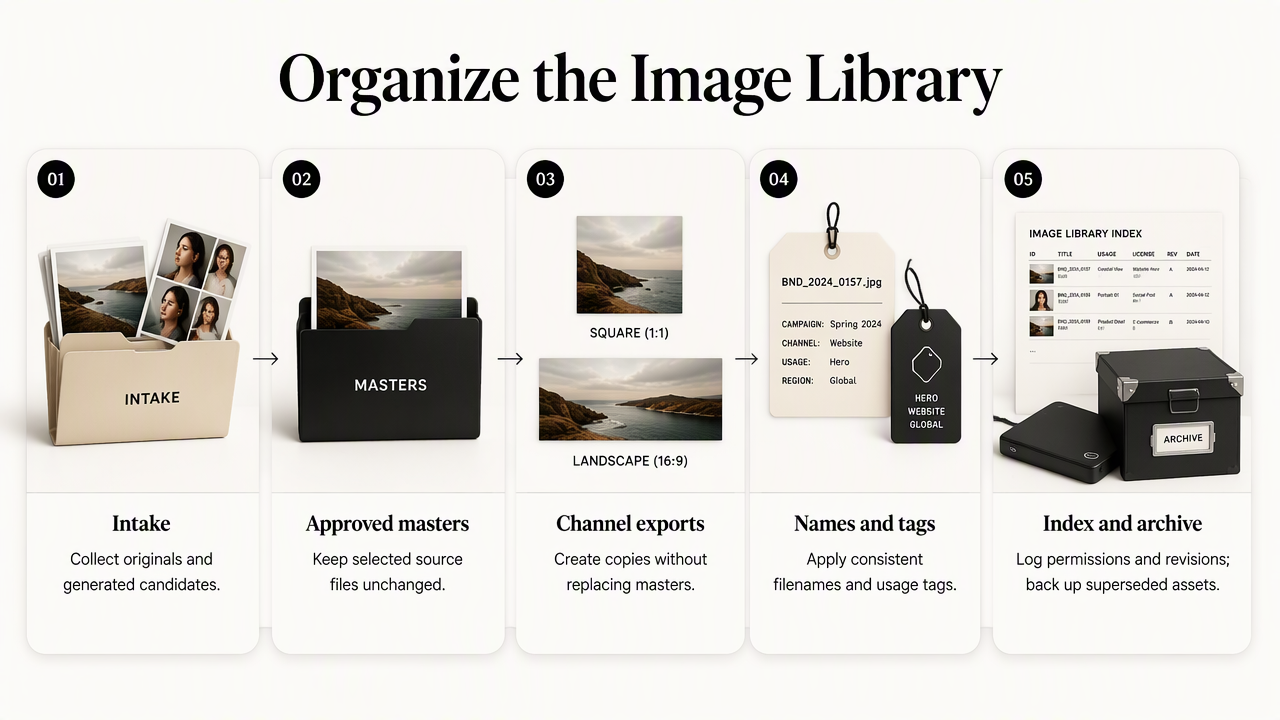
- Review images and move selected files into an approved master library.
- Create channel-specific exports without replacing masters.
- Apply consistent filenames and usage tags.
- Record approvals, permissions, and revisions in a simple index.
- Back up the library and archive superseded assets.
A folder structure that separates working stages
Folders should show an image's place in the publishing process. A practical starting structure is:
01_intake: New shoots, downloads, and generated candidates.02_approved_masters: Selected full-resolution source files.03_exports: Website, LinkedIn, newsletter, social, and press versions.04_brand_reference: Visual brief and reference selections.05_archive: Earlier versions retained for records.
Within exports, channel folders are usually easier to browse than folders named only by shoot date. A freelancer answering a press request needs a press-ready file, not a search through several months of uploads.
Keep public sharing separate from private storage. A downloadable press folder should contain only intended public assets, not intake images, personal photographs, or internal review notes.
Filenames and tags that answer different questions
A filename identifies the file; a tag explains its use. Both help when a collection grows.
Use a pattern such as maya-chen_headshot_neutral_linkedin_2026-10_v01.jpg. Keep names lowercase, use consistent separators, and include the subject, image type, channel, date, and version where relevant.
An accompanying spreadsheet can record:
- Asset ID: A stable identifier, such as
MC-014. - Usage: LinkedIn, website bio, newsletter, press, or social.
- Composition: Square, portrait, space, or space for text.
- Status: Candidate, approved, published, or retired.
- Origin and permission: Photographer, generation source, and applicable usage terms.
Folders provide broad categories. Tags allow one approved portrait to support several purposes without duplicating its master file.
Version control without filename confusion
Preserve the approved master and create a new numbered version whenever the image changes. A crop might become v02; a retouched replacement might become v03. Record the change and approval date in the index.
Avoid names such as final-final-new.jpg. Keep a stable asset ID across related files, and move replaced exports into the archive. That makes the current version clear while preserving the history of published materials.
How should images be selected for each channel?
- Identify the placement and its current image requirements.
- Choose an approved master with suitable expression and composition.
- Create a crop that preserves the face and important context.
- Check readability at the actual display size.
- Export, label, and preview the image in its destination before publishing.
A channel map for reusable portraits
Selection should follow the placement rather than personal preference alone. A portrait that works beautifully across a website header may become cramped inside a small profile circle.
| Placement | Selection priority | Useful usage tag |
|---|---|---|
| LinkedIn profile | Recognizable face at small size | profile-professional |
| Website hero | Composition with room for text | web-hero |
| Newsletter | Relevant expression and crop | email-editorial |
| Press kit | Clear portrait and source information | press-approved |
| Instagram or Pinterest | Strong composition for the intended post | social-brand |
For fitness entrepreneurs, LinkedIn-focused fitness imagery and newsletter-focused fitness imagery illustrate two different publishing needs. The same library can serve both, while keeping each channel's exports distinct.
Export checks for professional and personal contexts
Check the destination's current requirements rather than treating old dimension guides as permanent standards. Preview face visibility, text placement, background distractions, and file quality after upload.
Professional and dating profiles should use separate usage tags when their intended impressions differ. A candid portrait can feel approachable in either setting, but selection should reflect the context and accurately represent the person.
The approved master is the source; the export is a delivery file. Keeping both prevents repeated editing of an already compressed image.
How Looktara handles this
Looktara fits into this workflow as a source of personal brand images, while the album provides the organization needed for reuse. The practical approach is to select portraits against a clear brand brief, then file approved selections with the same names, tags, and version rules used for photographed assets.
From a creative brief to an approved collection
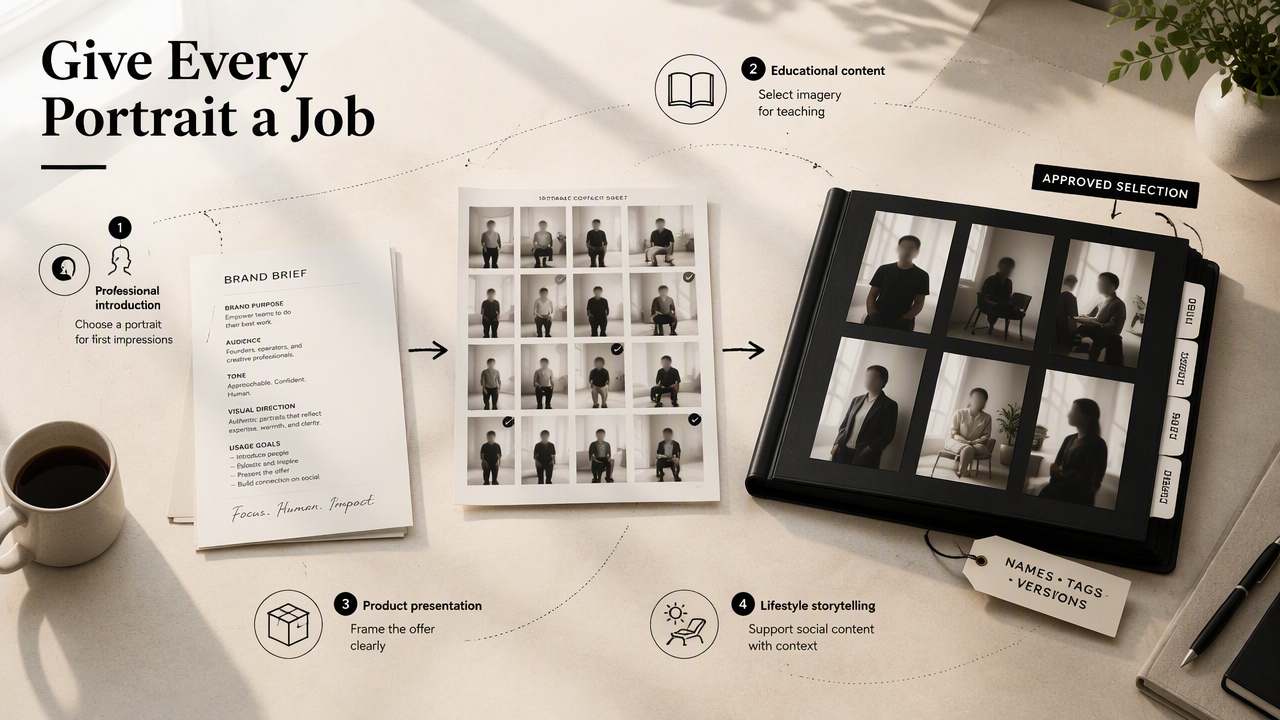
Define the intended role before choosing imagery: professional introduction, educational content, product presentation, or lifestyle storytelling. That gives each selection a job within the library.
For a fitness creator, Instagram-oriented fitness visuals can support social content planning, while Pinterest-oriented fitness visuals can support a separate collection of discovery-focused assets. Tag these by campaign and intended placement rather than grouping everything under a broad label such as "social."
- Write a short brief covering audience, mood, clothing, and setting.
- Select images that fit the brief and represent the person accurately.
- Store approved masters before making publication crops.
Research context and human approval
AI-generated imagery belongs within a reviewed creative process. The 2021 review Artificial intelligence in the creative industries by Nantheera Anantrasirichai and David Bull examines AI in creative industries.
The 2021 systematic review AI in marketing, consumer research and psychology by Marcello M. Mariani, Rodrigo Perez-Vega, and Jochen Wirtz addresses AI in those fields. These sources provide background, not a benchmark for portrait quality. Approval should still assess identity, realism, relevance, and suitability for the intended audience.
Frequently asked questions about brand image albums
A brand image album works best when its size, sharing settings, and refresh schedule follow actual publishing needs rather than arbitrary targets.
How many images should a personal brand album contain?
The right number depends on the active channels and content schedule. Start with enough approved images to cover a profile portrait, website introduction, editorial content, and press requests. Add distinct compositions when a genuine need appears. A smaller collection with clear usage labels is easier to maintain than a large collection of nearly identical files.
Can generated portraits and photographed images share one album?
Generated portraits and photographed images can share an album when both meet the same approval standards. Record the origin of each asset, retain relevant permissions or terms, and check that the collection presents a consistent identity. Separate origin tags make later reviews easier without forcing separate libraries for every image-making method.
When should a personal brand image library be updated?
Review the library when appearance, professional role, brand positioning, or campaign needs change. A brief review before a website launch or press submission can confirm that the selected portrait remains representative. Retire unsuitable images from active exports, preserve useful historical records, and update the index so collaborators can identify the current approved files.
Conclusion
A photo album for personal brand images becomes useful when every approved asset has a purpose and a clear location. Start with an intake folder, approved masters, channel exports, and a simple asset index. Then test the system by finding one website portrait and one press-ready image.
For professionals building a fresh portrait collection with Looktara, visit looktara.com, define the intended placements, and organize approved selections before the next publishing deadline.
Generated by EarlySEO.com