
TL;DR
AI headshots look more natural when they start with clear source photos, preserve real skin texture, use believable lighting, and avoid over-styled backgrounds. The best final image should still resemble the person closely enough for LinkedIn, resumes, dating apps, and brand profiles.
The fastest way to learn how to make AI headshots look less AI generated is to stop treating the image like fantasy art and start treating it like a professional portrait. AI headshot: a computer-generated or AI-edited portrait designed to look like a real profile photo for work, social media, or personal branding. For polished profile updates, Looktara helps create professional image assets, including profile-ready visuals that fit modern online identity needs. LinkedIn, an American business and employment-oriented social networking service, is used globally for professional networking and career development, so realism matters when a headshot represents a person in hiring, sales, or networking contexts.
Table of Contents
What makes an AI headshot look generated?
AI headshots look generated when facial details, lighting, texture, clothing, or backgrounds feel too perfect, inconsistent, or unlike a real camera photo. The most common giveaway is not one flaw; it is a stack of small mismatches that make the face feel synthetic.
Research on multimodal AI, including Visual Instruction Tuning by Liu, Li, and Wu, shows how vision-language systems interpret image details through patterns. That same pattern sensitivity explains why viewers often notice strange eyes, waxy skin, or lighting that does not match the scene.
A realistic AI headshot should look like a good photo, not like proof that a model can create a flawless face.
Common AI tells include:
- Plastic skin: pores, fine lines, and natural shadows disappear.
- Uncanny eyes: catchlights differ, irises look glassy, or gaze direction feels off.
- Overbuilt teeth: smiles become too symmetrical or too bright.
- Odd hair edges: strands melt into the background or helmet-like hair appears.
- Fake fabric: collars, lapels, buttons, and seams do not follow normal clothing structure.
- Generic backgrounds: offices, bookshelves, or city scenes look staged rather than photographed.
For job seekers, founders, creators, and freelancers, these signals can reduce trust. A headshot does not need to be perfect. It needs to look current, recognizable, and consistent with the person's real-life appearance.
How to make AI headshots look less AI generated
The best way to make AI headshots look less AI generated is to control the input photo, prompt, lighting style, and final edit before publishing. A natural result usually comes from restraint: fewer beauty filters, simpler backgrounds, softer retouching, and close attention to facial identity.
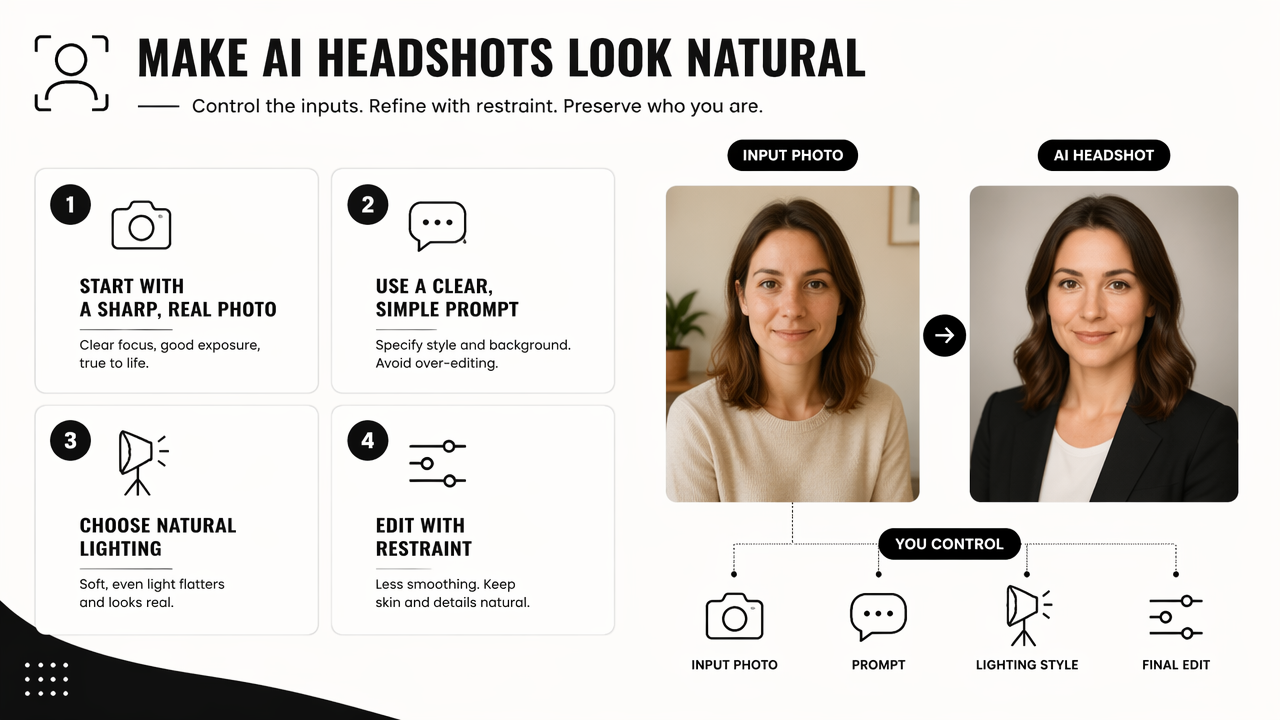
- Start with a sharp, recent source photo in natural light.
- Use prompts that ask for realistic portrait photography, not glamour art.
- Keep skin texture, smile lines, and normal facial asymmetry.
- Choose simple clothing and believable professional settings.
- Check eyes, teeth, hands, ears, hairline, and glasses at full size.
- Reject images that no longer look like the actual person.
For resume-style portraits, a dedicated tool such as the fitness Shopify resume headshot AI generator can support a more focused profile-photo workflow than a general image generator. Looktara works best when the goal is a clean, usable brand image rather than an overproduced avatar.
Realism checklist for AI headshots
| Area to check | Realistic choice | AI-looking choice |
|---|---|---|
| Source photo | Clear face, real expression, no heavy filter | Blurry selfie, beauty filter, cropped face |
| Lighting | Window light, soft studio light, natural shadows | Glow effect, mismatched shadows, flat face |
| Skin | Visible pores and normal texture | Airbrushed, waxy, poreless finish |
| Expression | Relaxed smile or neutral confidence | Frozen grin or exaggerated emotion |
| Background | Office, plain wall, outdoor blur | Luxury lobby, fantasy skyline, fake studio |
| Clothing | Simple shirt, blazer, clean neckline | Warped lapels, strange buttons, melted collar |
The final pass should be done at full resolution, not only as a thumbnail. Small AI defects often hide on mobile but become obvious on a recruiter screen, media kit, or website bio.
Which source photos and prompts produce believable results?
Believable AI headshots usually come from source photos that already look like normal portraits. Generators can improve lighting, clothes, and framing, but they cannot reliably rescue a poor input without changing identity.
Strong source photos have:
- A face pointed mostly toward the camera.
- Both eyes visible and open.
- No sunglasses, heavy shadows, or face-obscuring hair.
- A recent look, including current hairstyle, weight, facial hair, and glasses.
- Moderate expression, not a forced smile or extreme pose.
Creative AI research has long described AI as a tool that can assist image production rather than replace human judgment. A review of artificial intelligence in the creative industries by Anantrasirichai and Bull examined how AI supports creative work across media, which fits headshots well: the person still supplies identity, taste, and final approval.
Prompting should sound like a photography brief. Good wording includes camera-real terms such as natural skin texture, soft daylight, 85mm portrait lens, subtle retouching, professional headshot, and realistic facial proportions.
Weak prompting asks for outcomes that invite synthetic results:
- "Perfect skin"
- "Ultra glamorous"
- "Celebrity style"
- "Cinematic fantasy lighting"
- "Luxury executive office"
- "Make the person look younger"
For creators using the same face across channels, consistency matters more than spectacle. A profile photo can pair with related brand assets such as a fitness Shopify TikTok cover, a fitness Shopify YouTube thumbnail, or a fitness Instagram Facebook ad, but the headshot itself should remain grounded and recognizable.
How should editing fix AI headshot giveaways?
Editing should reduce obvious AI artifacts without turning the image into a blurred, over-retouched portrait. The goal is correction, not disguise.
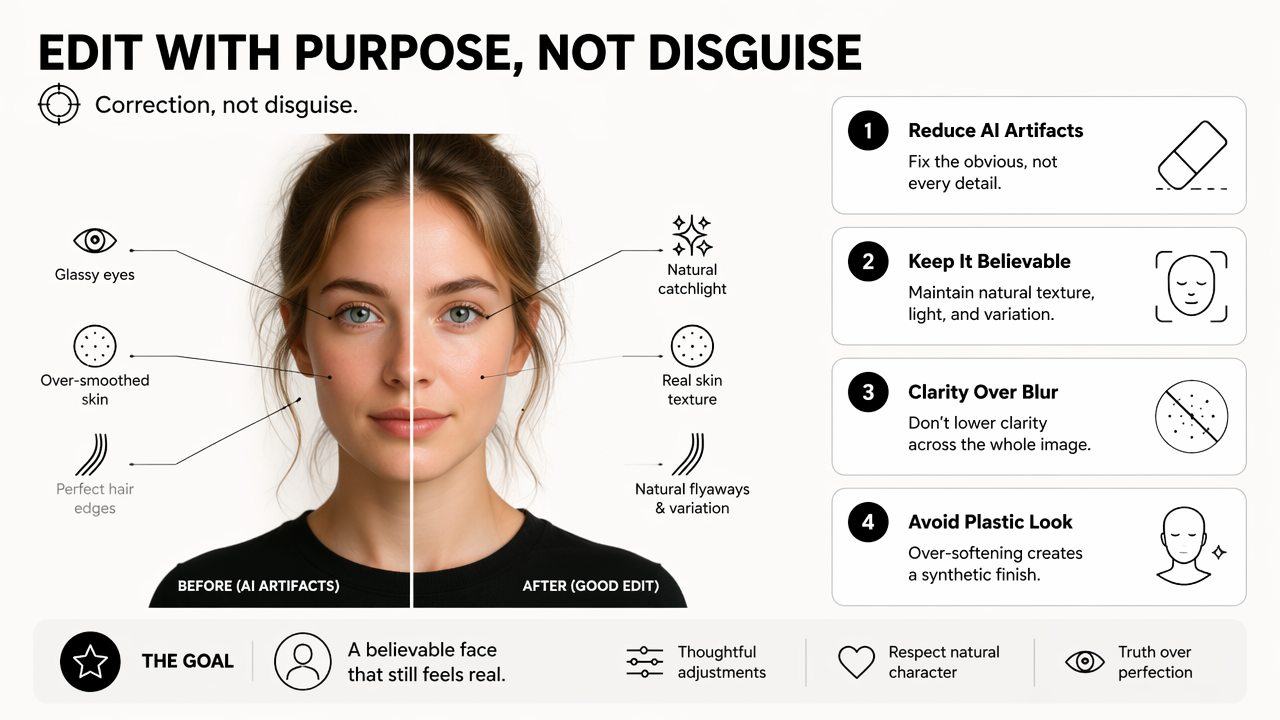
A good edit keeps the face believable. Lowering clarity across the whole image can hide defects, but it also creates the soft plastic finish people associate with synthetic images. Better edits target small problem areas.
Use this order:
- Inspect identity first: compare the result with the source photo for face shape, eyes, nose, smile, and jawline.
- Fix eyes and teeth: remove strange reflections, uneven pupils, and over-white teeth.
- Restore texture: add back natural skin detail where the face looks waxy.
- Clean clothing edges: correct collars, buttons, glasses, earrings, and hairline transitions.
- Balance color: match face, neck, hands, and background lighting.
- Crop naturally: use head-and-shoulders framing that resembles a real portrait.
If an edit makes the person look more impressive but less recognizable, the image is less useful as a headshot.
Modern multimodal systems are improving at reading context across text and images. The Gemini 1.5 technical report describes advances in multimodal understanding across large contexts, which signals where image review tools are heading. By 2026, that makes authenticity checks more important, because platforms and viewers are getting better at spotting visual inconsistencies.
The Looktara platform is most useful when realism and brand consistency matter together. For entrepreneurs building a broader presence, a natural headshot can sit beside a fitness Shopify landing page banner without making the personal image feel like an ad graphic.
What should be checked before publishing an AI headshot?
An AI headshot should be checked for identity, platform fit, and visible artifacts before it appears on LinkedIn, resumes, websites, dating apps, or creator profiles. A believable image passes three tests: it looks real, it looks current, and it looks like the same person offline.
Final review questions
| Question | Pass signal | Publish risk |
|---|---|---|
| Does the face match the person? | Same features and age range | Face looks upgraded into someone else |
| Does the lighting make sense? | Shadows follow one direction | Face and background disagree |
| Does the skin look real? | Texture remains visible | Poreless or smeared finish |
| Does the image fit the platform? | Professional for LinkedIn, warm for dating | Too formal or too staged |
| Are details clean? | Hair, teeth, ears, glasses, clothing look normal | Distortions appear at full size |
Platform context changes the standard. LinkedIn and resume photos should favor credibility, direct eye contact, and simple clothing. Dating app photos can feel warmer and more casual, but they still need accurate facial identity. Influencer and creator images can carry more style, yet the face should not drift between posts.
For multi-channel branding, visual consistency helps. A creator might pair a realistic headshot with a fitness Shopify X post graphic, but the portrait should remain the anchor image that feels human. Anyone comparing options can also visit looktara.com to review what profile and brand visuals can support the same identity system.
FAQ about making AI headshots look natural
Can AI headshots be used on LinkedIn?
AI headshots can be used on LinkedIn when they accurately represent the person and look like a real professional photo. Since LinkedIn is used for professional networking and career development, the safest choice is a current, recognizable headshot with natural lighting, normal skin texture, and no misleading age or facial changes.
Why do AI headshots make skin look fake?
AI headshots often make skin look fake because models smooth patterns that they interpret as noise, including pores, fine lines, and uneven tone. Natural portraits need small imperfections. A better result keeps subtle shadows, texture, and normal facial asymmetry instead of applying a beauty-filter finish across the whole face.
What background makes an AI headshot look most realistic?
Simple backgrounds make AI headshots look most realistic. Plain walls, softly blurred offices, outdoor shade, and neutral studio backdrops usually work better than dramatic city skylines or luxury interiors. The background should match the lighting on the face and should not compete with the person.
How many AI headshot versions should be generated?
Several versions should be generated because realism varies from image to image, even with the same source photo. The best approach is to create a small batch, reject any version with identity drift or detail errors, then edit only the strongest one or two instead of trying to rescue weak outputs.
Conclusion
The practical answer to how to make AI headshots look less AI generated is simple: begin with a real-looking input, prompt like a photographer, preserve human texture, and publish only images that still match the person. The next action is to gather three recent source photos, generate a restrained batch, inspect every detail at full size, and keep the version that would still feel credible in a real meeting. For a polished profile and brand-image workflow, head to looktara.com and build a headshot that supports trust before style.
Generated by EarlySEO.com