
TL;DR
Start with Google Lens from Google Photos, then review matching pages rather than treating visual similarity as proof of identity. Save evidence of unauthorized use before reporting it, and update professional profiles from one approved headshot.
A professional headshot can appear on websites its owner has never visited. Using google photos reverse image search for professional identity helps job seekers, freelancers, and business owners check where their public image appears. The practical starting point is Google Lens, accessible through Google Photos on supported devices. A useful audit separates ordinary reuse, outdated profiles, and possible impersonation, then turns those findings into specific actions.
Table of Contents
What is Google Photos reverse image search?
Google Photos reverse image search uses Google Lens to find information and visually related web results from a selected photo. For professional identity checks, it can help locate copies or similar versions of a headshot. It isn't a complete identity check, and a matching image doesn't establish who controls a page.
Reverse image search: A search method that uses an image, rather than typed words, to retrieve matching or related images.
Google Lens: Google's image recognition technology, which analyzes visual content to surface relevant information.
Google Photos: A photo library application that offers access to Lens on supported devices; searching a private library is different from searching the public web.
Three Google entry points, three distinct roles
Google Photos, Google Lens, and Google Images serve different parts of the same workflow.
| Entry point | Main role | Professional identity use |
|---|---|---|
| Google Photos | Stores and organizes photos; provides Lens access | Start with a saved headshot |
| Google Lens | Analyzes a selected image or region | Examine copies, crops, and related web results |
| Google Images | Provides a browser-based image search entry point | Upload a local file or submit an image URL |
Search results aren't a directory of every person with a similar face. Private accounts, restricted pages, and images outside the searchable web can remain absent.
Key distinction: A reverse image search checks image appearances, not a person's credentials, account ownership, or trustworthiness.
How can professionals check a headshot with Google Lens?
Professionals can check a headshot with Google Lens by following a short workflow:
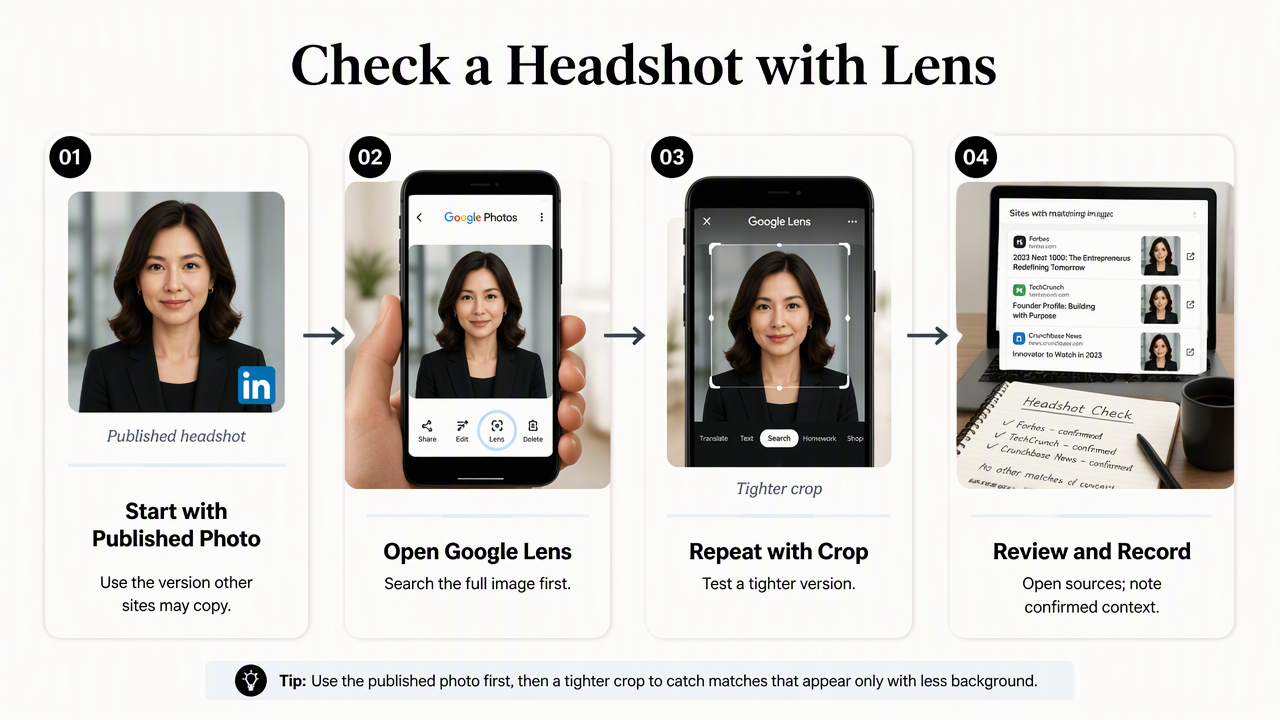
- Select the current public profile photo.
- Open it in Google Photos and choose Lens.
- Search the full image first.
- Repeat with a tighter crop.
- Open promising source pages.
- Record confirmed matches and their context.
Run the mobile check from the actual profile image
The published headshot is the best starting image because it matches the version other websites may have copied. A LinkedIn download or saved website image can be more useful than the original studio file, especially when the published version has different cropping or compression.
In Google Photos, open the image and select the Lens option where available. Interface labels and placement can vary by device and app version. Review website matches or exact-match options if they appear, rather than relying only on the first row of visually similar pictures.
Run one search with the whole frame and another with the head-and-shoulders crop. Clothing, logos, and backgrounds can affect results, so different selections may reveal different pages.
Use a browser for a second pass
Google Images provides a practical alternative when the photo is already stored on a computer. Open its image-search control and upload the file, or supply the publicly accessible image URL when that option is available.
For an image displayed in Chrome, a contextual Google Lens search may also be available. Browser controls vary, so uploading the saved file is a useful fallback.
Record the page URL, account name, screenshot, and date checked for each relevant result. A short spreadsheet keeps a LinkedIn listing, conference biography, and unfamiliar account from being treated as the same kind of finding.
What do matching headshots actually prove?
Matching headshots show that an image, or a visually related version, appears in a search result; they don't prove impersonation or account ownership. Professionals should open the source page, compare the image, and read the surrounding claims. Permission, attribution, and context determine whether a match needs action.
An employer biography, podcast announcement, or conference listing may use an approved photo. An unfamiliar account pairing the same image with another name deserves closer review. Similar lighting or facial features alone aren't enough to establish a copied photograph.
Classify results by the claim surrounding the image
The surrounding text usually determines the next step more reliably than visual similarity alone.
- Expected reuse: A known organization displays an approved biography or event listing.
- Outdated appearance: A legitimate page shows an older headshot, role, or company affiliation.
- Possible misuse: An unfamiliar profile uses the image with misleading identity claims.
- Uncertain resemblance: A result shares visual features without clearly reproducing the photograph.
A cropped or edited copy may still be recognizable. Conversely, a similar-looking portrait may belong to someone else. Empty results aren't proof that a photograph has never been reused.
Keep AI imagery and identity evidence separate
Image-generation research provides background, not a verdict about a particular headshot. The 2023 survey of AI-generated content by Yihan Cao and colleagues examines generative AI's development. The 2023 survey by Laith Alzubaidi and colleagues covers deep-learning tools and data scarcity.
Neither source supplies a benchmark for Google Lens identity checks in the provided research. A missing match cannot establish that a portrait is authentic, while a match cannot establish that it was AI-generated. Account history and direct confirmation remain separate evidence.
How should professionals respond to reused profile photos?
Professionals should respond to reused profile photos with a documented, proportionate process:
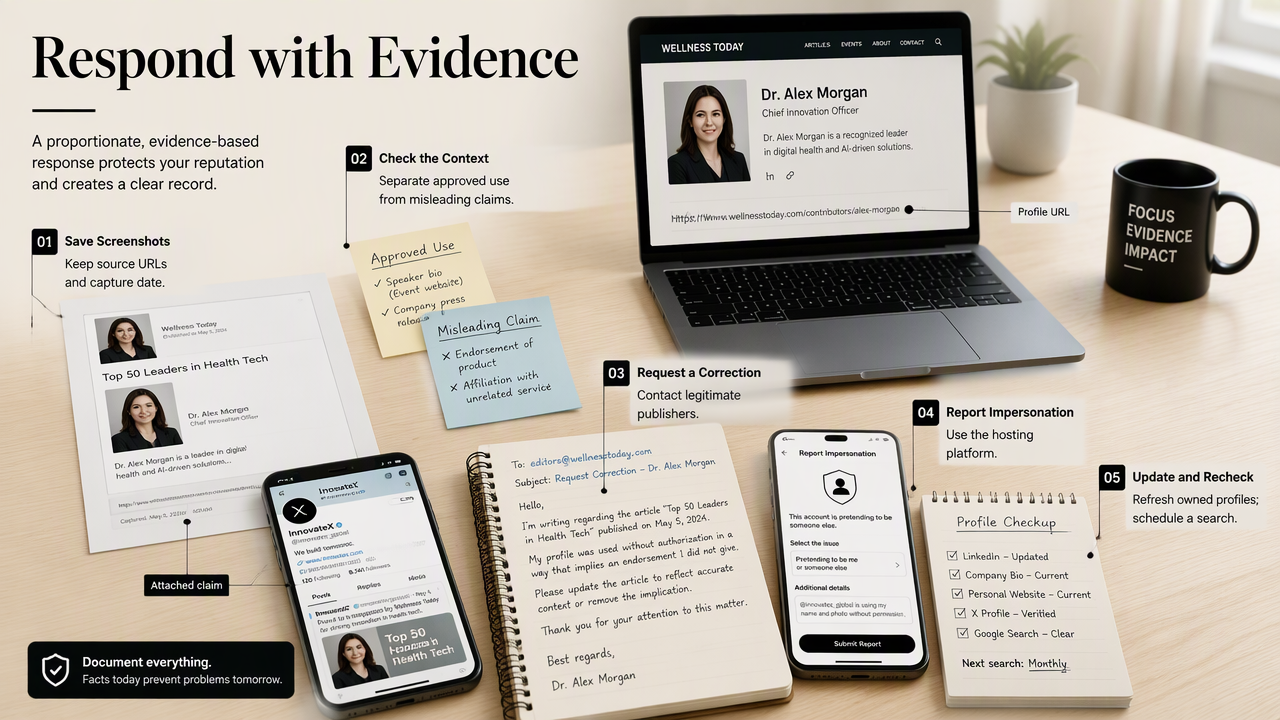
- Save screenshots and source URLs.
- Separate approved reuse from outdated information or misleading claims.
- Request corrections from legitimate publishers.
- Report apparent impersonation through the hosting platform.
- Update owned profiles and schedule a follow-up search.
Preserve evidence before requesting removal
Evidence should show both the photograph and the claim attached to it. Save the profile URL, visible account name, relevant messages, and capture date before contacting a publisher or submitting a report.
For an old employer biography, request an image or role update. For apparent impersonation, use the platform's relevant reporting category and describe the specific misleading behavior. Removing a search result doesn't necessarily remove the image from its hosting website.
Changing a headshot also doesn't erase existing copies. Where messages request money, credentials, or sensitive information, account security and reporting deserve priority over a cosmetic profile update.
Build one approved profile-photo set
A coordinated refresh keeps professional profiles recognizable across platforms. Maintain one approved master portrait, square and space crops, and a record of authorized uses. Clear filenames such as headshot-approved-2026.jpg help colleagues choose the current version.
A useful refresh brief specifies the intended role, clothing, background, expression, and publication channels. LinkedIn, a company biography, and a speaker page can share a consistent visual identity while using crops suited to each layout.
How Looktara supports a refreshed visual identity
Looktara is an option for creating professional brand imagery as part of that refresh. A defined brief helps connect image creation with the role and audience represented by the profile.
The Looktara platform fits the image-creation stage of the workflow, while Google's visual search tools serve the review stage. Before publication, check likeness, facial detail, wardrobe, and background, then choose a portrait that represents the professional accurately.
A profile-ready image should remain recognizable at thumbnail size. Previewing the final crop beside the biography and current job title provides a simple consistency check.
FAQ: Professional profile image checks
Professional profile image checks work best when search results are treated as leads and verified against the actual source pages.
Can Google Lens identify a person from a headshot?
Google Lens can surface related images and pages, but it shouldn't be treated as a reliable person-identification service. A result may contain a name because a website labels the photograph. That label still needs verification through a known company page, confirmed profile, or direct contact. Visual resemblance alone isn't sufficient evidence.
Does searching inside Google Photos check the public web?
Ordinary Google Photos library searches and public-web image searches have different purposes. Library search helps locate stored photographs, while Lens can surface web information related to a selected image. Finding a face within a private photo collection doesn't show where that photograph appears online. The Lens results need a separate review.
How often should a professional repeat a headshot search?
A practical schedule is after a new headshot launch, a job change, or a major publicity event, with occasional checks between those moments. No fixed interval guarantees detection. Professionals with public-facing roles can keep a simple audit log and repeat searches sooner when an unfamiliar account, message, or profile is reported.
Conclusion
Next step: Complete a focused profile audit
A focused audit starts with one current headshot, a Google Lens search, and a record of verified appearances. Resolve each finding according to its context, then align LinkedIn, company biographies, and other public profiles around an approved image.
For the creative refresh, prepare a portrait brief and explore Looktara at looktara.com. Publish the selected image across owned profiles, record its launch date, and schedule the next review.
Generated by EarlySEO.com