
TL;DR
AI-generated website bio photos work best when they look credible, consistent, and placement-ready, not overly polished or synthetic. The strongest workflow combines accurate likeness, brand-aware styling, multiple crops, and human review before publishing.
A website bio photo can shape trust before a visitor reads a single sentence. An artificial intelligence photo generator for website bio photos helps professionals create polished headshots, founder portraits, creator images, and team-page photos without booking a full studio session. For teams that need bio photos alongside brand assets, Looktara gives creators and business owners a practical way to produce on-brand visuals from one place.
Artificial intelligence photo generator: software that uses AI models to create or enhance profile-style images from prompts, uploaded photos, or style references.
AI is the capability of computational systems to perform tasks linked with human intelligence, including learning, perception, and decision-making. In image tools, that usually means generating or editing visual art through AI programs, often using text-to-image or image-to-image models. The goal for website bios is not fantasy artwork; it is a believable, accurate, and useful portrait.
Table of Contents
What is an artificial intelligence photo generator for website bio photos?
An artificial intelligence photo generator for website bio photos creates professional-looking portraits for webpages, using AI to adjust backgrounds, lighting, clothing style, facial presentation, and image crops. The best tools preserve identity, reduce production friction, and produce images that fit a website's tone rather than a random social media trend.
Research on deep learning by Ahmed, Alam, and Hassan in Artificial Intelligence Review describes current progress, applications, advantages, and challenges in deep learning systems, which sit behind many modern AI image workflows (2023 paper). For bio photos, the practical takeaway is simple: model quality matters, but direction matters just as much.
Key insight: A website bio image should support credibility first, aesthetics second, and novelty last.
AI-generated bio photos differ from AI bio text generators. QuillBot-style bio tools help write descriptions for LinkedIn, resumes, and websites, while photo generators create visual identity assets. Canva and PFPMaker-style tools focus on profile pictures, but website bios need more placement control, especially for team grids, press kits, and homepage founder sections.
Core terms for cleaner AI decisions
AI art: visual artwork generated or enhanced through artificial intelligence programs, commonly through text-to-image models.
AI slop: low-effort AI content perceived as lacking quality, meaning, or care. In bio photos, it often appears as waxy skin, strange hands, fake backgrounds, mismatched lighting, or portraits that look unlike the person.
Website bio photo: a professional image used on an about page, team page, homepage, speaker page, press kit, portfolio, or personal brand site.
What makes a website bio photo credible in 2026?
A credible website bio photo in 2026 looks like a real person in a believable brand context, with accurate facial features, natural lighting, clean composition, and a crop that works across desktop and mobile. The image should match the person's role, audience, and site design instead of chasing a generic corporate look.
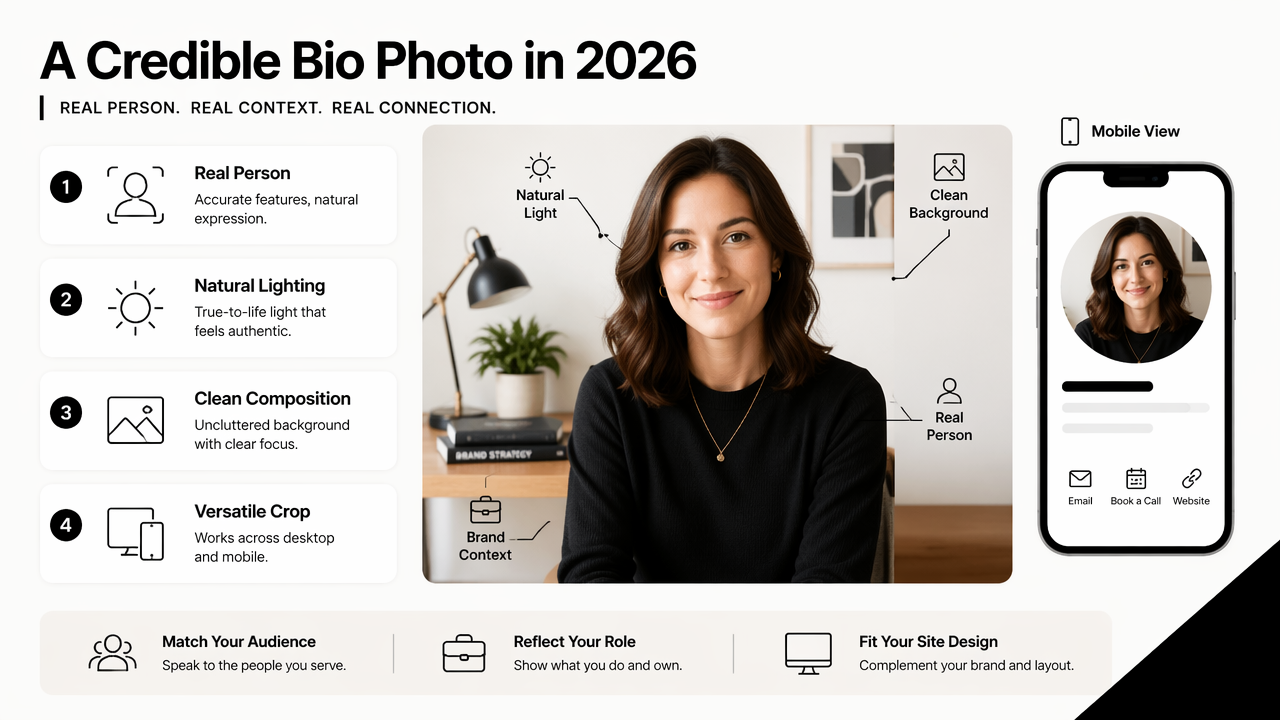
Credibility comes from restraint. A financial advisor, therapist, fitness coach, SaaS founder, and dating profile user should not all share the same blazer-and-gray-wall format. The best AI headshot choices reflect the trust signal each audience expects.
A creator may need warm expression and personality. A job seeker may need a clean LinkedIn-ready crop. A business owner may need a confident image that also works beside a fitness brand website hero image or service-page visual.
- Face accuracy: recognizably the same person across all generated options.
- Lighting: soft, directional, and consistent with the background.
- Expression: approachable, not frozen or exaggerated.
- Wardrobe: aligned with profession and audience expectations.
- Background: simple enough to keep attention on the person.
- Crop flexibility: room for square, vertical, and horizontal layouts.
Quality test: If the image would feel awkward beside a real client testimonial, staff directory, or media bio, it is not ready for a professional website.
Credibility checklist for AI bio photos
A strong AI portrait should pass a human review before publication. The reviewer should compare the image against real photos and check for identity drift, unnatural skin texture, odd teeth, distorted jewelry, and inconsistent eye direction.
- Confirm the face still resembles the person.
- Check hands, ears, glasses, hairlines, and collars.
- Test the crop on mobile and desktop.
- Compare the photo against the brand palette.
- Export at the right size for fast page loading.
- Keep a backup image with a wider crop for future layouts.
How should bio photos differ by website placement?
Website bio photos should differ by placement because each page has a different job: a homepage builds instant trust, an about page adds depth, a team page creates consistency, and a press kit gives media outlets a clean image to reuse. One AI image rarely handles every use case well.
A homepage founder photo can feel more editorial. An about-page portrait can be warmer and more personal. A team grid needs consistency more than drama. A press-kit image should be high-resolution, neutral, and easy to crop by journalists or partners.
Best AI bio photo formats by page type
| Website placement | Best crop | Visual style | Main goal |
|---|---|---|---|
| Homepage | Horizontal or vertical medium crop | Confident, polished, brand-colored background | Build immediate trust |
| About page | Vertical portrait or environmental crop | Warm, personal, lightly editorial | Show personality and story |
| Team page | Square or 4:5 crop | Consistent lighting and background | Make the group feel unified |
| Press kit | High-resolution head-and-shoulders | Neutral, clean, media-safe | Make reuse simple |
| Speaker bio | Vertical portrait | Professional, expressive, stage-ready | Support authority |
| Creator portfolio | Mixed portrait set | Distinctive but authentic | Signal personal brand |
For marketing-heavy sites, a founder headshot may need to sit near offer graphics, testimonials, and campaign visuals. A related AI asset workflow, such as a fitness Instagram and Facebook ad generator, can help keep visual tone consistent across website and paid channels.
Team pages deserve special care. If each person has a different background, camera angle, and color temperature, the page can look patched together. AI generation can solve that by creating a shared visual system, but only when prompts specify crop, lens feel, lighting, backdrop, and wardrobe range.
How to create website bio photos with AI without looking generic?
Creating website bio photos with AI without looking generic requires a clear source image, a brand-specific prompt, realistic styling, multiple crops, and a final human review. The workflow should treat the image as a business asset, not as a novelty profile picture.
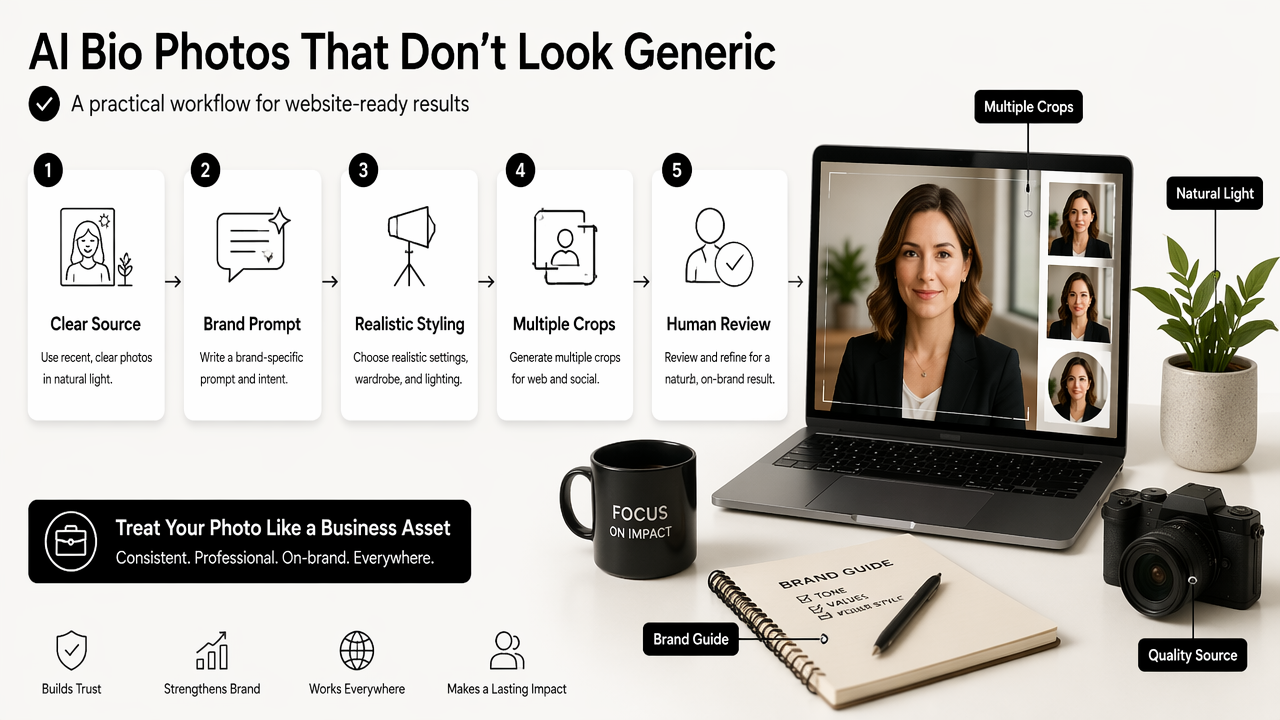
- Start with recent, clear reference photos in natural light.
- Choose a style tied to the website's audience and offer.
- Generate several versions with different crops and backgrounds.
- Remove options with identity drift or synthetic details.
- Test finalists in the actual webpage layout.
- Save approved versions for homepage, team page, and press use.
The Looktara platform is most useful when a brand needs a consistent visual direction across headshots and surrounding creative. A founder photo may pair with a fitness Shopify logo concept, a product image, or a social launch graphic, so the portrait should not be designed in isolation.
A prompt should include identity-safe and brand-safe details. Vague prompts create vague photos. Better prompts describe the person's role, energy, setting, lighting, wardrobe, crop, background, and use case.
- Weak prompt: professional headshot for website.
- Stronger prompt: warm professional bio photo for a remote fitness coach, natural window light, clean neutral background, relaxed confident expression, waist-up vertical crop, realistic skin texture, suitable for an about page.
Explainability also matters when AI is used in public-facing assets. Zhang, Al Hamadi, and Damiani reviewed explainable AI applications in cybersecurity, showing how researchers evaluate AI systems where trust and interpretation matter (IEEE Access, 2022). Website photos are a different field, but the trust principle carries over: people should understand when, why, and how AI-generated assets are being used.
Prompt ingredients that produce better portraits
| Prompt ingredient | What to specify | Example |
|---|---|---|
| Role | Profession or public identity | founder, coach, consultant, creator |
| Mood | Emotional signal | approachable, focused, energetic |
| Lighting | Realistic light source | soft studio light, window light |
| Background | Site-compatible setting | warm office, plain beige wall |
| Crop | Layout need | square team crop, vertical about-page crop |
| Wardrobe | Audience fit | smart casual, black tee, blazer |
| Constraints | What to avoid | no plastic skin, no distorted hands |
Creators who publish across channels should also adapt the bio image into supporting formats. A portrait can become a branded card, a launch announcement, or a fitness Instagram post visual when the crop and background leave enough room for text.
FAQ: AI bio photos for websites
AI bio photos are acceptable for professional websites when they are accurate, respectful, and reviewed for realism before publication. The best results look like polished photography, not synthetic avatars or exaggerated beauty edits.
Can an AI-generated headshot replace a photographer?
An AI-generated headshot can replace a photographer for many website bio needs, especially early-stage sites, remote teams, freelancers, and creators with limited time. A photographer still adds value for high-touch executive branding, complex art direction, and in-person environmental portraits that must document a real location.
What file size works best for a website bio photo?
A website bio photo should be large enough to stay sharp on modern screens but compressed enough to load quickly. Many sites use square or vertical images exported in web-friendly formats such as JPEG or WebP. The exact size depends on the template, crop, and whether the image appears in a small card or hero section.
Should AI bio photos be disclosed on a website?
Disclosure depends on context, industry, and local expectations. A lightly enhanced professional portrait may not need special labeling, while fully synthetic or heavily altered imagery may deserve transparency. Public trust is the main standard: if the photo could mislead clients, employers, or press contacts, disclosure becomes safer.
How many bio photo versions should a professional create?
Most professionals benefit from at least three approved versions: a square crop for team pages and social profiles, a vertical crop for about pages, and a wider crop for press kits or homepage sections. Extra versions can support newsletters, speaker bios, and LinkedIn content visuals.
Conclusion
The best artificial intelligence photo generator for website bio photos is the one that creates realistic, placement-ready images that support trust across a whole brand system. Strong results come from specific prompts, accurate likeness checks, page-based crops, and styling that fits the audience.
For a practical next step, a site owner should gather three recent reference photos, define the exact webpage placements, and generate separate homepage, about-page, team-page, and press-kit versions. Supporting assets can then extend the same look into ads, product visuals, and a fitness Instagram product mockup.
For brand-aligned AI visuals, head to looktara.com and create a bio photo set that matches the website rather than fighting it.
Generated by EarlySEO.com