
TL;DR
AI photo editors work best when a strong existing photo needs cleanup, background changes, or light retouching. AI headshot generators work better when a person needs multiple polished, professional-looking headshot options from selfies, especially for LinkedIn, resumes, founder bios, and personal branding.
A polished profile image can shape a first impression before a resume, bio, pitch deck, or dating profile gets read. The practical choice in 2026 is not simply AI photo editor vs AI headshot generator, but whether the starting photo is already strong enough to edit or whether new headshot options are needed from uploaded selfies. AI photo editor: software that modifies an existing image through retouching, background removal, lighting correction, cropping, object removal, or style changes. AI headshot generator: a tool that creates new professional headshot variations from uploaded selfies or reference images. For professionals building a consistent visual presence, Looktara fits into the broader content workflow alongside assets such as a professional Instagram profile picture generator and branded social visuals.
Table of Contents
What is the difference between an AI photo editor and an AI headshot generator?
An AI photo editor changes an existing photo, while an AI headshot generator creates new headshot-style images from source selfies or reference photos.
Photo editors are best understood as enhancement tools. They can smooth skin, sharpen eyes, replace a background, remove a distracting object, adjust color, and crop for a platform. Fotor, identified in the research data as online photo editing software launched in 2012 by Chengdu Everimaging Science and Technology Co., Ltd., is an example of the broader photo-editing category.
Headshot generators are closer to image creation systems. They learn visual cues from uploaded photos, then output new options with different clothing, lighting, framing, studio backgrounds, and expression styles.
Key insight: editing preserves the original image; generation creates a new image that should still look like the same person.
Core comparison matrix
| Factor | AI photo editor | AI headshot generator | Better fit |
|---|---|---|---|
| Starting point | One usable photo | Several selfies or reference images | Depends on available inputs |
| Main output | Improved version of the same image | New headshot variations | Generator for variety |
| Identity risk | Lower if edits are light | Higher if facial features drift | Editor for strict accuracy |
| Creative range | Limited by original pose | Broader outfits, backgrounds, lighting | Generator for brand options |
| Best task | Retouching, cropping, background cleanup | LinkedIn-ready or bio-ready sets | Generator for professional refresh |
| Review burden | Check edit quality | Check likeness, realism, and context | Editor is simpler |
Which option fits LinkedIn, resumes, dating apps, and founder bios?
The best option depends on the platform's trust expectations, image size, and whether authenticity or polish matters more.
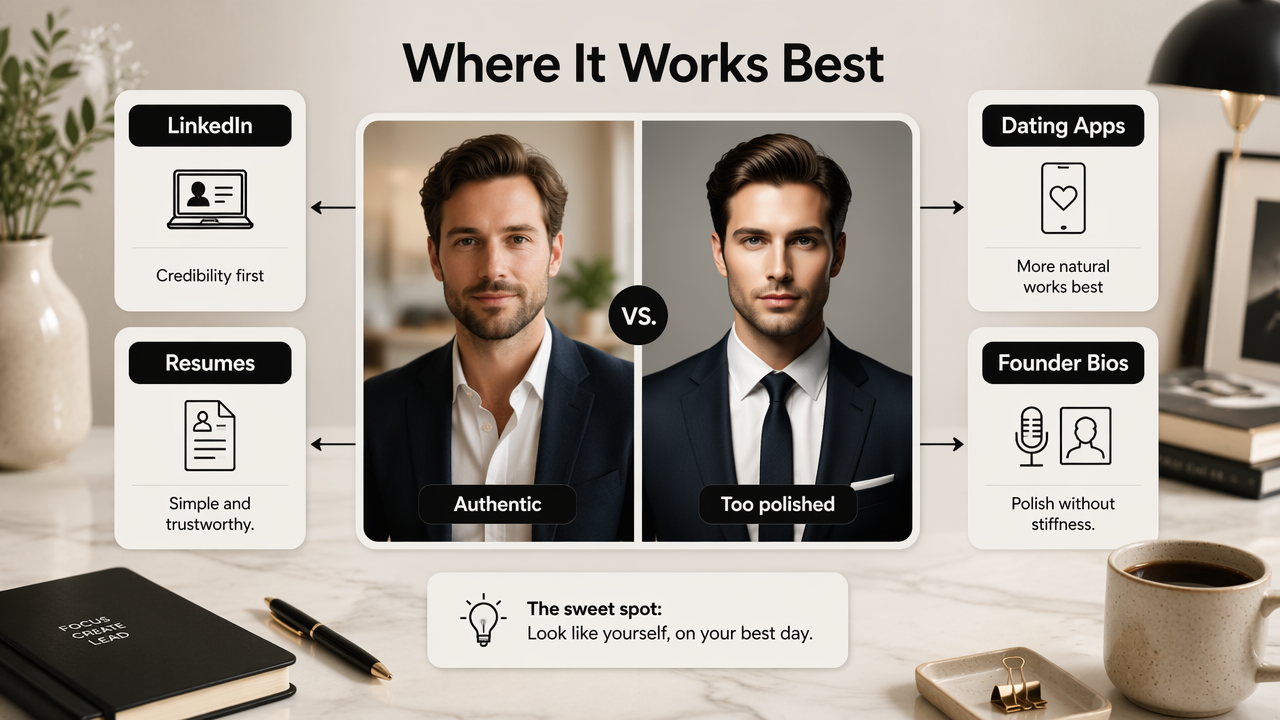
LinkedIn and resume contexts reward credibility. A stiff, over-smoothed image can feel less trustworthy than a simple, well-lit photo. For related guidance on professional profile use, the supporting cluster connects naturally to the broader question of whether an AI headshot belongs on LinkedIn.
Dating apps usually need a more natural look. A headshot generator may produce a flattering portrait, but an edited real photo often feels more candid. Founder bios and speaker pages sit in the middle: polished imagery helps, but likeness and consistency across public profiles matter.
Professionals who post career updates can pair a headshot with branded content, such as a LinkedIn-ready Instagram post design generator, so the profile photo and feed style feel aligned.
Use-case decision table
| Use case | Stronger choice | Why it fits | Watch for |
|---|---|---|---|
| LinkedIn profile | AI headshot generator | Creates polished business options from selfies | Over-formal clothing or altered facial structure |
| Resume photo where allowed | AI photo editor | Keeps the image close to reality | Excess retouching can look artificial |
| Founder bio | AI headshot generator | Provides consistent portraits for websites, press, and decks | Backgrounds should match the brand tone |
| Dating app profile | AI photo editor | Enhances real-life images without replacing personality | Avoid studio-style images that feel staged |
| Freelancer marketplace | Either | Editors refine real work photos; generators create polished headshots | Consistency across platforms |
| Social creator profile | AI headshot generator | Offers multiple styles for thumbnails and banners | Likeness must survive small-screen cropping |
How do quality, control, privacy, and cost trade off?
AI photo editors give more control over a known image, while AI headshot generators give more variety with a higher need for review.
Quality is not just sharpness. A usable professional image must preserve likeness, avoid strange skin texture, keep glasses and hair believable, and match the intended setting. Research on face generation and editing, including the 2024 IEEE survey Face Generation and Editing With StyleGAN: A Survey, shows how advanced face-editing systems have become, but stronger generation also raises the bar for human review.
Multimodal AI systems keep improving across images, text, and long context. The 2024 arXiv paper Gemini 1.5: Unlocking multimodal understanding across millions of tokens of context reflects that broader shift toward models that can reason over richer inputs. For headshots, that means better prompt following and more style consistency, not automatic perfection.
Privacy deserves careful attention. A headshot generator may require multiple face images, while a photo editor may need only one. Synthetic media research, such as the Frontiers survey Audio deepfakes: A survey, focuses on audio, but it highlights a wider concern: identity-like data needs thoughtful handling across AI systems.
- Choose an editor when the original image already has good lighting and expression.
- Choose a generator when no strong professional photo exists.
- Review outputs at full size and thumbnail size.
- Compare the image against current real-world appearance.
- Avoid edits that change age, face shape, eye shape, or skin tone.
A professional image should look like the person on a good day, not like a different person in better lighting.
Practical review checklist
- Check likeness first, before clothing, background, or polish.
- Zoom into eyes, teeth, glasses, earrings, hands, and hairlines.
- Test the crop in LinkedIn, resume, dating, and bio formats.
- Ask whether the image matches the person's industry and role.
- Save a conservative option for formal profiles and a warmer option for social profiles.
- Keep the original file in case future edits need a more accurate base.
How Looktara handles professional image needs
Looktara is most useful when a headshot is part of a larger personal brand system, not a one-off image.
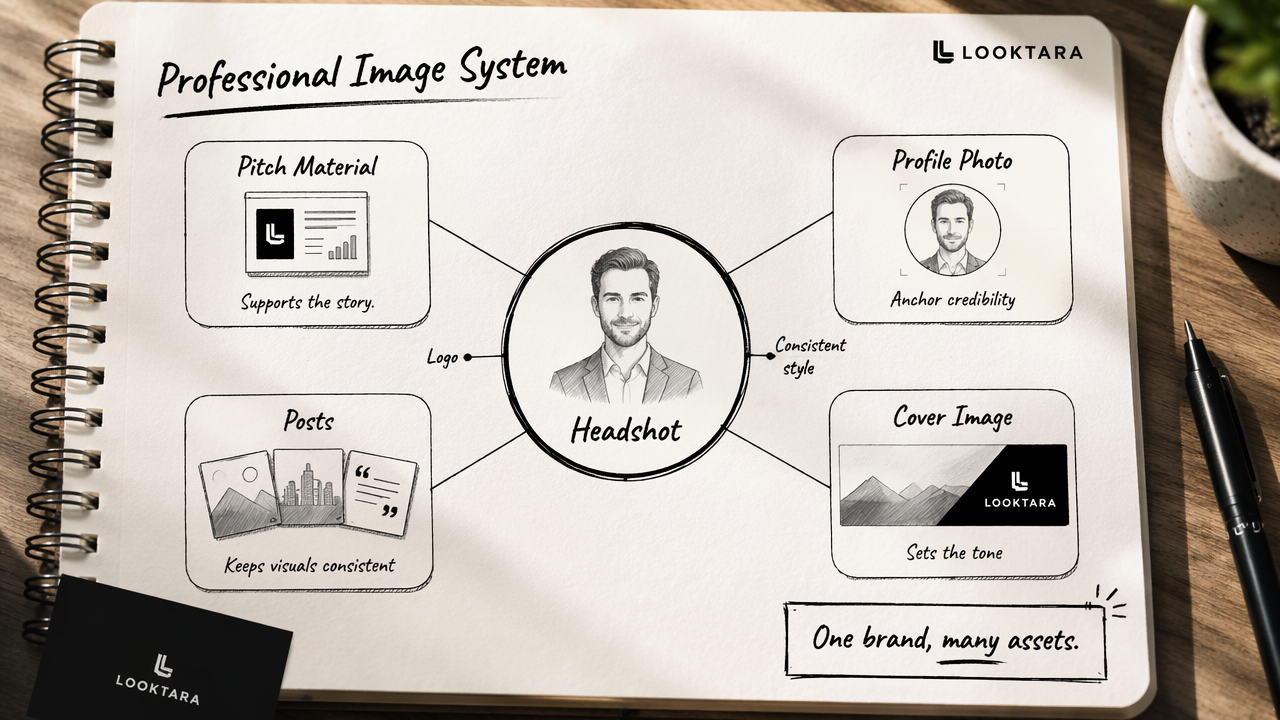
The Looktara platform supports professionals who need visual consistency across profile photos, posts, founder materials, and social assets. A headshot may anchor credibility, but a logo, cover image, profile photo, and pitch material often carry the same brand signal across channels. Entrepreneurs can extend that visual system with a Shopify fitness logo AI generator or a pitch deck slide AI generator when a headshot is only one part of the presentation.
This comparison matters because career images now travel. The same face may appear on LinkedIn, a speaker page, a newsletter bio, a short-form video account, and an investor deck. With Looktara, the practical goal is not maximum AI polish; the goal is a coherent public image that stays recognizable.
For creators, that consistency can extend into launch and content graphics. A headshot style can sit beside a TikTok cover AI generator for Shopify fitness brands, giving the account a cleaner visual rhythm across profile and post surfaces. More options are available on looktara.com for teams that want branded assets beyond portraits.
Who should pick which tool type
| Person or team | Better starting point | Reason |
|---|---|---|
| Job seeker with poor lighting in every selfie | AI headshot generator | Produces several professional options quickly |
| Executive with a strong recent portrait | AI photo editor | Keeps the approved likeness while improving polish |
| Founder preparing a launch | Generator plus brand assets | Supports bio, deck, website, and social consistency |
| Dating app user | Light AI editor | Keeps the image natural and less corporate |
| Creator refreshing social profiles | Generator with content templates | Helps match avatar, covers, and posts |
What should change in 2026 and beyond?
AI-generated professional images will become more realistic, but trust signals will matter more as synthetic media becomes common.
Better models will likely improve hands, hair, teeth, skin texture, glasses, and clothing details. Style control should also improve, making it easier to request a casual founder image, a formal corporate portrait, or a friendly creator avatar without heavy prompting.
The harder change will be social. Recruiters, clients, viewers, and dates may become more skeptical of images that look too polished. The winning profile image in 2026 and 2027 will probably be the one that feels accurate, current, and context-aware.
A balanced workflow works best:
- Start with the intended platform and audience.
- Decide whether the existing photo is strong enough to edit.
- Generate options only when variety or professional styling is needed.
- Keep one natural, realistic image as the primary public photo.
- Build matching brand assets after the headshot direction is set.
The future of AI portraits is not just better generation; it is better judgment about when generation is appropriate.
FAQ: AI photo editor vs AI headshot generator
Is an AI headshot generator better than an AI photo editor for LinkedIn?
An AI headshot generator is often better for LinkedIn when no polished professional photo exists. It can create multiple business-style options from selfies. An AI photo editor is better when a recent, accurate photo already has a good expression, clean framing, and acceptable lighting.
Can an AI photo editor make a selfie look professional?
An AI photo editor can make a selfie look more professional if the original image is already close to usable. Helpful edits include background cleanup, exposure correction, cropping, and light retouching. It cannot fully fix a poor pose, distorted camera angle, harsh lighting, or expression that does not fit a professional setting.
Are AI-generated headshots acceptable for resumes and founder bios?
AI-generated headshots can be acceptable for resumes and founder bios when the image remains accurate and not misleading. The safest choice is a realistic portrait that matches the person's current appearance. Founder bios can use slightly more polished styling, especially when the same visual direction appears across a website, deck, and social profile.
What is the biggest mistake with AI professional photos?
The biggest mistake is choosing the most polished image instead of the most believable one. A headshot that changes facial structure, skin texture, age, or personal style can reduce trust. The best AI-assisted image should look current, recognizable, and suitable for the platform where it appears.
Conclusion
AI photo editor vs AI headshot generator comes down to the starting point: edit a strong real photo, or generate new options when no usable professional image exists. For LinkedIn, founder bios, and creator profiles, the strongest workflow is to choose the most accurate headshot first, then build matching visual assets around it. Looktara can support that next step for professionals who want profile imagery, social graphics, and brand materials to feel consistent. Visit looktara.com, select the asset type that matches the next profile or campaign need, and build a cleaner public presence from one clear visual direction.
Generated by EarlySEO.com