
TL;DR
Retouching is best when the headshot already looks like the person and needs small fixes to skin, hair, teeth, clothing, or background. Regeneration is better when the face, pose, hands, outfit, or overall realism is structurally wrong. The safest workflow is to select the most accurate base image first, then retouch only the parts that do not change identity.
A professional headshot succeeds or fails on recognition, not polish. The debate around AI headshot retouching vs regeneration matters because one approach preserves a good image, while the other creates a new one from the prompt or training photos. A head shot, as commonly defined, is a portrait focused on a person's face for uses such as professional profiles, social media, and dating apps. For career, business, creator, and profile-photo use, Looktara is most useful when image selection starts with likeness and ends with careful finishing.
Table of Contents
What is AI headshot retouching vs regeneration?
AI headshot retouching vs regeneration is the choice between improving an existing AI headshot and creating a new version from scratch. Retouching changes details such as skin texture, stray hairs, teeth, clothing edges, or background cleanup. Regeneration rebuilds the image, which can fix major flaws but may change facial identity.
AI headshot retouching: targeted editing of an existing headshot while preserving the same face, pose, expression, and core composition.
AI headshot regeneration: creating a new headshot variation when the current output has identity, anatomy, pose, lighting, or realism problems that editing cannot reliably repair.
Key insight: retouching improves a believable image; regeneration replaces an unreliable one.
SERP research for this topic shows 36,500,000 results, with competitors often framing the issue as "AI generation doesn't retouch, it fabricates." That distinction is useful but incomplete. The practical question is not whether generation is good or bad. The better question is whether the current image has a correct foundation.
Core terms for quick evaluation
| Term | Plain meaning | Best use |
|---|---|---|
| Likeness | The image looks recognizably like the person | Required before any edit |
| Retouching | Small corrections to a chosen image | Skin, teeth, hair, fabric, background |
| Regeneration | A new generated version | Wrong face, odd pose, broken realism |
| Over-editing | Smoothing or reshaping that changes identity | Avoid for LinkedIn, resumes, and hiring |
| Realism | The image feels photographic, not synthetic | Needed for trust-heavy profiles |
For LinkedIn and resume use, the strongest starting point is a believable headshot with minimal identity drift. A dedicated LinkedIn resume headshot generator can help narrow the use case before final retouching decisions begin.
When should an AI headshot be retouched?
An AI headshot should be retouched when the face is accurate, the pose is natural, and the image only needs surface-level improvements. Retouching works well for minor shine, stray hair, small clothing wrinkles, uneven backgrounds, teeth cleanup, and subtle color correction. It should not reshape facial structure or invent missing anatomy.
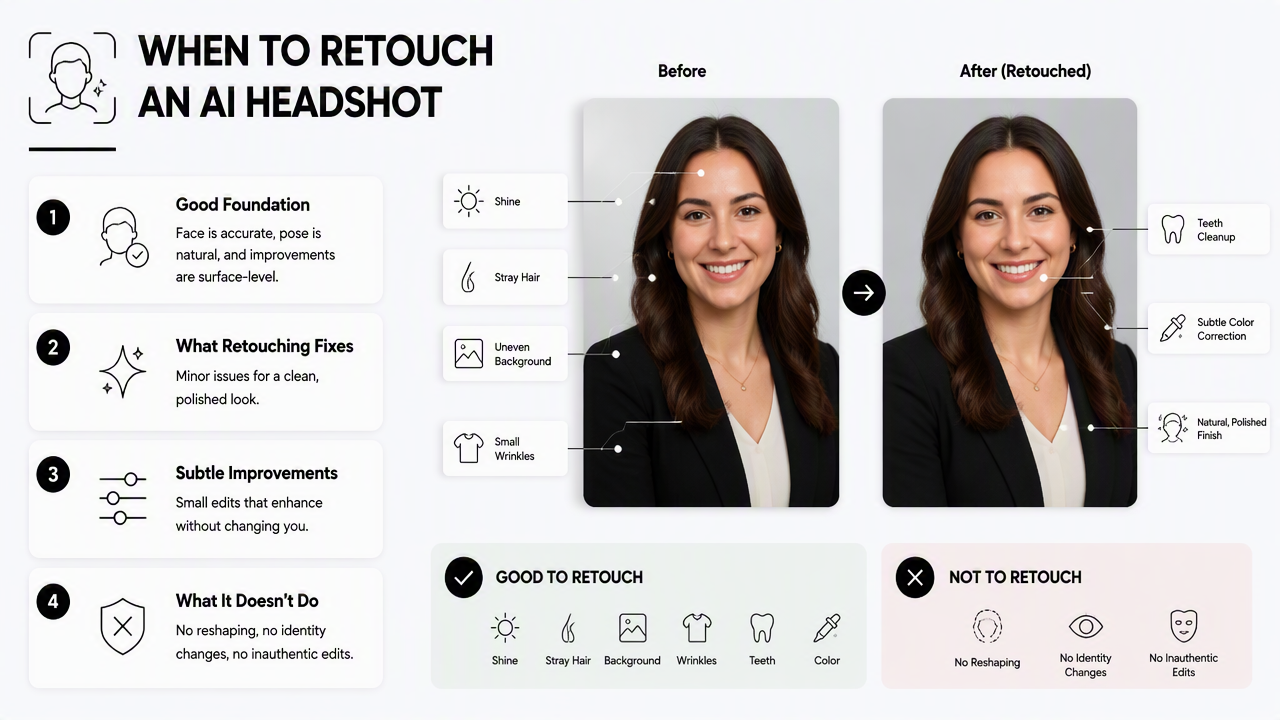
Retouching is usually the right call when the viewer's first reaction is "good photo, needs cleanup." The original image must already pass the trust test. If a hiring manager, client, audience member, or match would recognize the person in real life, retouching can polish the result without creating doubt.
Retouching works best for small visible distractions
- Skin: reduce temporary blemishes, shine, or under-eye darkness while keeping texture.
- Hair: remove flyaways that cross the face or collar.
- Teeth: brighten slightly, fix small discoloration, and avoid unnaturally white results.
- Clothing: clean lint, smooth tiny wrinkles, and sharpen collar edges.
- Background: remove spots, harsh shadows, or color casts.
- Cropping: align the face and shoulders for LinkedIn, resume, website, or dating profile formats.
A good rule is simple: retouch what a photographer would fix after a normal shoot. Do not retouch features that define identity, such as jaw shape, eye spacing, nose structure, smile line, or age level. Those edits may create a more polished image but a less trustworthy one.
Retouching is strongest for professional brand consistency
Entrepreneurs, freelancers, and creators often need a consistent look across newsletters, storefronts, and social profiles. In those cases, a subtle edit can match color, crop, and background style without replacing the person's appearance.
For brand-led profile images, the newsletter resume headshot generator fits cases where a clear, editorial-style portrait needs to support author bios, email headers, or expert positioning. The Looktara platform can then fit into a workflow where selection, realism checks, and light polishing happen in that order.
When should an AI headshot be regenerated?
An AI headshot should be regenerated when the underlying image is wrong, not merely imperfect. Regeneration is the better choice when the face does not match, hands look distorted, hair blends into clothing, teeth appear artificial, clothing is impossible, or the whole image feels synthetic. Editing cannot safely fix a broken base.
A flawed generated image may look impressive at thumbnail size and fail at full size. That gap matters in 2026 because headshots travel across LinkedIn, resumes, websites, online stores, dating apps, newsletters, and video call profiles. Small realism errors can signal low effort or reduce trust.
Red flags that call for a fresh generation
- Face mismatch: the person looks related to the source photos but not identical.
- Uneven eyes: pupils, eyelids, or gaze direction do not align.
- Plastic skin: texture looks airbrushed beyond normal retouching.
- Broken hands: fingers are fused, extra, missing, or oddly posed.
- Strange teeth: teeth form a flat strip, repeated pattern, or warped smile.
- Hair artifacts: hair melts into the background, ear, neck, or jacket.
- Impossible clothing: collars, buttons, seams, or lapels do not make physical sense.
- Fake lighting: face, neck, and background have conflicting light directions.
A bad base image rarely becomes a great headshot through editing; it usually becomes a cleaner bad headshot.
Regeneration gives the system another chance to solve anatomy, identity, styling, and photographic consistency together. That matters more than saving an image that fails the first impression test.
Regeneration is not the same as more polish
Regeneration can produce a stronger output, but it can also introduce new problems. The process should be treated as a new candidate image, not a guaranteed upgrade. Each new result needs the same checks for likeness, realism, professional fit, and context.
For ecommerce founders or operators who need a confident founder photo, brand card, or professional storefront identity, a Shopify resume headshot generator can help steer the image style toward business use rather than casual social imagery.
Which headshot issues need retouching or regeneration?
Most headshot problems can be sorted by severity: minor surface distractions should be retouched, while identity, anatomy, physics, and realism failures should be regenerated. The decision gets easier when each visual issue is judged separately rather than treated as one broad "edit or redo" choice.
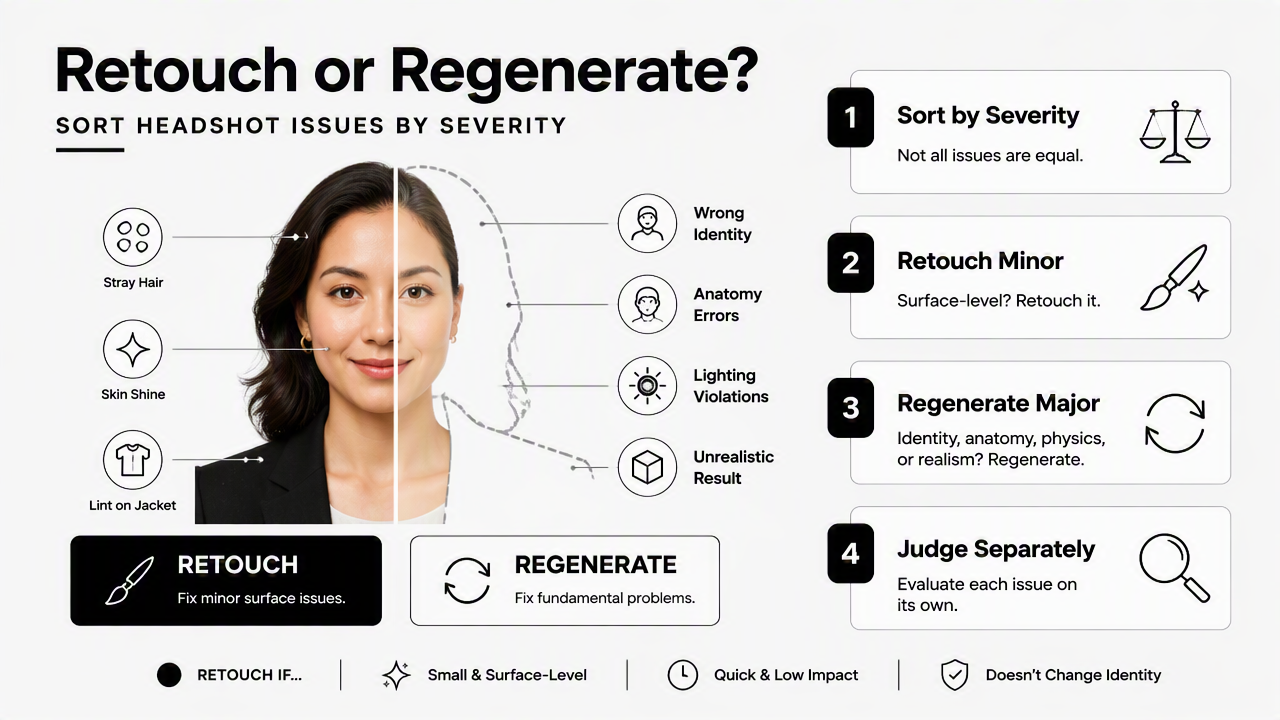
Quick decision table for common AI headshot flaws
| Issue | Retouch if... | Regenerate if... | Practical note |
|---|---|---|---|
| Face accuracy | The person is clearly recognizable | Facial structure, age, or expression feels wrong | Likeness comes before beauty |
| Hands | Hands are cropped out or only need slight cleanup | Fingers are fused, extra, or unnatural | Bad hands distract immediately |
| Hair | A few flyaways or edge artifacts appear | Hair melts into skin, ear, collar, or background | Hair errors often reveal AI use |
| Teeth | Slight whitening or cleanup is needed | Teeth are warped, duplicated, or too uniform | Avoid a "perfect strip" smile |
| Clothing | Wrinkles, lint, or collar edges need polish | Seams, buttons, lapels, or logos are impossible | Clothing must obey real-world structure |
| Background | Minor marks, blur, or color cleanup is needed | Lighting, depth, or perspective feels fake | Background should support, not star |
| Skin | Texture needs gentle evening | Skin looks waxy, plastic, or age-inaccurate | Preserve pores and natural tone |
| Overall realism | The photo passes at full size with small flaws | The image feels synthetic after two seconds | Trust beats novelty |
The table also helps prevent over-correction. A slightly imperfect but accurate image often performs better than a highly polished portrait that feels unfamiliar. For hiring and business contexts, authenticity carries more weight than studio perfection.
Looktara fits this decision model by encouraging a use-case-first mindset: select an accurate base image, check key features, then polish only what supports the final purpose. For direct access, head to looktara.com and choose the profile context before evaluating final images.
How to choose the best workflow in 2026
The best 2026 workflow is to generate several realistic candidates, reject identity or anatomy failures, retouch the strongest image lightly, and export versions for each platform. This avoids the two common mistakes: accepting a fake-looking image too quickly or over-editing a believable one until it loses trust.
A reliable five-step workflow
- Start with purpose: define whether the image is for LinkedIn, resume, founder bio, creator profile, dating app, or newsletter.
- Check likeness first: compare the face to current, clear reference photos.
- Inspect realism at full size: zoom into eyes, hair, teeth, hands, clothing, and background.
- Choose retouching or regeneration: use severity, not personal preference, as the deciding factor.
- Export platform-specific versions: crop and color-check for square, vertical, and resume-friendly layouts.
The current direction is clear: AI headshots are moving from novelty to quality control. Competitor content from 2026 already shows a backlash against careless AI headshots, especially where fabricated details reduce trust. The next stage is less about making every image look flawless and more about proving that the person, profession, and setting make sense together.
What to expect in 2027
By 2027, stronger identity preservation and built-in quality checks will likely become standard expectations for AI profile imagery. The biggest improvement will not be smoother skin or flashier backgrounds. It will be better rejection of outputs with weak likeness, distorted anatomy, or overdone styling.
That shift favors workflows that combine generation with judgment. A realistic image still needs human review because professional identity is contextual. A headshot for a remote software role, a fitness founder, a Shopify store owner, and a dating profile should not share the same pose, wardrobe, or level of polish.
FAQ
Is retouching better than regenerating an AI headshot?
Retouching is better when the image already looks accurate and only needs small improvements. Regeneration is better when the face, hands, clothing, or realism is fundamentally wrong. The best choice depends on the flaw, not on which method sounds more advanced.
Can AI retouching fix a face that does not look like the person?
AI retouching should not be used to fix a face that lacks likeness. Small edits can improve lighting, skin, or grooming details, but they cannot safely restore identity if the generated face is structurally wrong. A new generation is the safer option.
Are hands always a reason to regenerate a headshot?
Hands are not always a problem if they are cropped out or only partly visible. Regeneration is usually needed when fingers look fused, repeated, missing, or physically impossible. For professional headshots, cropping hands out often creates a cleaner and more reliable image.
How much retouching is too much for LinkedIn or resumes?
Retouching goes too far when it changes age, facial shape, skin texture, eye size, or expression. LinkedIn and resume images should look polished but still recognizable in a real interview or video call. Natural texture and accurate features are safer than glossy perfection.
Conclusion
The smartest answer to AI headshot retouching vs regeneration is a quality-control rule: retouch believable images and regenerate broken ones. Face accuracy, anatomy, lighting, clothing, and realism should decide the workflow before any polish is added. For the next step, compare the strongest generated options at full size, reject anything that feels synthetic, then use Looktara to create a profile-ready image that fits the intended platform. Visit looktara.com when a fresh, professional headshot is ready for selection and finishing.
Generated by EarlySEO.com