
TL;DR
A recruiter-ready AI headshot should look accurate, current, and aligned with the target role, not overly polished or artificial. The strongest results use a clear face crop, natural expression, simple background contrast, and visual consistency across LinkedIn posts, resumes, and founder or creator assets.
Recruiters often make quick credibility judgments before reading a full profile, so an AI headshot generator for LinkedIn recruiters to notice you should improve trust without making the person look synthetic. AI headshot generator: a tool that turns uploaded selfies or portraits into polished professional images using artificial intelligence, often with studio-style lighting, background changes, and outfit variations. Looktara helps professionals create brand-ready visuals, and the same visual discipline also applies to LinkedIn profile photos, posts, and supporting career assets. For broader LinkedIn content consistency, career-focused creators can pair a strong headshot with a polished LinkedIn post AI generator.
Table of Contents
What makes an AI headshot recruiter-ready?
A recruiter-ready AI headshot is accurate, professional, current, and easy to recognize at small LinkedIn sizes. It should show the face clearly, use clean lighting, avoid distracting edits, and match the seniority, industry, and communication style suggested by the profile headline.
LinkedIn is a business and employment-oriented social networking service used for professional networking and career development. That context matters: a profile photo is not a fashion portrait, dating app image, or creator thumbnail. It is a trust signal attached to a candidate, founder, freelancer, or consultant.
A strong LinkedIn headshot does not need to look expensive. It needs to look believable, current, and aligned with the role being pursued.
SERP research for this topic found 139 results and competitor articles averaging 1,896 words, with many focusing on tool rankings rather than recruiter visibility. The stronger angle in 2026 is not "which tool makes the glossiest image," but "which image helps a recruiter understand professional fit faster."
A useful AI-generated headshot should pass three tests:
- Recognition: the person would be recognizable in a video interview or office setting.
- Relevance: clothing, expression, and background suit the target industry.
- Credibility: edits do not distort facial structure, skin texture, age, or identity.
Looktara fits best when a professional wants the headshot to work as part of a broader brand system, not as an isolated photo. Consistent colors, tone, and image style can support LinkedIn posts, founder updates, sales pages, and social content without making every asset look identical.
How should a LinkedIn AI headshot be cropped, lit, and styled?
A LinkedIn AI headshot should use a close crop from the chest or shoulders upward, balanced lighting, natural eye contact, and a simple background that creates contrast with the face and clothing. The goal is instant clarity in a small circular profile frame.
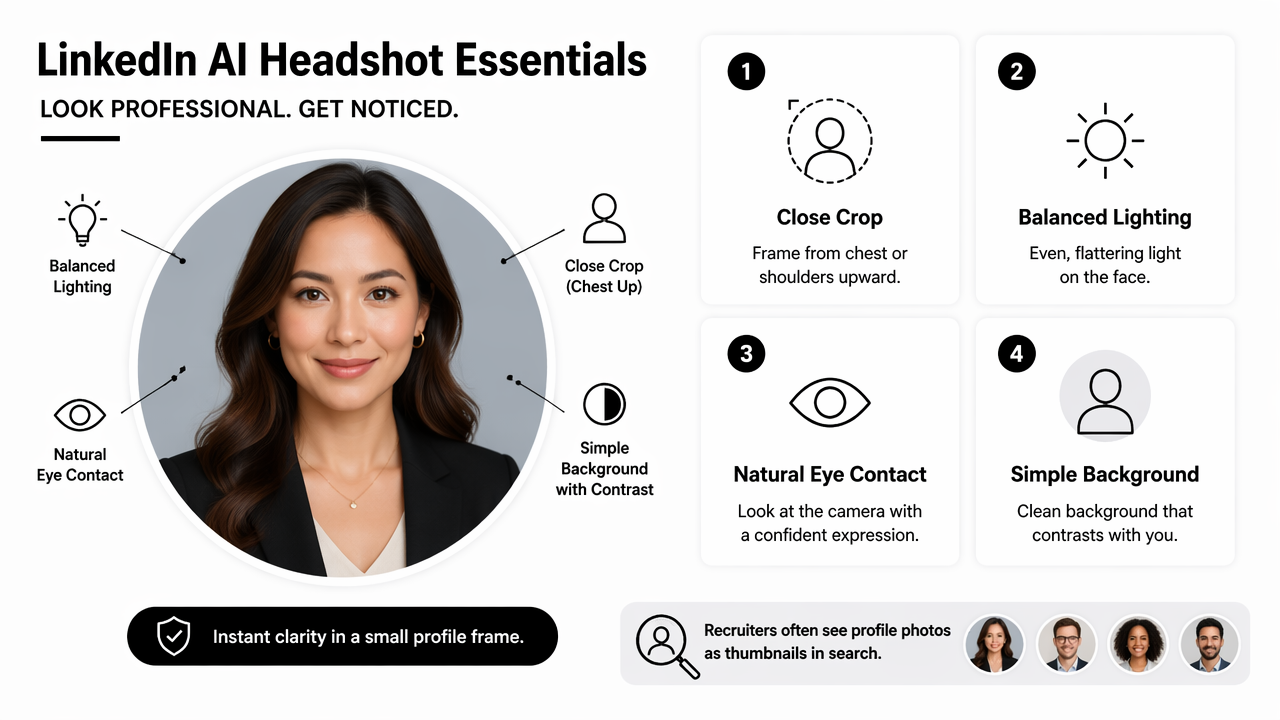
Recruiters often see profile photos as thumbnails in search results, messaging threads, comments, and applicant lists. Tiny-photo performance matters more than cinematic detail.
Recruiter-ready headshot specifications
| Element | Best practice | Why it helps recruiters |
|---|---|---|
| Crop | Head and shoulders, face centered | Keeps identity clear in small previews |
| Expression | Calm, approachable, lightly confident | Signals professionalism without stiffness |
| Background | Plain, soft office, muted color, or subtle gradient | Reduces visual noise around the face |
| Lighting | Even front lighting with gentle shadows | Makes features readable and realistic |
| Clothing | Role-appropriate top layer | Matches expected seniority and industry norms |
| Contrast | Face and outfit separated from background | Prevents the photo from blending into LinkedIn UI |
The strongest crop usually leaves a small amount of space above the head and keeps the eyes near the upper third of the image. A photo cropped too far back loses impact, while an extreme close-up can feel intense or informal.
Color contrast deserves more attention than most AI headshot guides give it. Dark hair against a dark background, white shirts against pale backgrounds, or busy office scenes can reduce visibility. A mid-tone background often works well because it frames the face without stealing attention.
Role seniority cues that should change the image
- Entry-level or career switcher: friendly expression, neat styling, accessible background.
- Manager or team lead: confident posture, structured clothing, calm expression.
- Executive or founder: sharper wardrobe, cleaner background, stronger lighting control.
- Creative or creator: more personality in color, outfit, or backdrop, while keeping facial clarity.
- Freelancer or consultant: polished but approachable image that supports trust and direct outreach.
For professionals who publish visual content beyond LinkedIn, supporting assets should share the same tone. A consistent image system can extend into a quote post AI generator for thought leadership snippets or a YouTube thumbnail AI generator for career videos and expert commentary.
How can an AI headshot generator for LinkedIn recruiters to notice you avoid fake-looking results?
An AI headshot generator for LinkedIn recruiters to notice you should preserve identity first and polish second. The safest workflow is to upload clear source images, choose realistic styles, reject distorted outputs, and compare the final image against recent real photos before posting.
AI headshots can look impressive at first glance yet fail the credibility test. Common weak spots include waxy skin, mismatched teeth, unusual hands near the face, warped glasses, over-smoothed jawlines, and clothing that looks pasted on. A recruiter may not analyze the image deeply, but visual mismatch can still create doubt.
Quality-control checklist before uploading
- Use recent source photos: current hair, facial hair, eyewear, and general appearance matter.
- Upload varied angles: front-facing and slight-angle images help the generator model the face more accurately.
- Avoid heavy filters: beautified selfies can teach the model the wrong facial texture.
- Select realistic outfits: choose clothing likely to appear in an interview or professional meeting.
- Inspect facial details: check eyes, teeth, ears, hairline, glasses, and skin texture.
- Test the thumbnail: view the photo as a small circle before publishing.
- Ask for fit feedback: a colleague can judge whether the image still looks like the person.
A practical rule: if the photo would make a video interview feel surprising, it is too edited. LinkedIn credibility depends on continuity between profile, messages, interviews, and public activity.
Tools such as Canva and Fotor appear in the broader AI image and photo-editing market. Wikipedia describes Fotor as online photo editing software developed by Chengdu Everimaging Science and Technology Co., Ltd., launched in 2012. These editors can help with general image polish, but recruiter-focused headshots require stricter judgment around identity accuracy.
The best AI headshot is not the most dramatic transformation. It is the one that makes the profile easier to trust.
How should the headshot fit the full LinkedIn profile?
A LinkedIn headshot should match the profile headline, banner, featured content, posts, and target role so the recruiter sees one coherent professional story. The image attracts attention, but consistency across the page keeps that attention from turning into confusion.
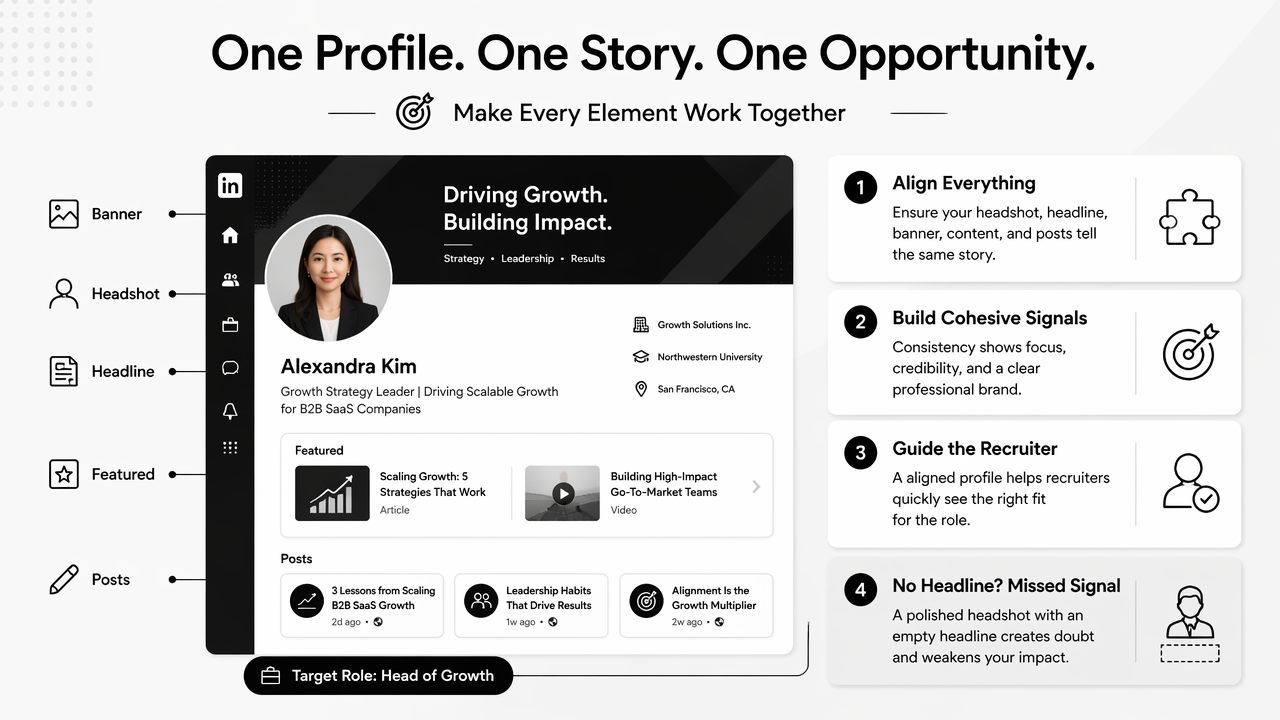
A polished headshot paired with an empty headline, outdated experience, or unrelated banner feels incomplete. Recruiter visibility comes from the full profile package: photo, role keywords, proof of work, recent activity, and clear positioning.
Profile alignment map
| LinkedIn profile area | What it should signal | Image connection |
|---|---|---|
| Headshot | Trust, identity, approachability | Clear face, current appearance |
| Headline | Target role and specialty | Styling should match role level |
| Banner | Industry or value proposition | Colors should not clash with photo |
| About section | Professional narrative | Tone should match expression and seniority |
| Featured section | Proof of work | Visual style should feel consistent |
| Recent posts | Active expertise | Headshot should support the author brand |
Entrepreneurs, consultants, and creators should treat the LinkedIn headshot as one part of a public brand kit. A founder raising capital may need a sharper image than a creator building community. A job seeker targeting operations roles may benefit from calm clarity rather than high-fashion styling.
Looktara can support that broader visual system by helping professionals keep visual assets aligned across channels. For example, a founder can use a headshot style alongside a pitch deck slide AI generator, while a creator can adapt the same visual direction for short-form channels through a TikTok cover AI generator.
The profile photo should also match the way the person communicates in posts. A warm, approachable image pairs well with advice-led posts. A formal executive portrait pairs better with board updates, strategic commentary, or hiring announcements. Neither style is universally better; the target audience decides the fit.
For teams and solo professionals, looktara.com is useful as a place to think beyond one profile photo and build supporting visuals that reinforce recognition across LinkedIn and other channels.
What should job seekers expect from AI headshots in 2027?
AI headshots in 2027 will likely become more identity-aware, more platform-specific, and more integrated with personal brand workflows. The winning images will still depend on human judgment because recruiters reward clarity and trust, not automation for its own sake.
The 2026 SERP already shows strong competition among AI headshot tools, including free generators, designer reviews, and large comparison posts. That competition will push tools toward faster outputs, more realistic lighting, and better role-based presets. Still, the professional standard will remain conservative: accurate face, appropriate styling, and honest representation.
Practical 2027 preparation checklist
- Keep a folder of recent source photos with different lighting and angles.
- Refresh the LinkedIn headshot after major appearance, role, or industry changes.
- Match image style to the next target role, not only the current role.
- Use the same visual direction across LinkedIn, speaker bios, resumes, and portfolio pages.
- Review AI outputs for accuracy before considering polish or creativity.
Personal branding will also spread across more surfaces. Recruiters and clients may see a LinkedIn comment, X post, video thumbnail, or ad creative before visiting the profile. Visual consistency can help recognition across those moments, especially for freelancers, creators, and business owners. A supporting X post AI generator can keep short-form professional content aligned with the same identity signals.
The strongest recommendation for 2026 and beyond is simple: create a headshot that makes a recruiter comfortable opening the profile, then make the rest of the profile worth reading. An AI headshot can earn the glance, but proof of skill earns the message.
FAQ
Can an AI-generated headshot be used on LinkedIn?
An AI-generated headshot can be used on LinkedIn when it accurately represents the person and looks professional. The image should not distort age, facial features, hairstyle, or identity. A realistic output with clear lighting and role-appropriate styling is safer than a highly edited image that looks unlike the person in interviews.
What background works best for a LinkedIn recruiter-facing photo?
A simple background usually works best for recruiter-facing LinkedIn photos. Soft gray, muted blue, warm beige, clean office, or subtle gradient backgrounds keep attention on the face. Strong patterns, cluttered rooms, and low-contrast backgrounds can make the profile photo harder to read in small circular previews.
Should a LinkedIn headshot look formal or friendly?
A LinkedIn headshot should look both professional and approachable, with the balance set by the target role. Senior executives may need a more structured look, while creators, freelancers, and customer-facing professionals may benefit from a warmer expression. The best choice matches industry expectations and communication style.
How often should a LinkedIn profile photo be updated?
A LinkedIn profile photo should be updated when appearance, target role, or professional positioning changes. A new haircut, glasses, seniority shift, industry move, or founder rebrand can justify a refresh. The photo should match the person a recruiter, client, or hiring manager would meet on a video call.
Conclusion
A strong AI headshot generator for LinkedIn recruiters to notice you should create a photo that is clear, current, and role-aligned, not merely polished. The next step is practical: choose recent source photos, generate several realistic options, test each one as a small LinkedIn circle, and select the image that best supports the target role. For professionals building a wider visual presence, Looktara can help connect the headshot with posts, slides, thumbnails, and social assets. Visit looktara.com to create career-ready visuals that make the profile easier to recognize and trust.
Generated by EarlySEO.com