
TL;DR
A creator media kit needs more than one polished portrait. The strongest set includes a professional headshot, lifestyle image, neutral press photo, brand-safe option, square avatar, and high-resolution download package for sponsors, podcasts, press, and social platforms.
A sponsor can decide whether a creator looks brand-ready before reading the rate card. An AI headshot generator for creators media kit helps turn existing selfies into a polished visual set for pitches, podcast bookings, affiliate campaigns, and press features. Looktara fits this need when creators want consistent professional imagery without booking a studio session for every new campaign. For creators also building branded assets beyond headshots, related visuals such as a website hero image can keep a media kit and landing page aligned.
AI headshot generator: a software tool that uses artificial intelligence to create professional-looking portrait images from uploaded photos, often adjusting lighting, background, wardrobe style, and composition.
Table of Contents
What is an AI headshot generator for creators media kit?
An AI headshot generator for creators media kit is a tool that creates media-ready portrait images from selfies or casual photos, usually for sponsor decks, press pages, social profiles, and partnership pitches. The best outputs look consistent, brand-safe, high-resolution, and usable across square, vertical, and horizontal placements.
Search results for this topic are crowded with general "free headshot generator" pages from tools such as Canva and broad rankings that test many AI portrait apps. Those pages often cover speed, realism, and price, but they rarely answer the creator-specific question: which exact photos belong inside a media kit.
Key insight: A creator does not need 50 headshots for a media kit. A creator needs 5 to 8 strategic images that help a brand, editor, or producer use the creator's likeness without extra back-and-forth.
Core media-kit image terms
Headshot: a clear portrait focused on the face, usually cropped from chest or shoulders upward.
Lifestyle portrait: a polished image showing personality, niche, or work context, such as a fitness creator in activewear or a podcaster near a microphone.
Press image: a neutral, high-quality portrait that a journalist, event team, or podcast producer can use without heavy editing.
Brand-safe image: a portrait with modest styling, clean background, and no distracting logos, claims, alcohol, politics, or risky visual signals.
Square avatar: a 1:1 crop designed for Instagram, TikTok, LinkedIn, YouTube, X, podcast directories, and community platforms.
Which photos belong in a creator media kit?
A creator media kit should include a professional headshot, lifestyle portrait, neutral press image, brand-safe image, square avatar, and high-resolution downloadable files. Each photo serves a different job, so one attractive image cannot replace the full set needed for sponsorships, PR, speaking, and platform profiles.
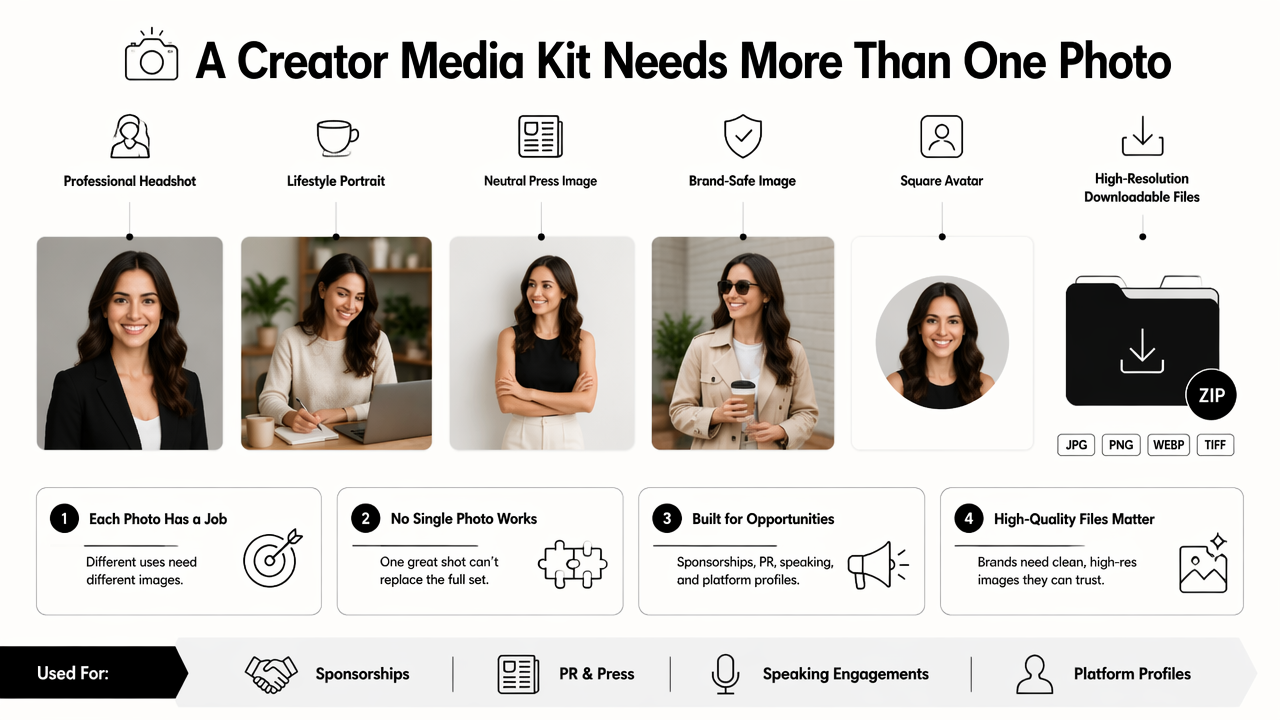
Creators often over-focus on the "best" image. Brand partners usually need the most usable image. A clean headshot may win a LinkedIn placement, while a lifestyle portrait may work better on a campaign recap slide.
The same visual system can extend across creator channels. For example, a creator who updates a profile image may also need a matching LinkedIn post visual for announcements or a sponsor collaboration.
Media-kit photo checklist
| Media-kit photo | Best use | Recommended format | What makes it work |
|---|---|---|---|
| Professional headshot | Pitch decks, speaker bios, LinkedIn | JPG and PNG, vertical crop | Clear face, even light, simple wardrobe |
| Lifestyle portrait | Brand partnerships, social proof | JPG, 4:5 or 3:4 crop | Shows niche, setting, or creator personality |
| Neutral press image | Articles, podcasts, event pages | High-res JPG | Clean background, minimal styling, easy cropping |
| Brand-safe image | Sponsor decks, paid campaigns | JPG and PNG | No risky props, slogans, or distracting logos |
| Square avatar | Social profiles, community pages | 1:1 JPG or PNG | Face centered, readable at small size |
| High-resolution download | PR folders, partner handoff | 2000 px or wider when possible | Sharp image with naming and usage notes |
Brand partnership checklist
A creator media kit should help a sponsor say yes quickly. The photo section should remove uncertainty about usage, quality, and fit.
- Include 5 to 8 final images, not a giant gallery.
- Add one image that matches each major content niche.
- Label files clearly, such as
name-headshot-light-bg.jpg. - Provide square, vertical, and horizontal crop options.
- Avoid heavy filters that change facial features.
- Keep one conservative image for corporate partners.
- Include high-resolution downloads in a shared folder.
- Refresh visuals after major hairstyle, branding, or niche changes.
How should creators use AI headshots in a media kit?
Creators should use AI headshots by selecting strong source photos, defining the needed media-kit roles, generating several styles, choosing realistic outputs, exporting platform-ready crops, and storing approved files in a labeled download folder. The process works best when the goal is consistency, not a completely different appearance.
A media kit usually travels through many hands: talent managers, agency coordinators, podcast producers, brand leads, editors, and assistants. Consistent images make that handoff cleaner. The portrait should look like the same person across a sponsorship PDF, a creator landing page, and a podcast cover.
Six-step workflow for media-kit images
- Choose source photos with natural expression. Clear selfies with good lighting usually work better than blurry event photos.
- Define the image roles first. Headshot, lifestyle, press, avatar, and brand-safe images should be separate outputs.
- Generate several background styles. Light gray, warm studio, office, outdoor, and niche-specific looks give partners options.
- Reject unrealistic edits. Strange hands, distorted jewelry, uneven eyes, or plastic skin reduce trust.
- Crop for real placements. Export 1:1, 4:5, 16:9, and vertical bio-card versions when needed.
- Build a download folder. Include file names, short usage notes, and a current media kit PDF.
Key insight: AI portraits work best as a production shortcut, not as a disguise. The strongest creator images still look recognizable, current, and easy for a partner to place in a campaign.
Where Looktara fits in the workflow
The Looktara platform is useful when creators want branded visual assets that sit beside portraits, such as social graphics, pitch visuals, and campaign-ready thumbnails. A media kit often needs more than a headshot page, so matching imagery across channels can make the full package feel intentional.
Creators preparing sponsorship outreach can pair portraits with a pitch deck slide or a matching podcast cover concept. For brand recall, looktara.com is the place to review related generator options.
How do AI headshots compare with studio photos and free tools?
AI headshots, studio photography, and free design tools solve different creator media-kit problems. AI is usually best for fast variety and consistent branded looks, a studio shoot is strongest for fully controlled original photography, and free tools are useful for simple edits or lightweight profile updates.
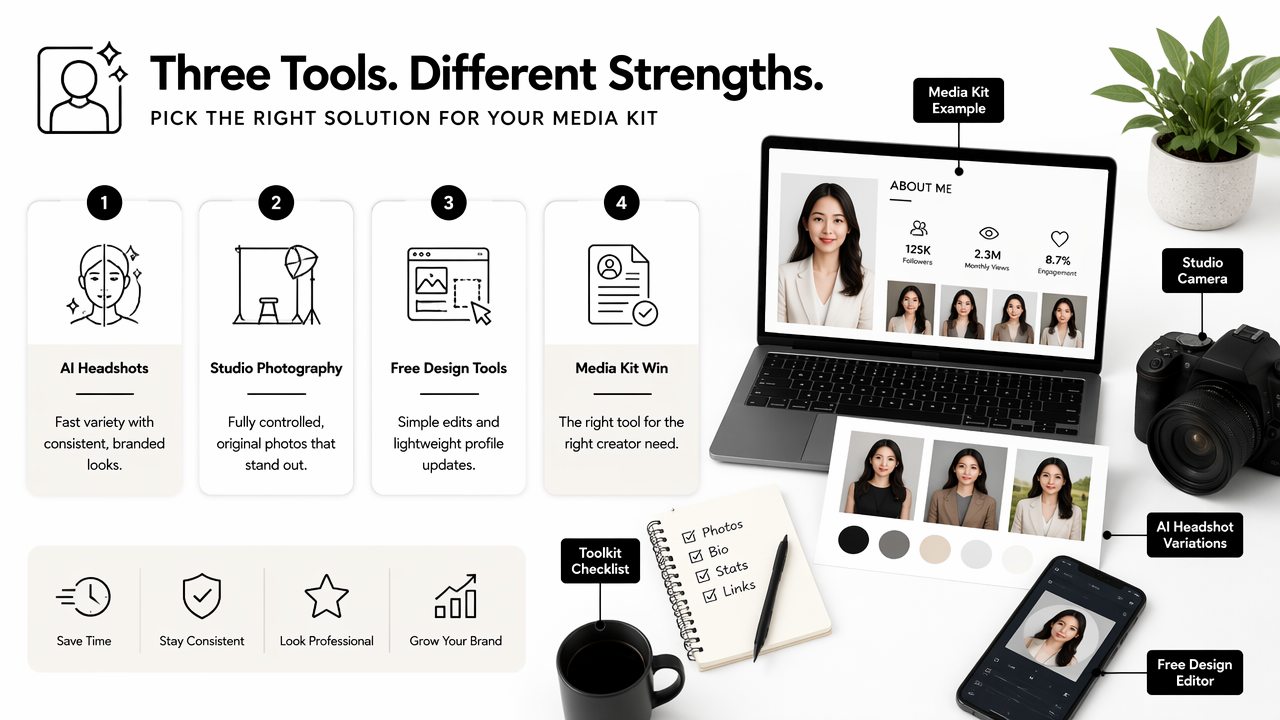
General AI headshot SERPs often lead with broad claims such as "studio-quality" or "free professional headshots." Those claims can be helpful, but creator media kits need a stricter test: whether the final images can survive sponsor review, press use, and small-size social cropping.
Media-kit photo options compared
| Option | Best fit | Strength | Tradeoff |
|---|---|---|---|
| AI headshot generator | Creators needing fast media-kit refreshes | Many styles and crops from existing photos | Requires careful review for realism |
| Studio photographer | Creators with budget and planned brand shoot | True original photos with full direction | Slower scheduling and higher cost |
| Free design editor | Simple profile polish or background cleanup | Easy access and fast edits | Less tailored to full media-kit systems |
| Smartphone self-shoot | Authentic social-first imagery | Natural and current | Lighting, framing, and quality vary |
| Hybrid workflow | Serious creators and founders | Studio hero images plus AI variations | Needs stronger organization |
The best choice depends on urgency and brand stakes. A creator launching a new sponsorship page may start with AI headshots, then commission a studio session later for hero campaign photography. A founder-creator raising capital may prefer studio photos for the main press image and AI-assisted crops for social channels.
Who should pick which option
- Creators with weekly brand pitches: AI headshots offer quick refreshes and flexible background styles.
- Entrepreneurs preparing major press: studio photography can provide the most controlled hero image.
- Remote workers and freelancers: AI portraits can update LinkedIn, resumes, and booking pages quickly.
- Influencers with strong niche visuals: a hybrid workflow can combine authentic lifestyle shots with polished headshots.
- Dating app users: natural, lightly polished portraits usually feel more trustworthy than overly corporate images.
What should creators expect from media-kit visuals in 2027?
Creator media-kit visuals in 2027 will likely become more modular, with one approved image set feeding sponsor decks, profile pages, newsletter bios, podcast artwork, short-form thumbnails, and press folders. The winning standard will be recognizable consistency across channels, not a single perfect portrait.
Brands already review creators across many surfaces. A sponsor may see a TikTok avatar, LinkedIn bio, media kit PDF, podcast guest page, and past campaign thumbnail before approving a deal. That means portraits must match the wider content identity.
Short-form video will also shape headshot choices. A creator's profile image needs to read clearly beside thumbnails, captions, and vertical video covers. A matching YouTube thumbnail image can help keep the creator's face, colors, and niche cues consistent across discovery surfaces.
2027-ready media-kit standards
- Store approved images in one cloud folder with dated file names.
- Keep one conservative press image for mainstream partners.
- Maintain one expressive creator-first image for social campaigns.
- Match colors and backgrounds to the creator's website and pitch deck.
- Replace outdated portraits when appearance, niche, or audience positioning changes.
- Track which photo versions sponsors actually use.
Looktara can support this broader visual system when creators need campaign assets beyond portraits. A headshot may open the door, but the surrounding graphics often help a media kit feel ready for a paid collaboration.
Frequently asked questions
How many AI headshots should a creator include in a media kit?
A creator media kit should usually include 5 to 8 final images. That range gives partners enough choice without creating decision fatigue. The set should include a headshot, lifestyle portrait, neutral press image, brand-safe image, square avatar, and high-resolution download options.
Are AI headshots acceptable for brand partnerships?
AI headshots are acceptable for many brand partnerships when they look realistic, current, and consistent with the creator's public presence. Sponsors care about usability and trust. Over-edited portraits, inaccurate facial features, or fantasy styling can weaken confidence and should be removed from the final kit.
What file types work best for media-kit headshots?
JPG works well for most media-kit PDFs, websites, and press pages. PNG is useful when a transparent or cleaner graphic treatment is needed. A creator should also keep high-resolution originals in a download folder so partners can crop images for articles, ads, and event listings.
How often should creator headshots be updated?
Creator headshots should be updated after a major appearance change, rebrand, niche shift, or audience repositioning. Many active creators refresh key visuals at least once per year so sponsor decks, social profiles, and press images do not feel disconnected from current content.
Conclusion
A strong creator media kit treats portraits as business assets, not decoration. The practical next step is simple: build one approved image set with a professional headshot, lifestyle portrait, neutral press image, brand-safe version, square avatar, and high-resolution download folder.
For creators ready to create a cleaner visual package, an AI headshot generator for creators media kit can speed up the first draft, while supporting assets make the full kit feel sponsor-ready. Visit looktara.com, choose the most relevant visual generator, and assemble a media-kit image folder before the next brand pitch goes out.
Generated by EarlySEO.com