
TL;DR
Consultants need LinkedIn headshots that signal expertise, clarity, and approachability without looking stiff. The best AI-generated option uses a natural expression, simple business wardrobe, clean background, and a tight crop that works across LinkedIn search, posts, and profile previews.
A consultant's LinkedIn photo often acts as the first trust signal before a prospect reads a headline, case study, or recommendation. An AI headshot for consultants LinkedIn profile can work well when it looks credible, current, and specific to the consulting role rather than overly polished. LinkedIn: a global business and employment-oriented social networking service used for professional networking, career development, recruiting, and reputation building. For consultants who need polished images without a studio session, Looktara offers a practical way to create profile-ready headshots that match a professional brand.
Table of Contents
What is an AI headshot for consultants?
An AI headshot for consultants is a professionally styled profile image generated or enhanced by artificial intelligence from uploaded photos, then adjusted for business context, industry tone, and platform fit. For LinkedIn, the goal is not glamour; the goal is trust, recognizability, and a clear signal of advisory expertise.
Key insight: the strongest consultant headshot looks like a real person prepared for a client meeting, not a stock model placed in a generic office.
Search results for this topic show heavy competition from free generators, prompt guides, and broad LinkedIn photo tools. SERP research found 157 total results, with analyzed competitor articles averaging 1,843 words. Many top pages focus on speed, free generation, or prompts, while fewer explain what consultants specifically need to convey.
Core terms for consultant profile photos
AI headshot: a generated or enhanced portrait designed to resemble a professional camera headshot.
Consultant brand signal: the visual cue that communicates judgment, confidence, and approachability before any profile text is read.
LinkedIn crop: the square or circular display format that affects how the face, shoulders, and background appear in feeds, search results, and profile cards.
Source photo: the original selfie or portrait used by the AI system to preserve facial identity and expression.
Which headshot style works best for consultant LinkedIn profiles?
The best consultant LinkedIn headshot style is polished but not theatrical: a relaxed expression, simple background, tailored clothing, and crop that keeps the face clearly visible. Independent consultants usually benefit from warmth, agency consultants from brand consistency, and enterprise advisors from restrained authority.
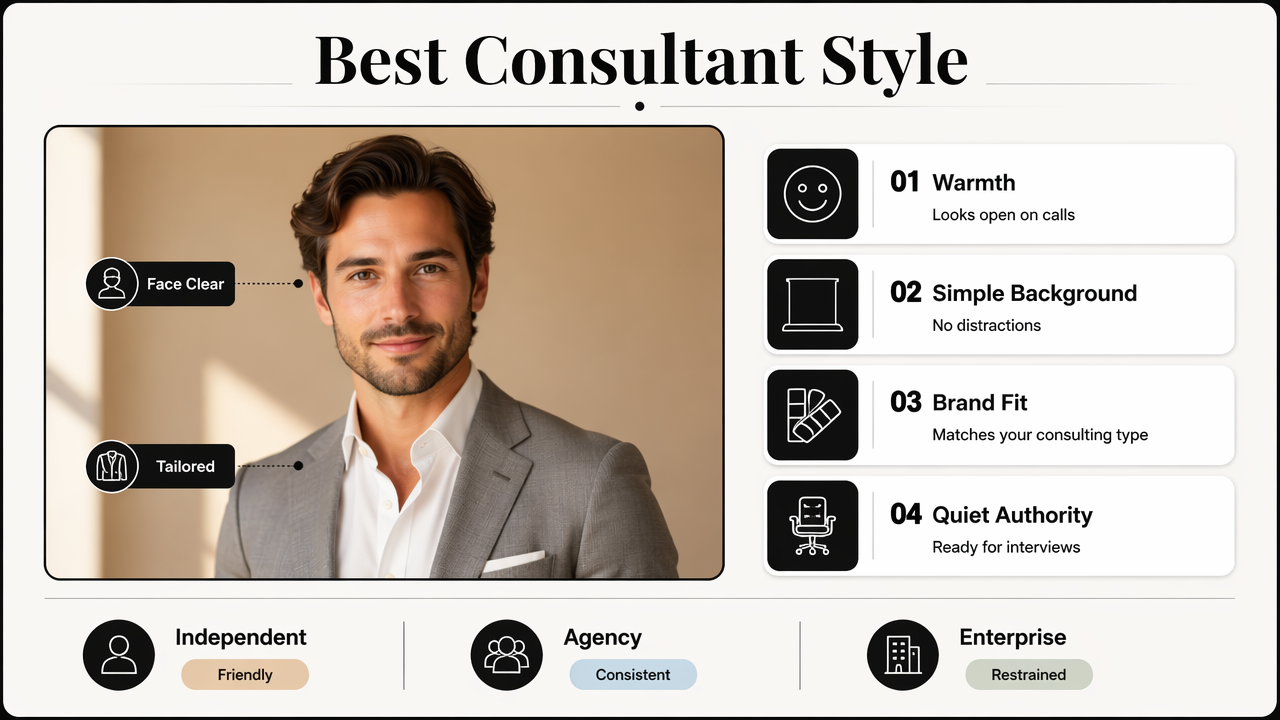
A strong image should answer one silent question: does this person look credible enough for a discovery call, strategy workshop, board presentation, or expert interview?
Recommended consultant headshot settings
| Consultant type | Best expression | Background | Wardrobe | Color palette | Crop |
|---|---|---|---|---|---|
| Independent consultant | Warm, confident half-smile | Soft office, neutral wall, light studio gray | Blazer, knit, open-collar shirt, refined blouse | Navy, charcoal, cream, muted green | Head and upper shoulders |
| Agency consultant | Friendly, energetic, on-brand | Clean workspace or branded color wash | Smart casual jacket, structured top | Brand colors plus neutrals | Slightly wider shoulder crop |
| Enterprise advisor | Calm, direct, composed | Dark neutral, boardroom style, subtle gradient | Suit, tailored jacket, crisp shirt | Charcoal, navy, white, burgundy accent | Tight executive crop |
| Technical consultant | Focused, approachable | Minimal background, light gray, soft blue | Clean shirt, simple jacket, no busy pattern | Slate, black, blue, white | Face-forward crop |
| Creative consultant | Open, expressive, polished | Warm studio, tasteful texture, muted color | Elevated casual, distinctive accessory | Earth tones, black, warm neutral | Balanced crop with personality |
Expression, lighting, and posture rules
- Expression: a slight smile usually works better than a blank stare because consulting depends on trust and collaboration.
- Lighting: soft front lighting keeps facial features clear and avoids harsh shadows that can make a profile feel severe.
- Posture: shoulders angled slightly toward the camera often looks more natural than a rigid straight-on pose.
- Eye line: direct eye contact supports confidence, while a distant gaze can feel less available.
- Background: clean settings outperform busy rooms because LinkedIn displays photos at small sizes across search and comments.
How should consultants prepare source photos for AI?
Consultants should prepare source photos by using clear, recent images with consistent facial visibility, natural lighting, and varied angles. A good AI result depends on identity accuracy first, then styling. Blurry selfies, heavy filters, sunglasses, and extreme expressions reduce the chance of a believable professional headshot.
Most current AI profile tools ask for several images or a single high-quality selfie. The better input is usually not the most formal image; it is the most accurate image of the face under clean lighting.
Source photo checklist before generation
- Choose recent photos where the face still matches current appearance.
- Use images taken in natural window light or soft indoor light.
- Include a few angles, such as front-facing, slight left, and slight right.
- Keep hair, glasses, facial hair, and common presentation style consistent.
- Avoid heavy filters, hats, masks, dark shadows, and strong backlighting.
- Select files where the face fills enough of the frame for detail.
A believable consultant headshot starts with recognizable source photos, then adds professional styling around the person.
Before and after decision checklist
| Review point | Before generating | After generating |
|---|---|---|
| Identity match | Face is clear, recent, and unobstructed | Result still looks like the same person |
| Consultant tone | Source photos show natural confidence | Final image feels credible, not theatrical |
| Wardrobe | Clothing does not distract from the face | Outfit matches client type and price point |
| Background | No clutter competes with the subject | Setting supports expertise without looking fake |
| LinkedIn fit | Original has enough resolution | Crop works in a circular profile preview |
| Trust check | Expression feels natural | Image could appear beside a proposal or article byline |
How Looktara handles consultant profile images
Looktara focuses consultant headshots on professional clarity, natural presentation, and profile usefulness rather than novelty effects. The best use case is a consultant who needs a credible LinkedIn image that fits a specific advisory niche, such as strategy, operations, technology, finance, coaching, or marketing.
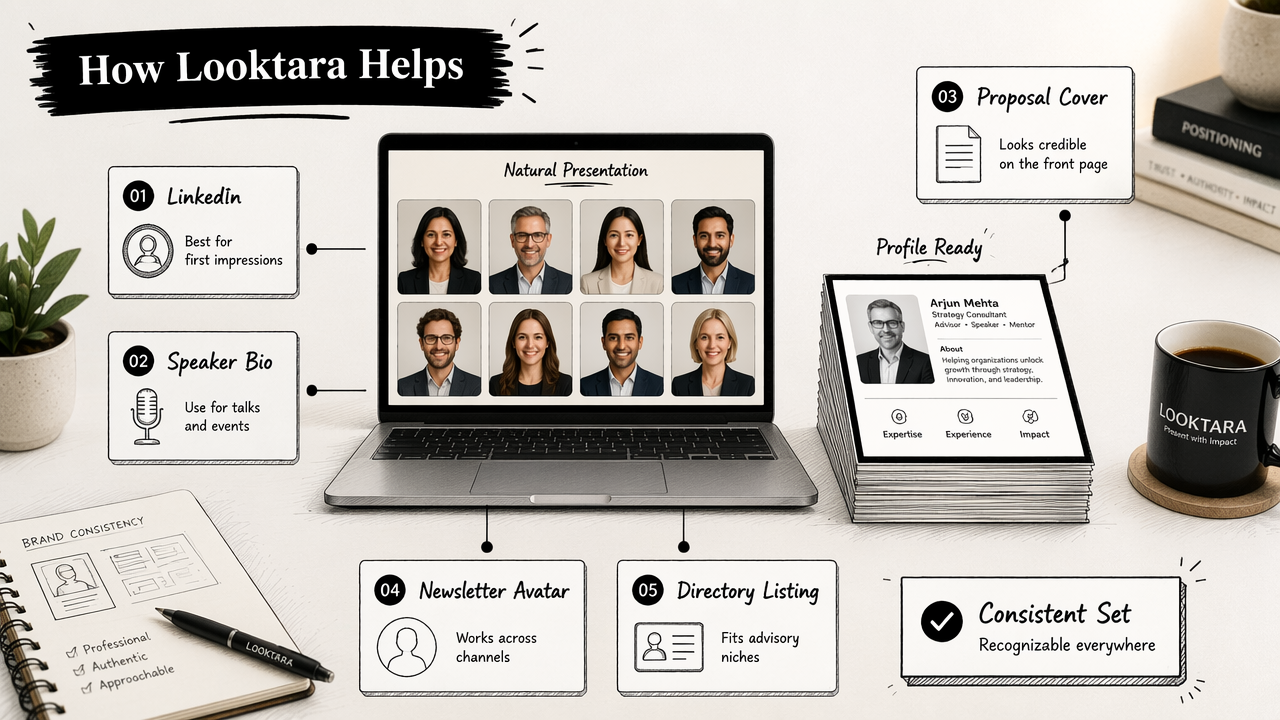
The Looktara platform is especially relevant when a consultant needs multiple polished options for different public surfaces: LinkedIn profile, speaker bio, proposal cover, newsletter avatar, or professional directory listing. A consistent image set helps the consultant look recognizable across business channels.
Consultant-specific choices to make before using an AI tool
- Client level: early-stage founders, small business owners, corporate directors, or enterprise executives.
- Positioning: specialist operator, strategic advisor, fractional executive, coach, analyst, or implementation partner.
- Visual tone: warm and accessible, premium and composed, technical and precise, or creative and distinctive.
- Output use: LinkedIn profile photo, article byline, webinar page, proposal document, or booking page.
A consultant with a premium enterprise practice may need a more formal image than a solo marketing consultant serving small brands. A career coach may need more warmth than a cybersecurity advisor. The right AI headshot reflects the buying context, not just personal taste.
Profile-ready image rules for LinkedIn
| Element | Recommended choice | Why it matters |
|---|---|---|
| Face size | Face clearly visible in circular crop | LinkedIn shows small thumbnails in many places |
| Outfit | Consultant-level business or polished smart casual | Clothing signals price point and audience fit |
| Background | Neutral, office-like, or soft studio setting | Keeps attention on expertise |
| Expression | Calm smile or confident neutral expression | Balances authority and approachability |
| Image style | Realistic, not overly retouched | Trust depends on recognizability |
| Consistency | Similar style across public profiles | Helps prospects connect the same person across channels |
For consultants ready to update public profiles, head to looktara.com after gathering clear source photos and deciding which client segment the image should speak to.
FAQ about AI headshots for consultant LinkedIn profiles
Common questions usually focus on realism, client perception, and platform fit. The safest standard is simple: if the image looks like the consultant on a video call and fits the service brand, it can support a stronger LinkedIn presence.
Can consultants use AI headshots on LinkedIn?
Consultants can use AI headshots on LinkedIn when the final image remains realistic, recognizable, and professionally appropriate. The image should not create a misleading appearance, exaggerated lifestyle setting, or false seniority cue. A practical test is whether the person would feel comfortable using the same image beside a proposal, webinar bio, or client-facing article.
What should a consultant wear in an AI LinkedIn headshot?
A consultant should wear clothing that matches the client base and advisory positioning. Navy, charcoal, white, cream, black, muted green, and soft blue usually work well. Independent consultants can look approachable in smart casual layers, while enterprise advisors often benefit from tailored jackets, crisp shirts, and restrained accessories.
What background is best for a consultant profile photo?
The best background is simple, clean, and aligned with the service category. A neutral studio background works for most consultants. A soft office background can suit client-facing advisors. A subtle brand-color background can help agency consultants, but the face should remain the clear focal point in LinkedIn's small circular crop.
How often should a LinkedIn headshot be updated?
A LinkedIn headshot should be updated when appearance, positioning, audience, or service level changes. A consultant moving from freelance work to enterprise advisory may need a more executive image. A change in hairstyle, glasses, facial hair, or branding can also make an older image feel less credible.
Conclusion
A strong AI headshot for consultants LinkedIn profile should communicate expertise before any profile text is read. The practical formula is clear: start with accurate source photos, choose a consultant-specific visual tone, keep the background simple, use a realistic expression, and test the final crop at small LinkedIn sizes.
The next step is to gather 5 to 10 clear recent photos, define the target client segment, and select two or three headshot styles that match the consulting offer. For a polished set of professional options, consultants can create images with Looktara and visit looktara.com when ready to refresh LinkedIn, speaker bios, and proposal materials.
Generated by EarlySEO.com